
1 月 21 日到手,去掉假期,平均一天写入 1TB,这 swap 也太狠了吧
家里装了六七年的台式机的系统盘,写入量也才和这个一个月差不多,照这么下去,用不到一年固态硬盘就得先报废啊
你们的使用情况如何?可以用下面的命令查看下
brew install smartmontools

smartctl -a /dev/disk2
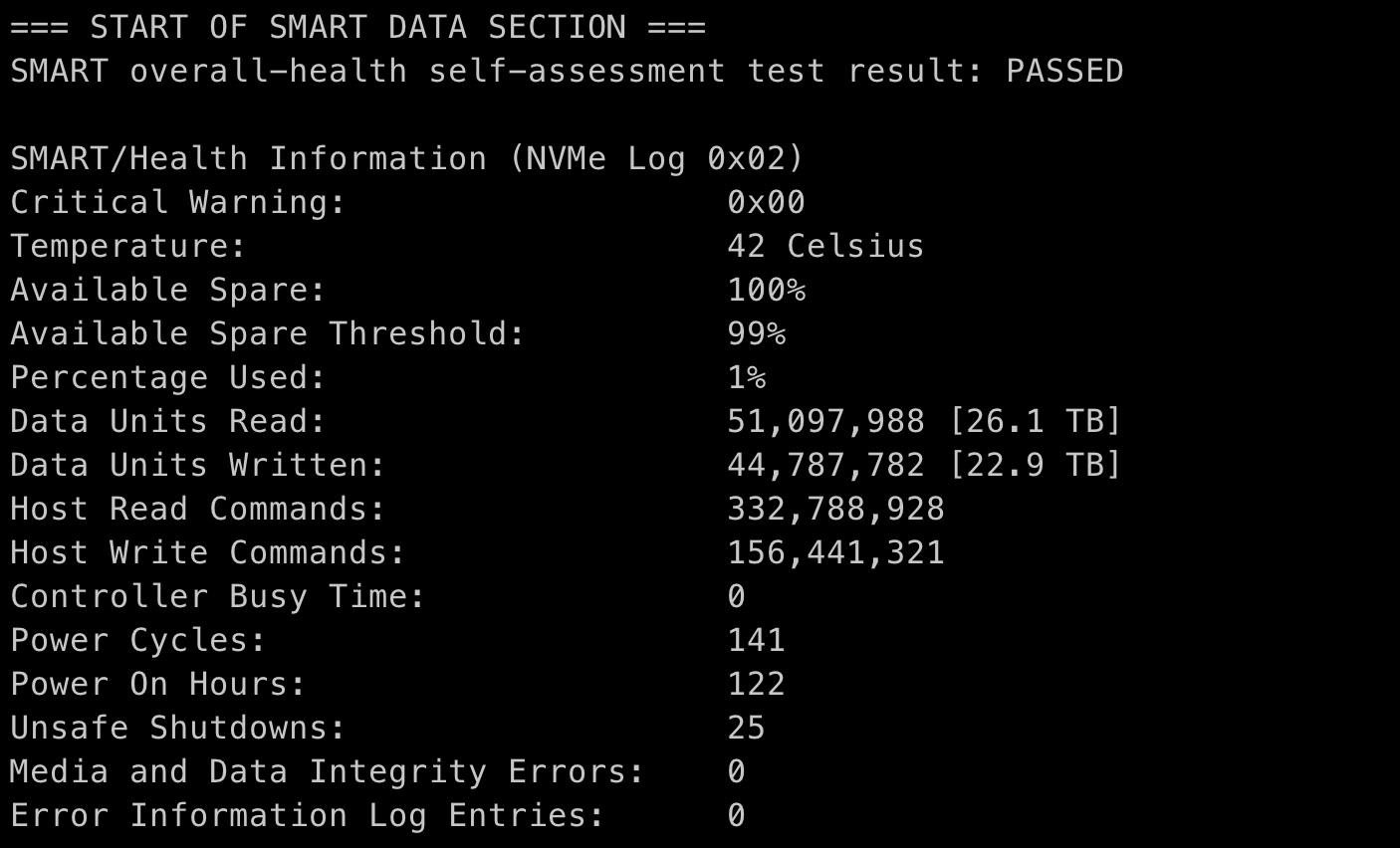
1 月 21 日到手,去掉假期,平均一天写入 1TB,这 swap 也太狠了吧
家里装了六七年的台式机的系统盘,写入量也才和这个一个月差不多,照这么下去,用不到一年固态硬盘就得先报废啊
你们的使用情况如何?可以用下面的命令查看下
brew install smartmontools
smartctl -a /dev/disk2
 |
101
啊这...楼上只是调侃一句,没必要那么认真吧,怎么就给 ban 了呢
|
 |
waskyFeb 24, 2021
102
16 寸 mbp,用了一年了
=== START OF SMART DATA SECTION === SMART overall-health self-assessment test result: PASSED SMART/Health Information (NVMe Log 0x02) Critical Warning: 0x00 Temperature: 24 Celsius Available Spare: 100% Available Spare Threshold: 99% Percentage Used: 0% Data Units Read: 21,856,969 [11.1 TB] Data Units Written: 18,729,695 [9.58 TB] Host Read Commands: 494,315,255 Host Write Commands: 610,454,956 Controller Busy Time: 0 Power Cycles: 210 Power On Hours: 525 Unsafe Shutdowns: 7 Media and Data Integrity Errors: 0 Error Information Log Entries: 0 而且我的命令是 disk0 啊,disk2 没用啊。。。 |
 |
kemchenjFeb 24, 2021
103
M1 MacBook Air 16G,现在用了三个多月左右...
SMART/Health Information (NVMe Log 0x02) Critical Warning: 0x00 Temperature: 33 Celsius Available Spare: 100% Available Spare Threshold: 99% Percentage Used: 0% Data Units Read: 41,054,409 [21.0 TB] Data Units Written: 35,436,022 [18.1 TB] Host Read Commands: 367,558,106 Host Write Commands: 178,543,249 Controller Busy Time: 0 Power Cycles: 183 Power On Hours: 171 Unsafe Shutdowns: 9 Media and Data Integrity Errors: 0 Error Information Log Entries: 0 |
 |
zeropercenthappyFeb 24, 2021
104
看起来不管是 8G 还是 16G 内存的,都疯狂读写 SSD 了啊...
|
 |
ragnaroksFeb 24, 2021
105
好家伙,一天比我几个月写入都多( Fedora 32 ),不过我没划 swap,只用物理内存
|
 |
mnsFeb 24, 2021
106
看了你们的硬盘使用,怎么感觉我的用的太多了
=== START OF SMART DATA SECTION === SMART overall-health self-assessment test result: PASSED SMART/Health Information (NVMe Log 0x02) Critical Warning: 0x00 Temperature: 25 Celsius Available Spare: 100% Available Spare Threshold: 10% Percentage Used: 40% Data Units Read: 311,937,704 [159 TB] Data Units Written: 202,938,542 [103 TB] Host Read Commands: 14,786,344,318 Host Write Commands: 3,732,477,081 Controller Busy Time: 21,337 Power Cycles: 10,435 Power On Hours: 5,771 Unsafe Shutdowns: 200 Media and Data Integrity Errors: 0 Error Information Log Entries: 90 |
 |
107
win 系统即,64G 内存,已经关了 swap,压根用不虚拟内存。
另外,@Livid 感觉 48 楼太冤了,人家说的很在理,言语中并没有很过份侮辱词汇,充其量是鄙视各位果粉而已,你这随手一个彻底 ban, 是不是太圣母了点。 |
 |
thx2uFeb 24, 2021 via iPhone
109
@gowk 101# 我也觉得,而且人家在摆客观数据对比,算是有意义的调侃。虽然我不赞同他的结论,但这种摆数据的 ban 了有点可惜。
|
|
dasenlinFeb 24, 2021
112
|
 |
PEALFeb 24, 2021
113
我也觉得调侃巨多,没有恶意的言语,这就 ban 了也太。。。
|
 |
Administrat0rFeb 24, 2021
115
12 月 8 号买的 8+256 不到 3 个月 600 多 g 还好还好
|
 |
liuzhedashFeb 24, 2021
116
你们这都怎么用的。。我这 2018 年 7 月到现在也就几十 T
Data Units Read: 98,236,123 [50.2 TB] Data Units Written: 90,270,355 [46.2 TB] |
 |
FightPigFeb 24, 2021
117
我用了四年的电脑才 200T,你这个有点太狠了吧
|
 |
FanZhenFeb 24, 2021
118
|
 |
120
这种动不动就来个“逗比”的人就是莫名其妙。
如果都当是调侃,那污言秽语就可以満天飞了,回头说一下“调侃”为自己开脱就行了。 |
 |
kennedy32Feb 24, 2021
121
丐版 m1,12 月入手,坐等后续
SMART/Health Information (NVMe Log 0x02) Critical Warning: 0x00 Temperature: 35 Celsius Available Spare: 100% Available Spare Threshold: 99% Percentage Used: 0% Data Units Read: 29,850,139 [15.2 TB] Data Units Written: 18,208,412 [9.32 TB] Host Read Commands: 388,229,318 Host Write Commands: 148,600,986 Controller Busy Time: 0 Power Cycles: 202 Power On Hours: 167 Unsafe Shutdowns: 9 Media and Data Integrity Errors: 0 Error Information Log Entries: 0 |
 |
aero99Feb 24, 2021
122
请问我这怎么显示的信息不一样?
=== START OF READ SMART DATA SECTION === SMART overall-health self-assessment test result: PASSED General SMART Values: Offline data collection status: (0x00) Offline data collection activity was never started. Auto Offline Data Collection: Disabled. Total time to complete Offline data collection: ( 30) seconds. Offline data collection capabilities: (0x00) Offline data collection not supported. SMART capabilities: (0x0003) Saves SMART data before entering power-saving mode. Supports SMART auto save timer. Error logging capability: (0x01) Error logging supported. General Purpose Logging supported. SMART Attributes Data Structure revision number: 16 Vendor Specific SMART Attributes with Thresholds: ID# ATTRIBUTE_NAME FLAG VALUE WORST THRESH TYPE UPDATED WHEN_FAILED RAW_VALUE 9 Power_On_Hours 0x0012 100 100 000 Old_age Always - 1837 12 Power_Cycle_Count 0x0012 100 100 000 Old_age Always - 3226 167 Unknown_Attribute 0x0022 100 100 000 Old_age Always - 0 168 Unknown_Attribute 0x0012 100 100 000 Old_age Always - 0 169 Unknown_Attribute 0x0003 100 100 010 Pre-fail Always - 0 173 Unknown_Attribute 0x0012 186 186 000 Old_age Always - 0 192 Power-Off_Retract_Count 0x0012 100 100 000 Old_age Always - 141 194 Temperature_Celsius 0x0023 073 059 020 Pre-fail Always - 27 (Min/Max 14/41) 241 Total_LBAs_Written 0x0032 100 100 000 Old_age Always - 95747 SMART Error Log Version: 1 No Errors Logged SMART Self-test log structure revision number 1 No self-tests have been logged. [To run self-tests, use: smartctl -t] Selective Self-tests/Logging not supported |
 |
125
都为你送终了还不 ban
楼上的忍耐度都这么高的么? |
 |
LeiothrixFeb 24, 2021
126
=== START OF SMART DATA SECTION ===
SMART overall-health self-assessment test result: PASSED SMART/Health Information (NVMe Log 0x02) Critical Warning: 0x00 Temperature: 32 Celsius Available Spare: 100% Available Spare Threshold: 99% Percentage Used: 0% Data Units Read: 11,648,880 [5.96 TB] Data Units Written: 11,750,444 [6.01 TB] Host Read Commands: 265,865,827 Host Write Commands: 317,564,246 Controller Busy Time: 0 Power Cycles: 67 Power On Hours: 282 Unsafe Shutdowns: 14 Media and Data Integrity Errors: 0 Error Information Log Entries: 0 19 款末代 15 寸 32GB + 1TB,使用一年半,写入量不大 |
 |
MaxLi77Feb 24, 2021
127
32g 内存都感觉不太够,不知道那些 8g 的是怎么坚持下来的。。
|
 |
bomb77Feb 24, 2021
128
=== START OF SMART DATA SECTION ===
SMART overall-health self-assessment test result: PASSED SMART/Health Information (NVMe Log 0x02) Critical Warning: 0x00 Temperature: 38 Celsius Available Spare: 100% Available Spare Threshold: 99% Percentage Used: 5% Data Units Read: 284,391,573 [145 TB] Data Units Written: 275,484,659 [141 TB] Host Read Commands: 1,347,458,440 Host Write Commands: 1,187,337,249 Controller Busy Time: 0 Power Cycles: 69 Power On Hours: 1,215 Unsafe Shutdowns: 13 Media and Data Integrity Errors: 0 Error Information Log Entries: 0 💊 |
 |
unneededFeb 24, 2021
129
我的 16G 13 寸 macbookpro 用了四年多了才 21.4T/14T ……
|
 |
yangxin0Feb 24, 2021
132
我的还行,
Data Units Read: 4,371,446 [2.23 TB] Data Units Written: 2,185,192 [1.11 TB] |
 |
MaverickLeeFeb 24, 2021
133
@nicevar #124 老哥人品这么爆炸的嘛……是不是电源有问题(囧)
|
 |
134
这是大搞文字狱的意思了吗
|
 |
terrychaninFeb 24, 2021
135
SMART/Health Information (NVMe Log 0x02)
Critical Warning: 0x00 Temperature: 27 Celsius Available Spare: 100% Available Spare Threshold: 99% Percentage Used: 0% Data Units Read: 18,630,663 [9.53 TB] Data Units Written: 11,418,607 [5.84 TB] Host Read Commands: 401,645,850 Host Write Commands: 251,128,478 Controller Busy Time: 0 Power Cycles: 264 Power On Hours: 136 Unsafe Shutdowns: 11 Media and Data Integrity Errors: 0 Error Information Log Entries: 0 Read 1 entries from Error Information Log failed: GetLogPage failed: system=0x38, sub=0x0, code=745 M1 Air 乞丐版去年首发入手的 |
 |
Binary10Feb 24, 2021
136
非程序员,不懂就问,运行这个代码需要安装什么吗?为什么我的电脑 not found?
|
|
137
@sq125 Homebrew
|
|
mnsFeb 24, 2021
138
@cbangchen #134 你要跟不熟悉的人随便开玩笑,这是礼节吧。
Data Units Read: 311,937,704 [159 TB] Data Units Written: 202,938,542 [103 TB] |
 |
acoldfoxFeb 24, 2021
139
我也觉得这样的话,用词限制也太大了,大家规规矩矩文明用词好了,一个月庄字都不要说
|
 |
141
@sq125 安装 homebrew,如果 brew 命令找不到的话需要 export PATH="/opt/homebrew/bin:$PATH"
|
 |
nicevarFeb 24, 2021
142
@MaverickLee 不是人品爆,是 SSD 厂商默认一小部分人一定会用坏的,我是不同的电脑用坏的,而且坏的 SSD 都是经过三星和因特尔等售后的检测的,不是人为损坏,其实我就是虚拟机用得比较频繁。
|
 |
mikevenFeb 24, 2021
143
常规的 256G 的 SSD 有 150TBW,这么算 1 个月用 20T 还是很危险啊
|
 |
ethusdtFeb 24, 2021
145
16G M1, 2021/1/24 日到 2021/2/24 整整一个月, 看起来我的很正常, 不到 1T:
=== START OF SMART DATA SECTION === SMART overall-health self-assessment test result: PASSED SMART/Health Information (NVMe Log 0x02) Critical Warning: 0x00 Temperature: 43 Celsius Available Spare: 100% Available Spare Threshold: 99% Percentage Used: 0% Data Units Read: 1,288,305 [659 GB] Data Units Written: 988,401 [506 GB] Host Read Commands: 22,290,865 Host Write Commands: 16,312,578 Controller Busy Time: 0 Power Cycles: 80 Power On Hours: 16 Unsafe Shutdowns: 2 Media and Data Integrity Errors: 0 Error Information Log Entries: 0 |
 |
fish2050Feb 24, 2021
146
群晖 nas 同步文件的飘过,nas 还做了双备份,从此不怕 ssd 挂掉,ssd 挂掉丢数据的几率那是比机械硬盘高多了。
|
 |
148
虽然 47 楼带节奏随意『调侃』缺乏礼节,彻底 ban 确实惩罚过度。像楼上说的,如果不是连续发布恶意言语,禁言或封禁几天都可以啊。大家觉得呢 @Livid
|
 |
GarlandFeb 24, 2021
149
老款的来了,15 款的 16G 内存,去年这个点换的东芝-RD500,1 年写入似乎也不是很多
SMART/Health Information (NVMe Log 0x02) Critical Warning: 0x00 Temperature: 45 Celsius Available Spare: 100% Available Spare Threshold: 5% Percentage Used: 9% Data Units Read: 46,579,630 [23.8 TB] Data Units Written: 41,524,791 [21.2 TB] Host Read Commands: 680,826,512 Host Write Commands: 449,788,384 Controller Busy Time: 1,345 Power Cycles: 971 Power On Hours: 7,214 Unsafe Shutdowns: 34 Media and Data Integrity Errors: 0 Error Information Log Entries: 0 Warning Comp. Temperature Time: 0 Critical Comp. Temperature Time: 0 |
 |
HangoXFeb 24, 2021
150
SMART overall-health self-assessment test result: PASSED
SMART/Health Information (NVMe Log 0x02) Critical Warning: 0x00 Temperature: 53 Celsius Available Spare: 100% Available Spare Threshold: 10% Percentage Used: 6% Data Units Read: 165,453,815 [84.7 TB] Data Units Written: 260,523,351 [133 TB] Host Read Commands: 1,964,236,762 Host Write Commands: 10,365,039,857 Controller Busy Time: 4,284 Power Cycles: 296 Power On Hours: 5,809 Unsafe Shutdowns: 50 Media and Data Integrity Errors: 0 Error Information Log Entries: 1 Warning Comp. Temperature Time: 0 Critical Comp. Temperature Time: 0 我的 64G 的黑苹果使用也挺多的 |
 |
lazyrmFeb 24, 2021
151
毕竟没有手动狗头,不过我觉得站长可能忙,没有认真看下来
|
 |
nicholasxuuFeb 24, 2021
152
@mikeven 真的吗?
我手上这台( 250G SSD )显示写了 117TB,Percentage Used 只有 14%,如果 TBW 只有 150TB 的话,应该 78%级别的。 SMART/Health Information (NVMe Log 0x02) Critical Warning: 0x00 Temperature: 45 Celsius Available Spare: 87% Available Spare Threshold: 2% Percentage Used: 14% Data Units Read: 247,922,890 [126 TB] Data Units Written: 229,493,433 [117 TB] Host Read Commands: 2,048,630,233 Host Write Commands: 1,573,942,054 Controller Busy Time: 0 Power Cycles: 19,369 Power On Hours: 787 Unsafe Shutdowns: 76 Media and Data Integrity Errors: 0 Error Information Log Entries: 0 |
 |
HanashirodotETHFeb 24, 2021
153
Temperature: 32 Celsius
Available Spare: 100% Available Spare Threshold: 99% Percentage Used: 0% Data Units Read: 10,219,782 [5.23 TB] Data Units Written: 5,434,190 [2.78 TB] Host Read Commands: 129,691,819 Host Write Commands: 68,767,922 Controller Busy Time: 0 Power Cycles: 84 Power On Hours: 106 Unsafe Shutdowns: 5 一个半月的丐版 MBA,感觉和你们用的不是同一个 MBA |
 |
hd2exFeb 24, 2021
154
是不是感染新冠了?
|
 |
chinemdsFeb 24, 2021
155
SMART/Health Information (NVMe Log 0x02)
Critical Warning: 0x00 Temperature: 35 Celsius Available Spare: 100% Available Spare Threshold: 99% Percentage Used: 6% Data Units Read: 115,459,359 [59.1 TB] Data Units Written: 105,537,170 [54.0 TB] Host Read Commands: 1,419,770,601 Host Write Commands: 824,535,333 Controller Busy Time: 0 Power Cycles: 177 Power On Hours: 958 Unsafe Shutdowns: 68 Media and Data Integrity Errors: 0 Error Information Log Entries: 0 2018 款 13 寸 8+256, 看下来 M1 的硬盘写入太吓人了吧。 |
 |
morizeFeb 24, 2021
156
16 款
为啥我的 Power Cycles 那么大 === START OF SMART DATA SECTION === SMART overall-health self-assessment test result: PASSED SMART/Health Information (NVMe Log 0x02) Critical Warning: 0x00 Temperature: 31 Celsius Available Spare: 90% Available Spare Threshold: 2% Percentage Used: 6% Data Units Read: 136,705,928 [69.9 TB] Data Units Written: 100,394,616 [51.4 TB] Host Read Commands: 2,769,852,925 Host Write Commands: 1,289,688,986 Controller Busy Time: 0 Power Cycles: 66,152 Power On Hours: 779 Unsafe Shutdowns: 63 Media and Data Integrity Errors: 0 Error Information Log Entries: 0 |
 |
157
|
 |
Martin9Feb 24, 2021
158
16 寸 32G 版本一年多十几 T
SMART/Health Information (NVMe Log 0x02) Critical Warning: 0x00 Temperature: 36 Celsius Available Spare: 100% Available Spare Threshold: 99% Percentage Used: 0% Data Units Read: 28,007,658 [14.3 TB] Data Units Written: 24,463,997 [12.5 TB] Host Read Commands: 572,310,462 Host Write Commands: 410,319,771 Controller Busy Time: 0 Power Cycles: 109 Power On Hours: 703 Unsafe Shutdowns: 16 Media and Data Integrity Errors: 0 Error Information Log Entries: 0 |
 |
12101111Feb 24, 2021
159
这是一个 dell 的笔记本,跑 OpenZFS on Linux, Gentoo Linux, Windows10 on KVM on zvol, 10810U + 24GB 内存,数据仅供参考
> swapon NAME TYPE SIZE USED PRIO /dev/nvme0n1p6 partition 16.1G 2G -2 /dev/zram0 partition 6G 3.3G 16383 smartctl 7.2 2020-12-30 r5155 [x86_64-linux-5.10.16-zen+] (local build) Copyright (C) 2002-20, Bruce Allen, Christian Franke, www.smartmontools.org === START OF INFORMATION SECTION === Model Number: KXG60ZNV1T02 NVMe KIOXIA 1024GB ....... === START OF SMART DATA SECTION === SMART overall-health self-assessment test result: PASSED SMART/Health Information (NVMe Log 0x02) Critical Warning: 0x00 Temperature: 36 Celsius Available Spare: 100% Available Spare Threshold: 10% Percentage Used: 7% Data Units Read: 11,307,246 [5.78 TB] Data Units Written: 31,110,576 [15.9 TB] Host Read Commands: 178,084,384 Host Write Commands: 532,094,671 Controller Busy Time: 594 Power Cycles: 320 Power On Hours: 3,884 Unsafe Shutdowns: 70 Media and Data Integrity Errors: 0 Error Information Log Entries: 1 Warning Comp. Temperature Time: 0 Critical Comp. Temperature Time: 0 Temperature Sensor 1: 36 Celsius Error Information (NVMe Log 0x01, 16 of 256 entries) No Errors Logged |
 |
jonathanshiFeb 24, 2021
160
18 年购入 mbp13
SMART/Health Information (NVMe Log 0x02) Critical Warning: 0x00 Temperature: 34 Celsius Available Spare: 100% Available Spare Threshold: 99% Percentage Used: 0% Data Units Read: 12,978,946 [6.64 TB] Data Units Written: 12,717,410 [6.51 TB] Host Read Commands: 206,455,519 Host Write Commands: 184,333,483 Controller Busy Time: 0 Power Cycles: 85 Power On Hours: 166 Unsafe Shutdowns: 26 Media and Data Integrity Errors: 0 Error Information Log Entries: 0 |
 |
MaboroshiiFeb 24, 2021
161
用了一年出头
|
|
MaboroshiiFeb 24, 2021
162
|
 |
neofacenewFeb 24, 2021
163
我 M1 AIR 8G 512G 1 月入手
=== START OF SMART DATA SECTION === SMART overall-health self-assessment test result: PASSED SMART/Health Information (NVMe Log 0x02) Critical Warning: 0x00 Temperature: 36 Celsius Available Spare: 100% Available Spare Threshold: 99% Percentage Used: 0% Data Units Read: 49,300,025 [25.2 TB] Data Units Written: 41,622,712 [21.3 TB] Host Read Commands: 278,605,473 Host Write Commands: 136,555,968 Controller Busy Time: 0 Power Cycles: 108 Power On Hours: 180 Unsafe Shutdowns: 7 Media and Data Integrity Errors: 0 Error Information Log Entries: 0 吓人啊 |
 |
lschoFeb 24, 2021
164
19 款 15 寸,用了一年半,11T,感觉还好吧
=== START OF SMART DATA SECTION === SMART overall-health self-assessment test result: PASSED SMART/Health Information (NVMe Log 0x02) Critical Warning: 0x00 Temperature: 34 Celsius Available Spare: 100% Available Spare Threshold: 99% Percentage Used: 2% Data Units Read: 23,013,335 [11.7 TB] Data Units Written: 21,534,885 [11.0 TB] Host Read Commands: 396,801,783 Host Write Commands: 419,381,827 Controller Busy Time: 0 Power Cycles: 105 Power On Hours: 379 Unsafe Shutdowns: 23 Media and Data Integrity Errors: 0 Error Information Log Entries: 0 Read 1 entries from Error Information Log failed: GetLogPage failed: system=0x38, sub=0x0, code=745 |
 |
165
像极了上学时给老师打小报告的样子(逃
|
 |
back0893Feb 24, 2021
166
容忍度这么高?
岂不是我可以来这嘴臭了? |
 |
mcluyuFeb 24, 2021
167
Critical Warning: 0x00
Temperature: 33 Celsius Available Spare: 100% Available Spare Threshold: 99% Percentage Used: 2% Data Units Read: 66,303,912 [33.9 TB] Data Units Written: 52,289,653 [26.7 TB] Host Read Commands: 1,091,050,092 Host Write Commands: 551,613,003 Controller Busy Time: 0 Power Cycles: 114 Power On Hours: 623 Unsafe Shutdowns: 22 两年多的公司 MBP2018, 才用了这么点,难道我一直在摸鱼?? 完蛋,电子产品掌握隐私信息太多了。。 |
 |
tanmyFeb 24, 2021
168
16 寸用了一年
|
|
tanmyFeb 24, 2021
169
=== START OF SMART DATA SECTION ===
SMART overall-health self-assessment test result: PASSED SMART/Health Information (NVMe Log 0x02) Critical Warning: 0x00 Temperature: 48 Celsius Available Spare: 100% Available Spare Threshold: 99% Percentage Used: 1% Data Units Read: 194,072,594 [99.3 TB] Data Units Written: 234,596,792 [120 TB] Host Read Commands: 7,251,181,644 Host Write Commands: 3,332,279,985 Controller Busy Time: 0 Power Cycles: 196 Power On Hours: 3,103 Unsafe Shutdowns: 79 Media and Data Integrity Errors: 0 Error Information Log Entries: 0 |
 |
jasonixFeb 24, 2021
170
11 月份买的
SMART/Health Information (NVMe Log 0x02) Critical Warning: 0x00 Temperature: 31 Celsius Available Spare: 100% Available Spare Threshold: 99% Percentage Used: 0% Data Units Read: 10,572,019 [5.41 TB] Data Units Written: 6,185,185 [3.16 TB] Host Read Commands: 154,368,286 Host Write Commands: 75,990,383 Controller Busy Time: 0 Power Cycles: 183 Power On Hours: 98 Unsafe Shutdowns: 6 Media and Data Integrity Errors: 0 Error Information Log Entries: 0 |
 |
ExplorerLogFeb 24, 2021
171
|
 |
dLvsYgJ8fiP8TGYUFeb 24, 2021
173
2018 款 MBP 8G/512G 路过,用了快 3 年了
SMART/Health Information (NVMe Log 0x02) Critical Warning: 0x00 Temperature: 36 Celsius Available Spare: 100% Available Spare Threshold: 99% Percentage Used: 3% Data Units Read: 113,293,680 [58.0 TB] Data Units Written: 86,502,753 [44.2 TB] Host Read Commands: 2,067,035,286 Host Write Commands: 1,088,332,873 Controller Busy Time: 0 Power Cycles: 122 Power On Hours: 1,466 Unsafe Shutdowns: 36 Media and Data Integrity Errors: 0 Error Information Log Entries: 0 |
 |
dangyuluoFeb 24, 2021
174
你的确实比我的多,不过 who cares
=== START OF SMART DATA SECTION === SMART overall-health self-assessment test result: PASSED SMART/Health Information (NVMe Log 0x02) Critical Warning: 0x00 Temperature: 43 Celsius Available Spare: 100% Available Spare Threshold: 99% Percentage Used: 1% Data Units Read: 42,875,730 [21.9 TB] Data Units Written: 45,583,989 [23.3 TB] Host Read Commands: 786,513,655 Host Write Commands: 922,625,930 Controller Busy Time: 0 Power Cycles: 116 Power On Hours: 847 Unsafe Shutdowns: 61 Media and Data Integrity Errors: 0 Error Information Log Entries: 0 |
 |
haiironezumiFeb 24, 2021
176
1.16 入,16G/512G M1 MacBook Air,3.34T 写入
SMART/Health Information (NVMe Log 0x02) Critical Warning: 0x00 Temperature: 28 Celsius Available Spare: 100% Available Spare Threshold: 99% Percentage Used: 0% Data Units Read: 8,979,073 [4.59 TB] Data Units Written: 6,524,071 [3.34 TB] Host Read Commands: 125,313,192 Host Write Commands: 54,111,858 Controller Busy Time: 0 Power Cycles: 116 Power On Hours: 68 Unsafe Shutdowns: 5 Media and Data Integrity Errors: 0 Error Information Log Entries: 0 这一代的确写入量大 |
 |
systemcallFeb 24, 2021 via Android
178
不知道这代用的到底是怎样的闪存
kioxia 的 tc10 240G 的寿命非常短,rc10 也好不了多少,不信的话可以自己去查一下。tc10 240G 是 64 层和 96 层混着用的,都是铠侠的原厂闪存。不清楚苹果能要到多好的闪存,但是感觉 kioxia 的闪存寿命不会很长 以前买的三星 850evo 120G,是 75t tbw,250G 也是。现在的闪存的寿命是更长还是更短还不好说,850evo 是 40nm 的 3d tlc 没有查到苹果用的闪存的信息,而且表面似乎被打磨了。不过有意思的地方是有 2 块闪存,毕竟没有找到什么关于闪存的有价值的信息,感觉可能是有一定的冗余吧,不然找这个趋势,如果是一般的 kioxia 96 层 TLC 还真的撑不过 2 年 |
 |
runzeFeb 24, 2021
179
=== START OF SMART DATA SECTION ===
SMART overall-health self-assessment test result: PASSED SMART/Health Information (NVMe Log 0x02) Critical Warning: 0x00 Temperature: 40 Celsius Available Spare: 100% Available Spare Threshold: 99% Percentage Used: 6% Data Units Read: 191,528,939 [98.0 TB] Data Units Written: 184,604,343 [94.5 TB] Host Read Commands: 586,899,038 Host Write Commands: 420,889,299 Controller Busy Time: 0 Power Cycles: 81 Power On Hours: 304 Unsafe Shutdowns: 3 Media and Data Integrity Errors: 0 Error Information Log Entries: 0 |
 |
clrssFeb 24, 2021
180
一年半
Data Units Read: 19,182,141 [9.82 TB] Data Units Written: 19,530,212 [9.99 TB] |
 |
fengyjFeb 24, 2021
181
你们这 M1 的数据都太高了吧
18 年用的 Mac mini 到现在也没那么高 SMART/Health Information (NVMe Log 0x02) Critical Warning: 0x00 Temperature: 39 Celsius Available Spare: 100% Available Spare Threshold: 99% Percentage Used: 1% Data Units Read: 15,114,305 [7.73 TB] Data Units Written: 15,116,642 [7.73 TB] |
 |
garipanFeb 24, 2021
182
买了两年多的 MBP 13inch ( with touchbar ),只用了 13T…… 除了使用频率不算非常高以外,可能是因为内存富余,间接保护了硬盘?(选配 16G RAM,日常 11G 左右使用中)
=== START OF SMART DATA SECTION === SMART overall-health self-assessment test result: PASSED SMART/Health Information (NVMe Log 0x02) Critical Warning: 0x00 Temperature: 42 Celsius Available Spare: 100% Available Spare Threshold: 99% Percentage Used: 2% Data Units Read: 20,304,584 [10.3 TB] Data Units Written: 25,439,266 [13.0 TB] Host Read Commands: 463,064,285 Host Write Commands: 656,504,716 Controller Busy Time: 0 Power Cycles: 65 Power On Hours: 537 Unsafe Shutdowns: 14 Media and Data Integrity Errors: 0 Error Information Log Entries: 0 |
 |
jeeyongFeb 24, 2021
184
开机时间 20 小时, 1.86TB
我 TM 都干什么了? |
 |
windirtFeb 24, 2021
185
2014 mid 15 寸,512GB 16GB
用了六年了,写入才 46TB.. https://tva1.sinaimg.cn/large/008eGmZEly1gnyoicerudj30nc0aswem.jpg |
 |
zxcsloveFeb 24, 2021
186
永封重了点,不过“一群 DB”这个炮开大了
|
 |
hahasongFeb 24, 2021
187
2018 款用了两年
=== START OF SMART DATA SECTION === SMART overall-health self-assessment test result: PASSED SMART/Health Information (NVMe Log 0x02) Critical Warning: 0x00 Temperature: 39 Celsius Available Spare: 100% Available Spare Threshold: 99% Percentage Used: 2% Data Units Read: 52,171,792 [26.7 TB] Data Units Written: 46,821,946 [23.9 TB] Host Read Commands: 526,275,482 Host Write Commands: 467,774,668 Controller Busy Time: 0 Power Cycles: 89 Power On Hours: 438 Unsafe Shutdowns: 13 Media and Data Integrity Errors: 0 Error Information Log Entries: 0 |
 |
linhongyeFeb 24, 2021
188
用了 20 天, 我的秘诀是不睡眠
Data Units Read: 3,038,754 [1.55 TB] Data Units Written: 1,903,384 [974 GB] |
 |
ruidoBlancoFeb 24, 2021
189
M1 Mac Mini 丐版,两个月,24 小时不关机不休眠。
=== START OF SMART DATA SECTION === SMART overall-health self-assessment test result: PASSED SMART/Health Information (NVMe Log 0x02) Critical Warning: 0x00 Temperature: 31 Celsius Available Spare: 100% Available Spare Threshold: 99% Percentage Used: 0% Data Units Read: 4,749,226 [2.43 TB] Data Units Written: 2,726,013 [1.39 TB] Host Read Commands: 60,213,957 Host Write Commands: 59,918,269 Controller Busy Time: 0 Power Cycles: 68 Power On Hours: 76 Unsafe Shutdowns: 13 Media and Data Integrity Errors: 0 Error Information Log Entries: 0 |
 |
zzb90sFeb 24, 2021
190
48 楼就这么挂了? 感觉没到那个程度啊 。。。
|
 |
LXchienneFeb 24, 2021
191
不到半年的公司新电脑 8+256 的 intel 乞丐版 13 寸 mbp,平均每小时 0.114T 的写入,写入这么多 ssd 感觉意料内,每天打开 chrome 和 ide 占用内存 chrome 就达到 8G 多,还有其他应用,不 swap 这电脑就废了,根本没法用
SMART/Health Information (NVMe Log 0x02) Critical Warning: 0x00 Temperature: 54 Celsius Available Spare: 100% Available Spare Threshold: 99% Percentage Used: 1% Data Units Read: 80,489,494 [41.2 TB] Data Units Written: 72,956,112 [37.3 TB] Host Read Commands: 464,823,545 Host Write Commands: 283,750,728 Controller Busy Time: 0 Power Cycles: 93 Power On Hours: 327 Unsafe Shutdowns: 12 Media and Data Integrity Errors: 0 Error Information Log Entries: 0 |
 |
loolacFeb 24, 2021
192
----------------------------------------------------------------------------
(2) eVtran EV26S-256G ---------------------------------------------------------------------------- Model : eVtran EV26S-256G Firmware : N1126F Serial Number : ******************* Disk Size : 253.4 GB (8.4/137.4/253.4/253.3) Buffer Size : 未知 Queue Depth : 32 # of Sectors : 494927872 Rotation Rate : ---- (SSD) Interface : Serial ATA Major Version : ACS-2 Minor Version : ---- Transfer Mode : SATA/600 | SATA/600 Power On Hours : 4113 小时 Power On Count : 1655 次 Host Reads : 24495 GB Host Writes : 19992 GB NAND Writes : 41010 GB Temperature : 26 C (78 F) Health Status : 良好 (100 %) Features : S.M.A.R.T., AAM, 48bit LBA, NCQ, TRIM, DevSleep APM Level : ---- AAM Level : 0000h [OFF] Drive Letter : C: -- S.M.A.R.T. -------------------------------------------------------------- ID Cur Wor Thr RawValues(6) Attribute Name 01 100 100 __0 000000000000 Raw Read Error Rate 05 100 100 __0 000000000000 Reallocated Sectors Count 09 100 100 __0 000000001011 Power-On Hours 0C 100 100 __0 000000000677 Power Cycle Count A0 100 100 __0 000000000000 Uncorrectable Sector Count A1 100 100 __0 00000000003E Valid Spare Blocks A3 100 100 __0 000000000026 Initial Invalid Blocks A4 100 100 __0 0000000280C8 Total TLC Erase Count A5 100 100 __0 0000000000D0 Maximum TLC Erase Count A6 100 100 __0 000000000069 Minimum TLC Erase Count A7 100 100 __0 0000000000A0 Average TLC Erase Count A8 100 100 __0 000000000BB8 厂商特定项目 A9 100 100 __0 00000000005F Percentage Lifetime Remaining AF 100 100 __0 000000000000 厂商特定项目 B0 100 100 __0 000000000000 厂商特定项目 B1 100 100 _50 00000000020E 厂商特定项目 B2 100 100 __0 000000000000 厂商特定项目 B5 100 100 __0 000000000000 Program Fail Count B6 100 100 __0 000000000000 Erase Fail Count C0 100 100 __0 000000000037 Power-off Retract Count C2 100 100 __0 00000000001A Temperature C3 100 100 __0 000000000034 Cumulative ECC Bit Correction Count C4 100 100 _16 000000000000 Reallocation Event Count C5 100 100 __0 000000000000 Current Pending Sector Count C6 100 100 __0 000000000000 Smart Off-line Scan Uncorrectable Error Count C7 100 100 _50 000000000003 Ultra DMA CRC Error Rate E8 100 100 __0 000000000064 Available Reserved Space F1 100 100 __0 00000009C304 Total LBA Write F2 100 100 __0 0000000BF5EB Total LBA Read F5 100 100 __0 000000140640 Cumulative Program NAND Pages windows 系统使用了 5.08433988764045 年了, 系统 C 盘. 现在明白为什么那么多人买了苹果电脑装个 windows 用了 |
 |
8kspainFeb 24, 2021
193
10.15.7 的系统该用什么命令查?
|
 |
djsFeb 24, 2021
194
twitter 上有类似的讨论了
|
 |
thermalnekoFeb 24, 2021
195
@aero99 我的跟你的一样
|
 |
bella926Feb 24, 2021
196
今年 1 月 1 开始使用,m1 16g pro
SMART/Health Information (NVMe Log 0x02) Critical Warning: 0x00 Temperature: 25 Celsius Available Spare: 100% Available Spare Threshold: 99% Percentage Used: 0% Data Units Read: 3,967,491 [2.03 TB] Data Units Written: 3,068,645 [1.57 TB] Host Read Commands: 56,923,501 Host Write Commands: 44,558,395 Controller Busy Time: 0 Power Cycles: 141 Power On Hours: 41 Unsafe Shutdowns: 16 Media and Data Integrity Errors: 0 Error Information Log Entries: 0 |
 |
SteveLeeFeb 24, 2021
197
我 18 15' 写入 23T
不过我有个问题,我的 Percentage Used 是 3%,上边回复中写入 20T 的 Percentage Used 是 0 难道不同的 SSD 的 TBW 还不同? |
 |
RoryskyFeb 24, 2021
198
m1 Mac mini 8g 256g 版本,使用时间 2 个月,不是很重度使用:
SMART/Health Information (NVMe Log 0x02) Critical Warning: 0x00 Temperature: 21 Celsius Available Spare: 100% Available Spare Threshold: 99% Percentage Used: 0% Data Units Read: 5,900,276 [3.02 TB] Data Units Written: 5,503,511 [2.81 TB] Host Read Commands: 93,695,764 Host Write Commands: 72,377,253 Controller Busy Time: 0 Power Cycles: 102 Power On Hours: 52 Unsafe Shutdowns: 17 Media and Data Integrity Errors: 0 Error Information Log Entries: 0 |
 |
yorushikaFeb 24, 2021
199
16G M1 Mini,也是 1 月下旬到手
``` Critical Warning: 0x00 Temperature: 26 Celsius Available Spare: 100% Available Spare Threshold: 99% Percentage Used: 0% Data Units Read: 4,210,317 [2.15 TB] Data Units Written: 2,666,273 [1.36 TB] Host Read Commands: 67,767,488 Host Write Commands: 37,180,200 Controller Busy Time: 0 Power Cycles: 143 Power On Hours: 41 Unsafe Shutdowns: 6 Media and Data Integrity Errors: 0 Error Information Log Entries: 0 ``` |
 |
dvbuzhidao1Feb 24, 2021 via Android
200
@8kspain 一样的
|
 14


 Select Language