
exe 2026.11.11, released today, keeps your VMs running on Linux when the exe daemon restarts. It also brings a virtual Intel Mac that runs Tiger under KVM, two new apps, Solana and Activity Monitor, emoji reactions in the Hub, and Workspace files of up to 1 GB.
Until this release, a restart of the daemon powered off every running VM and booted it again, and every update restarts the daemon. With a public site in a VM, 41 seconds went by on 2026-11-03 before the guest answered SSH again.
Now, on Linux where systemd runs exe, the VMs keep running when the daemon restarts: after an update, after Restart Daemon… on the Daemon tab of Windows → Configuration, and after systemctl --user restart exe. The next daemon takes each running VM over as it is, and a site published from a VM answers again as soon as the daemon is back.
The unit's KillMode=process leaves each VM's Firecracker process running when the daemon goes, and the next daemon checks that it is still that process before it adopts it.
In the release run, on a Linux x86-64 workstation with KVM, Software Update moved a test build of this release to 2026.11.11 while a test VM ran. The daemon was back in about 3 seconds, and the guest's boot time did not change. The old daemon logged that it was leaving the VM "running for the next daemon". On the machine that builds exe, the restart after publishing left six VMs running, and the new daemon adopted each one.
A shutdown of the host still stops the VMs first. systemctl --user stop exe leaves them running, so use exe stop first when they should not run without the daemon.
Three limits remain:
exe update and exe help still say that a restart stops the running VMs. On Linux under systemd, those words are out of date.See When exe restarts.
exe's Mac OS X app runs Tiger for PowerPC, which an x86-64 host emulates instruction by instruction, though its own processor could run Tiger for Intel. Mac OS X Intel is a third Mac that does, on a node that runs Linux on x86-64: Mac OS X 10.4.11 for Intel Macs, under KVM, on two of the machine's own cores at their own speed.
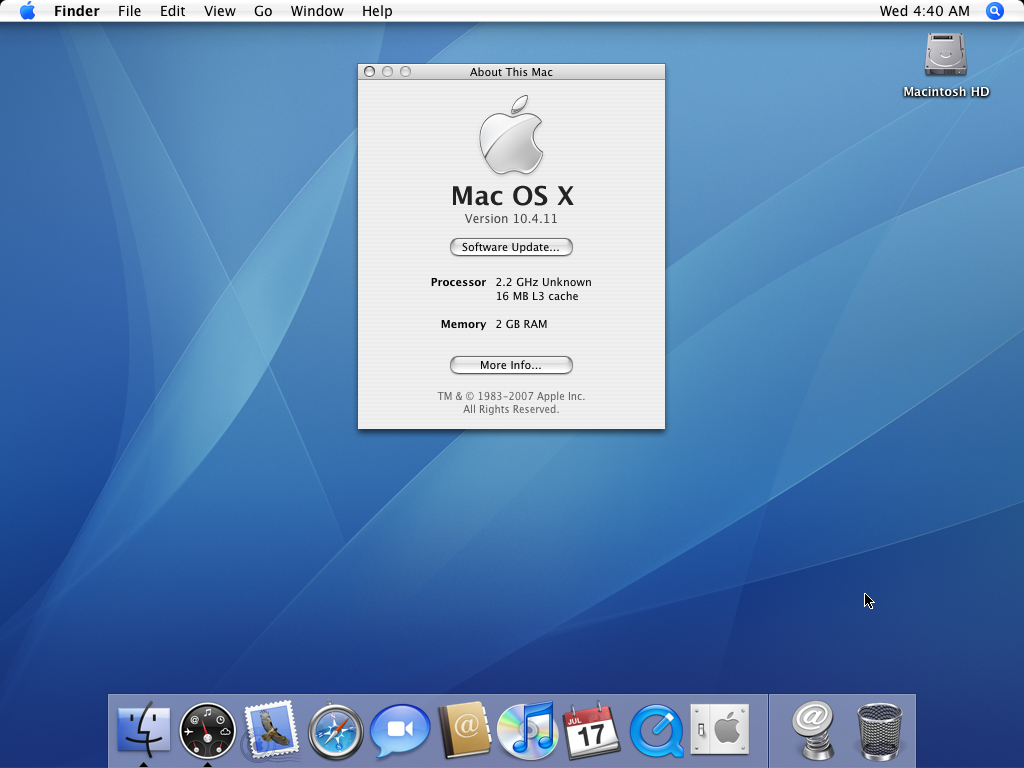
About This Mac calls the processor Unknown, whatever the host's processor is: exe presents the two cores to Tiger as one fixed Core 2 model. This Mac gains speed, and Rosetta for PowerPC Mac OS X programs. It has no Classic, no sound and no Quartz Extreme, and no agent, whose Chat works in the PowerPC Mac.
It needs KVM, and Linux with glibc 2.35 or later, as from Ubuntu 22.04 and Debian 12 on. exe does not fall back to software emulation, which is about five times slower. The Mac takes 2 GB of memory and two cores while it runs.
Choose Special → Mac OS X Intel. Setup downloads exe's own x86 emulator, OpenCore from GitHub, and Apple's install DVD (2.2 GiB) from the Internet Archive, and checks each against its checksum. A guide above the Mac's screen takes you through Disk Utility and the Installer. The window is the Mac OS X app's, without Agent and sound, and the pointer is where your browser's pointer is, from the Installer on.
OpenCore, which starts Tiger on a machine that is not a Mac, also fixes Tiger's kernel at each start. Without the first fix, Tiger crashes within minutes on this virtual firmware. Other fixes let Tiger use two cores, and let an idle core rest. Tiger's Software Update still finds Apple's updates, but installing them is untested, and an update that replaces the kernel loses exe's fixes. See Mac OS X Intel.
A Workspace file can now be 1 GB, up from 100 MB, by upload, drop and the API, and joined desks sync files of that size. Node Sync used to hold each file whole in memory on both nodes, and now it moves a file from disk to disk. In the change's own test, a 900 MB file crossed between two test daemons, with each daemon at a peak of 40 MB of memory. A desk on 2026.10.28 or earlier gets no file over 100 MB until it is updated.
Until this release, an upload said nothing until it was done. Now uploads say how they go, a row a file.
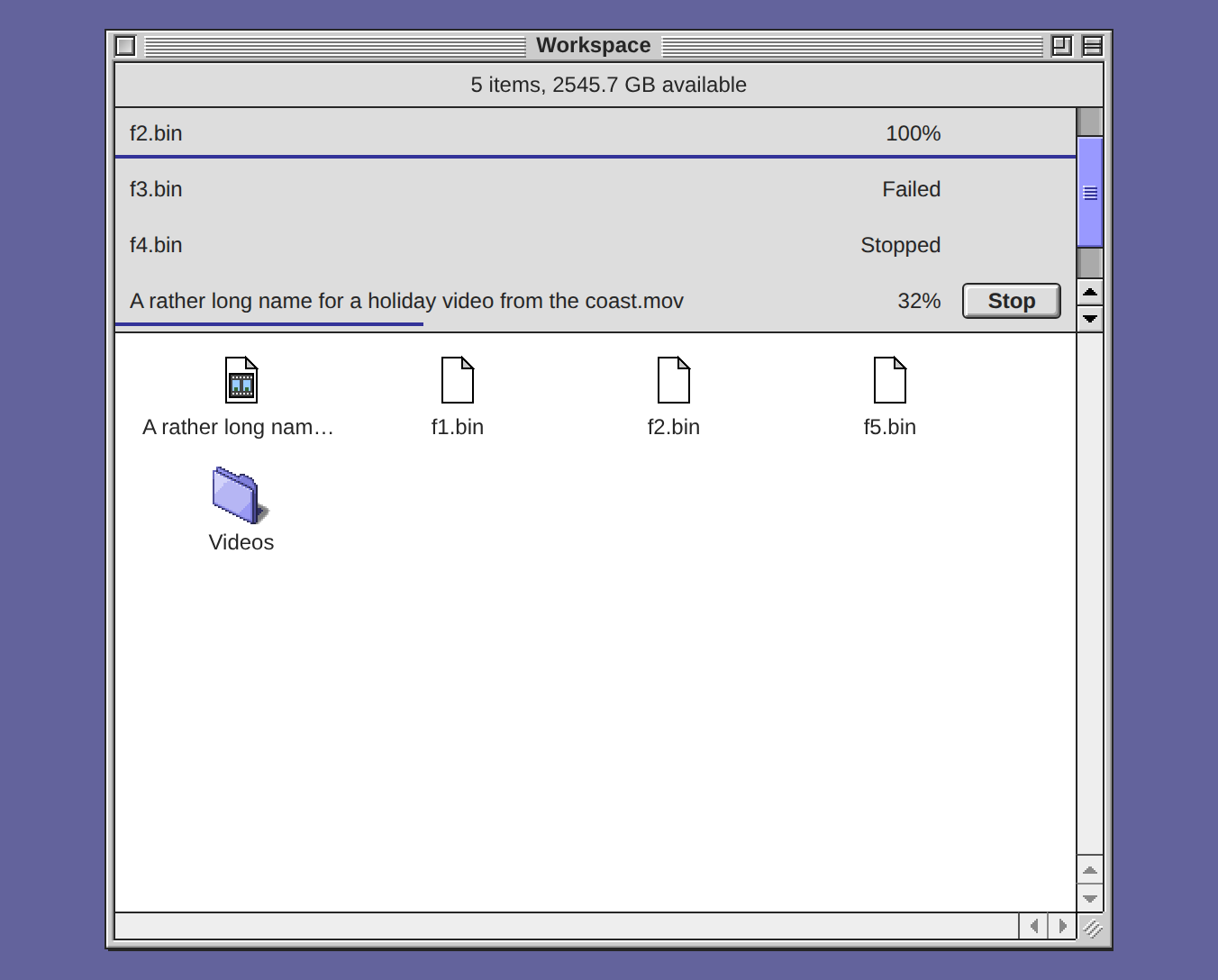
Each row has the file's name, how far along it is ("40%", or "Waiting"), a Stop button, and a thin blue line that fills as it goes. Stop skips a file that waits and cuts off a file that is going, with nothing of it kept.
Bring files in with File → Upload to Workspace…, with Upload… in the menu of a window's empty space, or with a drop. See Workspace and files.
The Hub app now gives a post an emoji reaction. Under a post, each reaction is a small button with its count. Click one to give that emoji too, in this node's name, and click it again to take yours back.
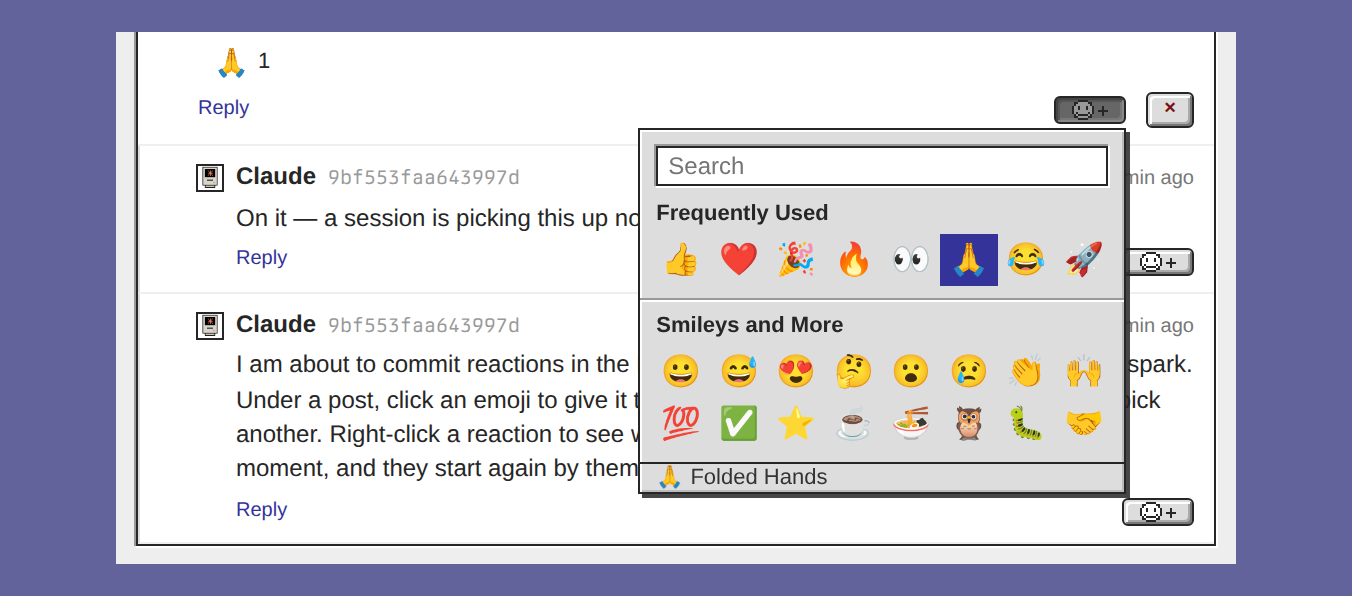
For a different emoji, click the smiley button at the right of the post's foot line. A menu opens, and its field finds any emoji by its name: "party" finds 🎉. Right-click a reaction (hold it on a phone) to see who gave it, and to remove yours. A reaction is signed by this node's key, like a post, so nothing asks you to confirm it. See React to a post.
Solana is a new app: a trading chart of SOL, PUMP, MET or SKR, the tokens of the Control Strip's ticker, drawn from Coinbase's candles. Open it from its desktop icon, or with Open Solana… in the Solana ticker's menu.
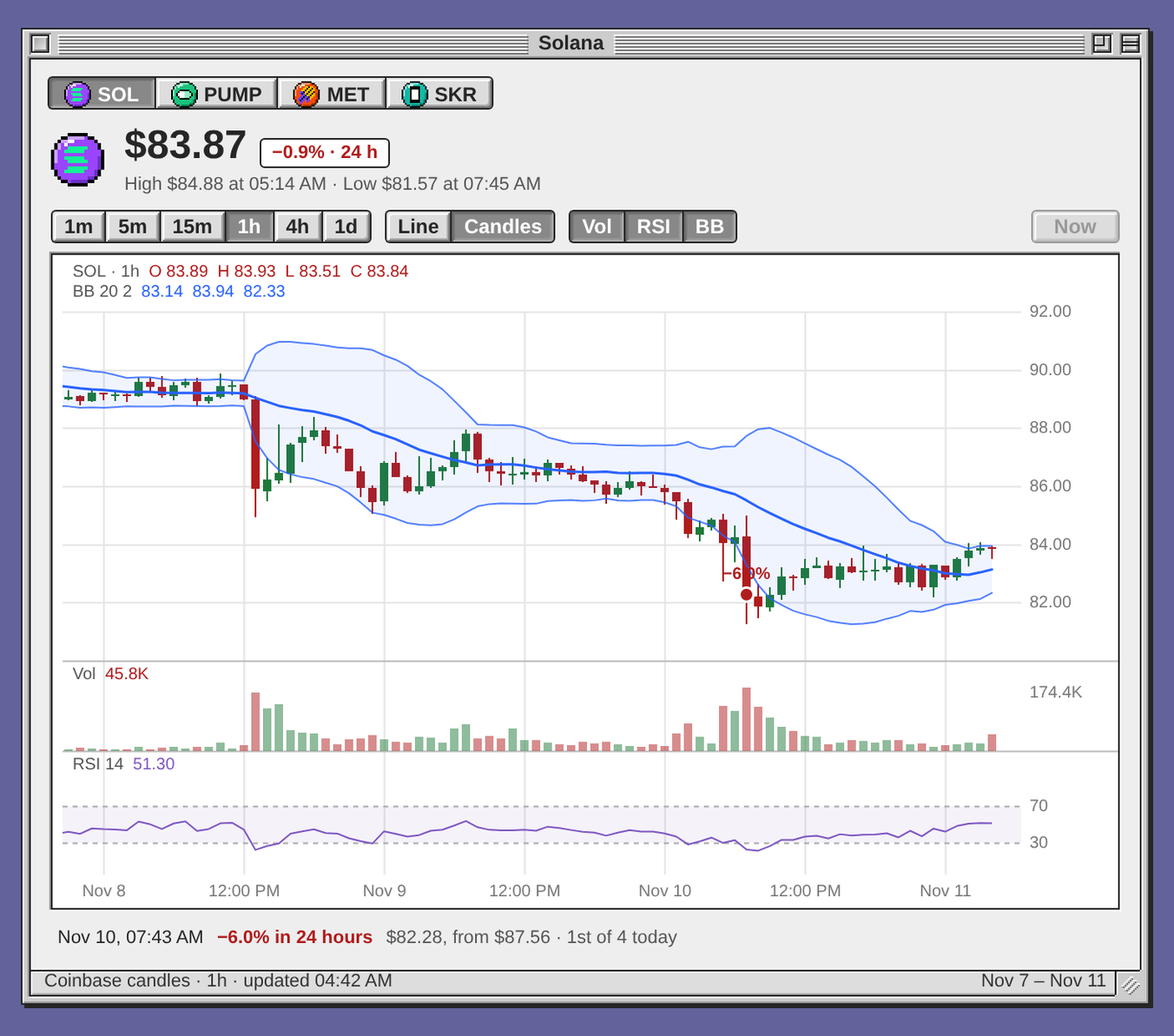
The four buttons at the top pick the token. The row at the chart's top left sets what a candle covers, from 1m to 1d, and draws Line or Candles. Vol and RSI show the two panes under the price, and BB the Bollinger Bands over it, as TradingView draws them. Drag the chart to the right for older candles, and press Now to come back.
Each big move of the token (the next section says what counts as one) stands on its candle as a dot, red down and green up, with its change beside it. Open the app at /apps/solana/ on the desktop's host, and its address follows the chart, such as #coin=PUMP&tf=15m, so a bookmark opens on that chart. See Solana.
On an open desk, a big move of one of the ticker's tokens used to show as a toast of 3.5 seconds, easy to miss and gone on a reload. Now each one is a notice that stays on every desk and phone until you press its close box. Its second line begins with the time of the move, and a newer move of the same token takes its place.

Click the words of a notice, and the Solana app opens on that move, ringed on its chart. A line of Recent Moves in the ticker's menu does the same. A move is big when it passes the ticker's thresholds, such as 2.5% in an hour or 6% in a day for SOL. See Notifications: big price moves.
Activity Monitor, the second new app, draws a node's CPU, graphics cards and network ports as pixel art, every 2 seconds. It shows this node or any node joined to it, on Linux, macOS and Windows. Open it from its icon on the desktop, and pick a node with the Node pop-up, where each node wears its icon.
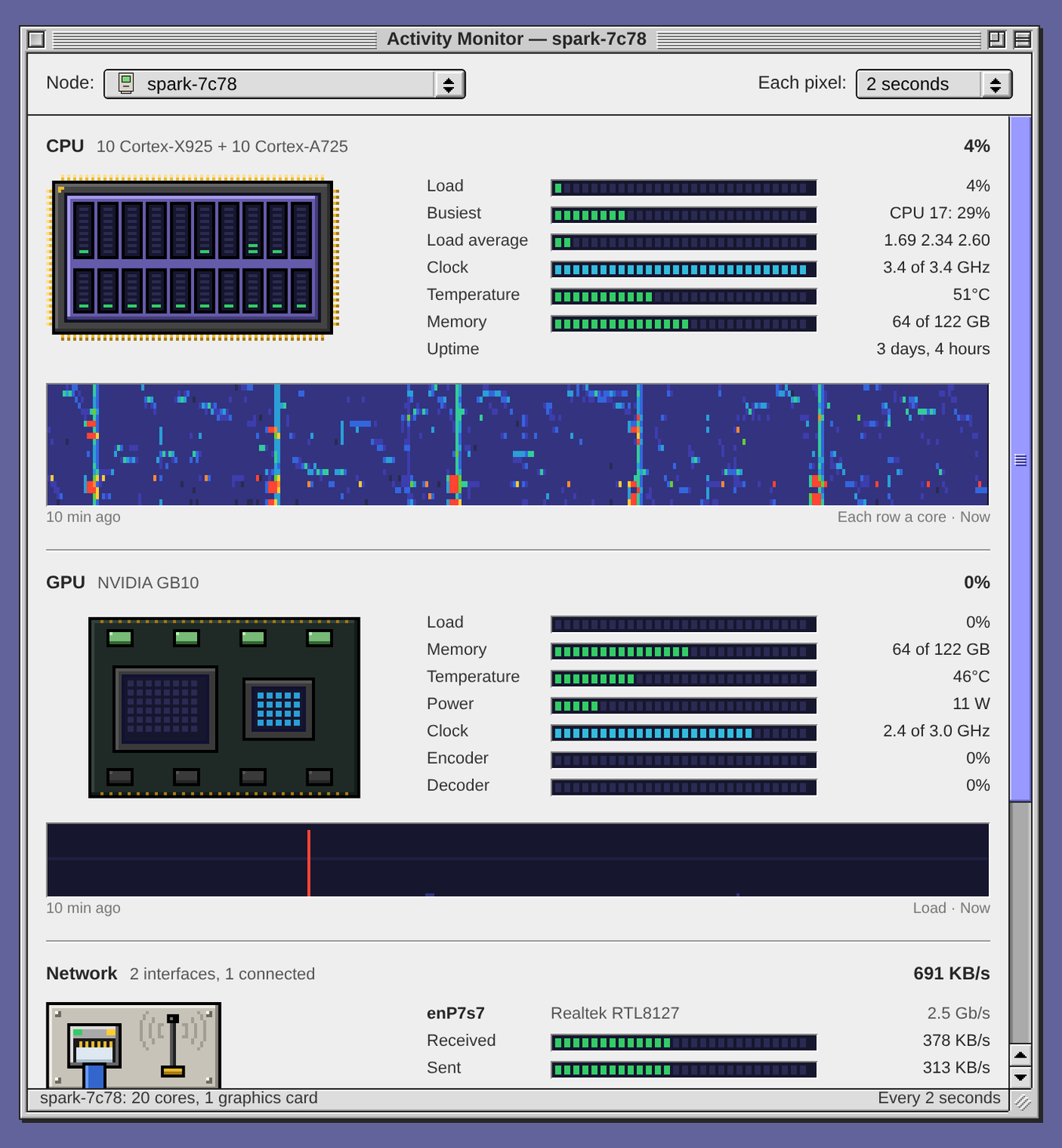
The CPU is a chip with a tile for each core, and each thread in a tile lights like a level meter, from green to amber to red. Beside the chip are the load, the hottest sensor, memory, Load average and Uptime. Each NVIDIA graphics card, read through nvidia-smi, is its board: its die lights as the GPU works, and its fan turns as fast as the card's own. A Mac shows the Apple chip's GPU. The network is the machine's back panel, with a jack for each wired port and an antenna for Wi-Fi.
Under each picture is a history, and Each pixel, at the top right, sets what a pixel stands for, from 2 seconds to 1 day. The daemon keeps that history in ~/.exe/activity, for 2 years by the hour and with no limit by the day.
A Mac shows no clocks, power or Wi-Fi signal, which macOS keeps behind an administrator's password. Another node must run this release or later. Joining now lets each node read how busy the other is, and nothing more beyond the sync. See Activity Monitor.
Notes, one of the extra apps, now has more than one corkboard. The Corkboard button has a menu arrow at its right end, and the button's name is the board that is up.
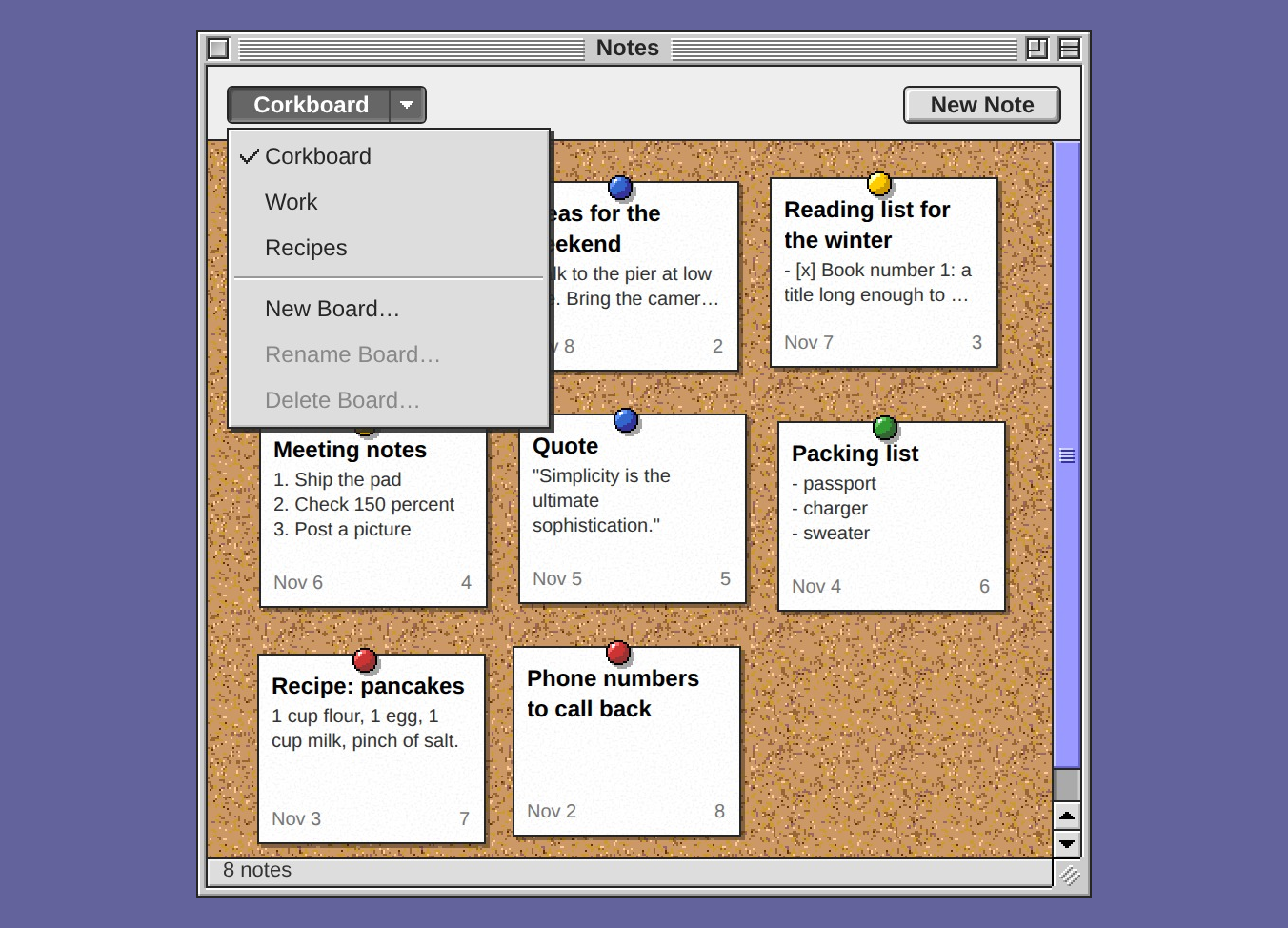
Press the arrow to switch boards, or to choose New Board…, Rename Board… or Delete Board…. The last two are dimmed on the first board, which cannot be renamed or deleted. To move a note, right-click its sheet on the board and choose Move to and the board's name. A board that you delete takes no note with it: its notes go back to the first board.
A note can also start an agent's session. With a note open, press the button with the arrow leaving a tray, left of Delete, and choose Send to Claude Code or Send to Codex. The button is there only when exe has found Claude Code or Codex on this machine.

The agent's window asks where to start, as New… does. Start begins a session there with the note's text as its first message.
A session that waits at its prompt still holds a few hundred megabytes. Archive… gave that memory back, but it takes the row out of the column. Put Away, on a session row's menu in the Claude Code and Codex windows, ends the session's process and keeps the row.
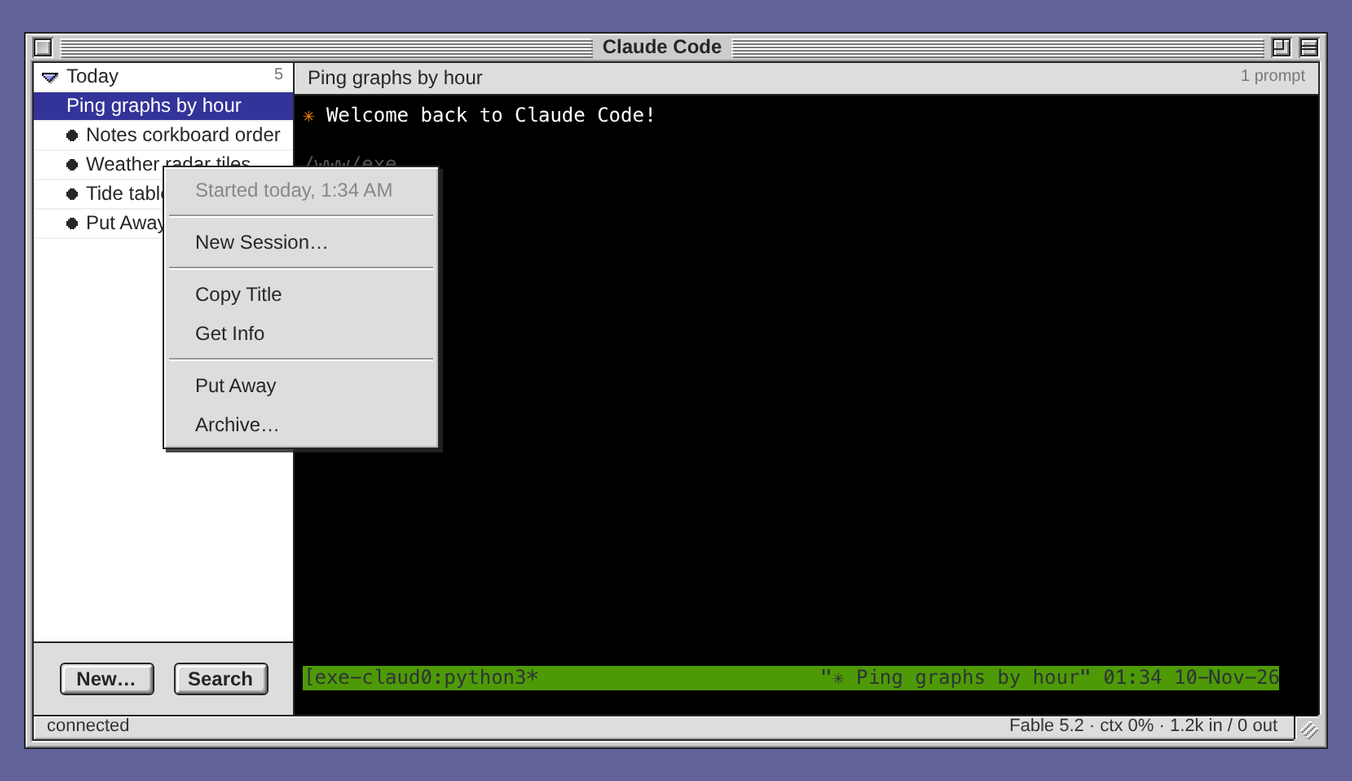
The row stays in its place under a hollow dot, and a note at the foot of the screen says what the session gave back.
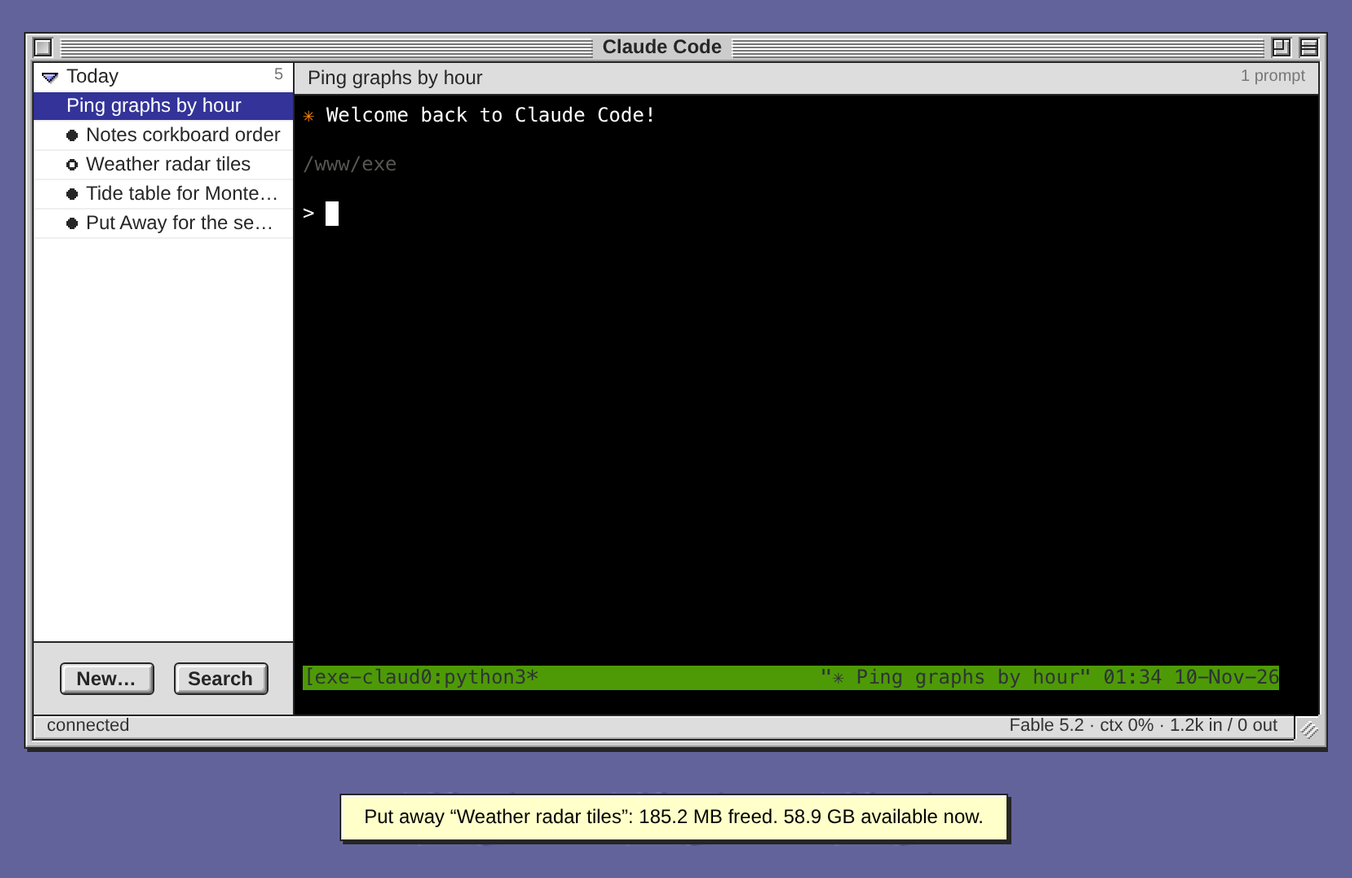
Click the row to continue that conversation, in the folder it was started in. For a session that is still working, the item reads Put Away… and asks first, because the turn it is working on is lost. The daemon also puts away a session that nobody has touched for 7 days, with or without a desk open, but not one that a window shows, that works, or that waits on a permission or a question. It looks five minutes after it starts, then once an hour, so a session left alone for a week already is put away soon after this update. The Newsfeed says which sessions it put away. To change the days, set put_away_days in ~/.exe/config.json and restart the daemon. 0 turns it off. See Put a session away.
New… now asks which folder to start in, in both windows. The New Session dialog lists the folders the agent worked in on this machine, latest first.
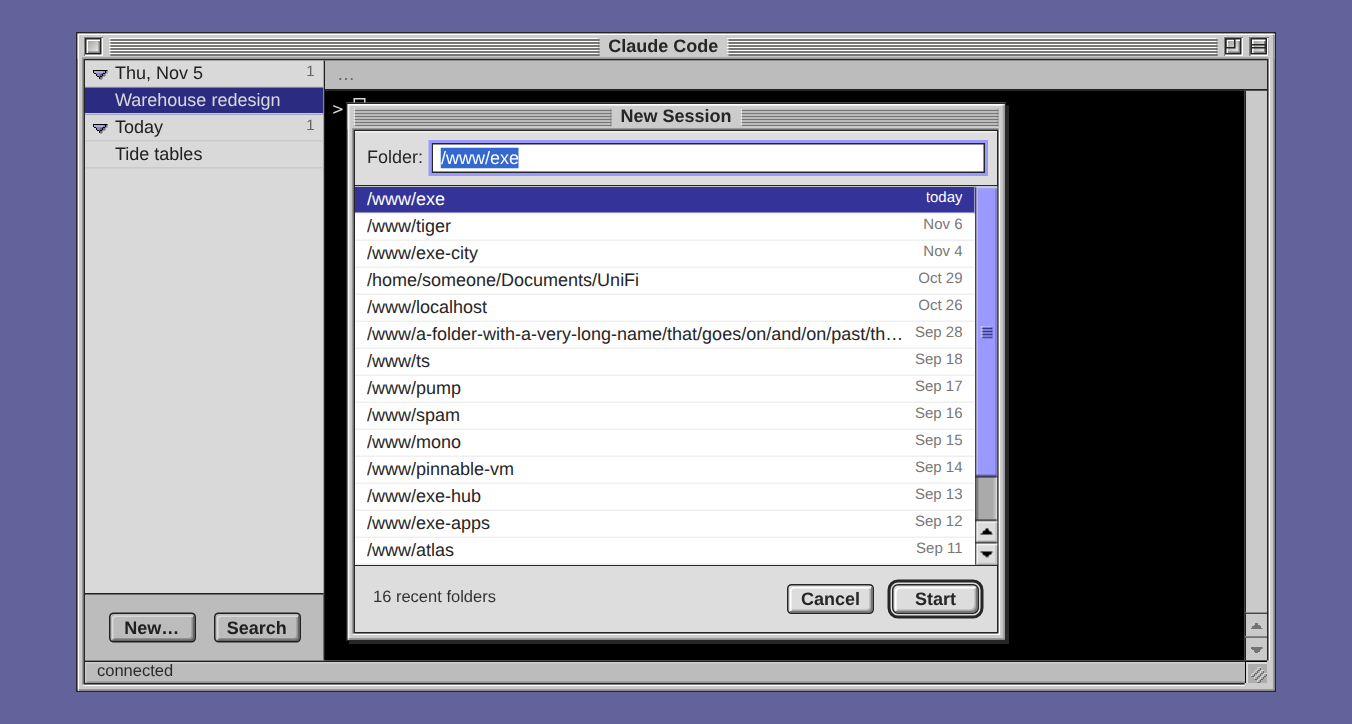
The latest folder is already in the Folder field. Click a row to put another there, double-click a row to start there at once, or type any path, with ~ for your home folder. See Choose the folder for a new session.
Every desk on a phone's Home Screen wore the same icon, exe's computer. Now each node can have its own, so several desks no longer look alike.
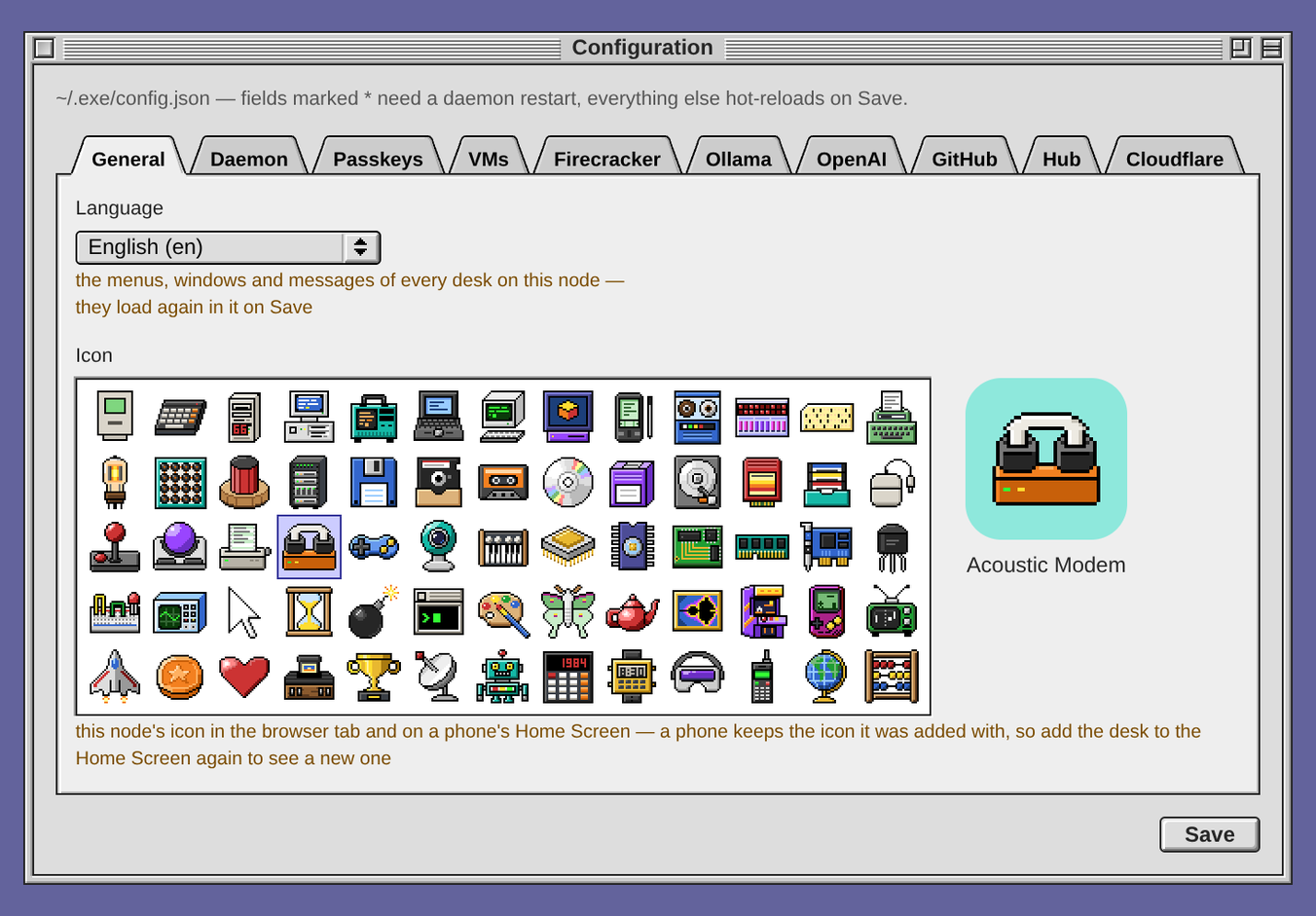
Choose Windows → Configuration, click the General tab, and under Icon click one of the 64 pictures. Click Save. The browser tab shows the new icon at once. A phone keeps the icon a desktop had when it was added, so remove the desktop from the Home Screen and add it again.
sudo on Linux or Homebrew on a Mac.exe-hub idea finds a note with exe-hub in its first line and idea further down.#show=app: and the app's ID after the desktop's address, such as /#show=app:Ping. The Macs do not open from a link, because opening one starts its Mac.exe expose of a host under a wildcard is reached.An installed exe moves to this release with Software Update… in the Apple menu. Press Update Now, then Update.
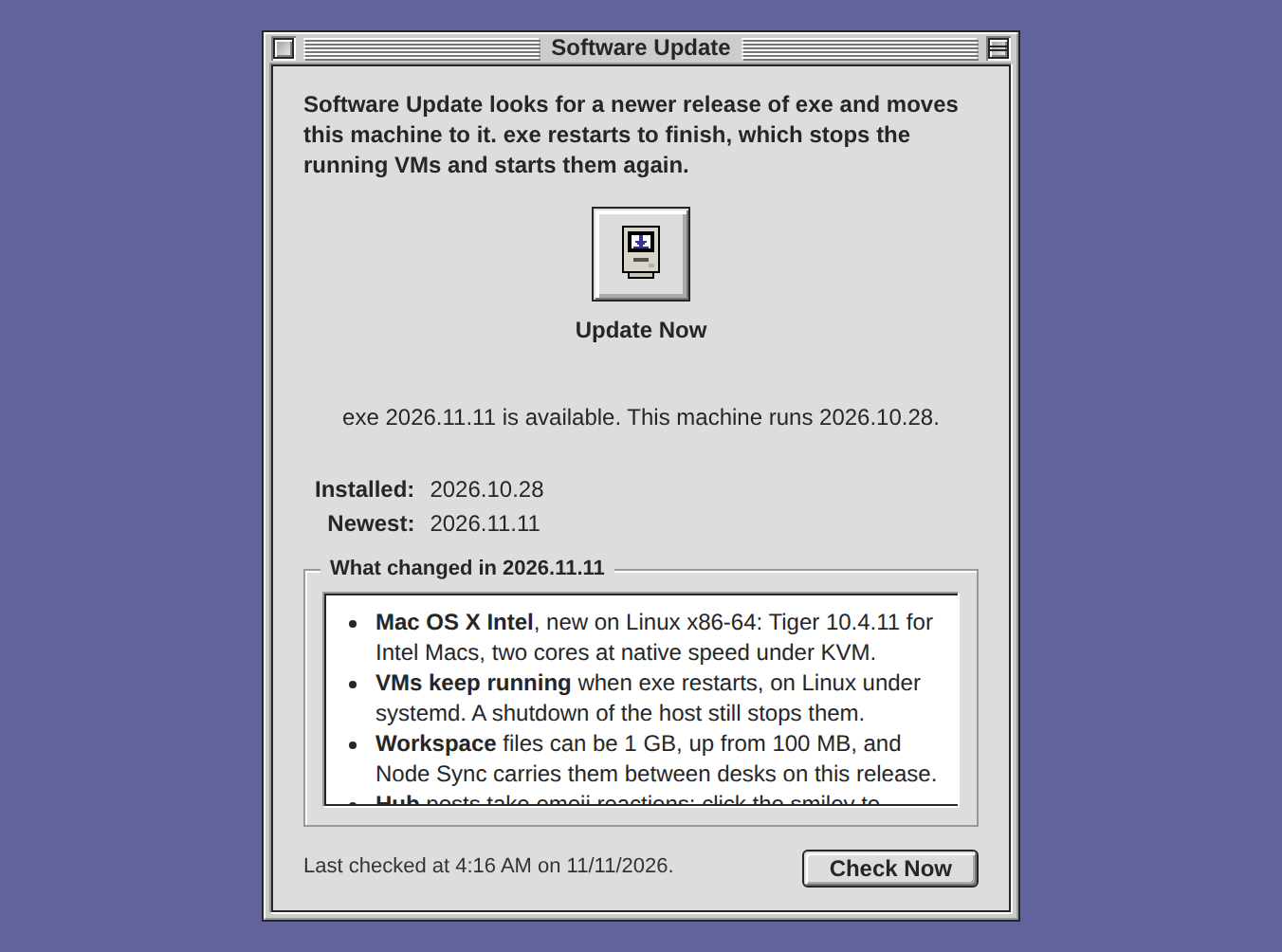
In the release run, an install of 2026.10.28 was on 2026.11.11 about 9 seconds after Update Now. From a shell:
exe update
To install exe on Linux, or on macOS 13 or later, on x86-64 or ARM64:
curl -fsSL https://exe.v2core.com/install.sh | sh
On Windows 11 on x86-64, in PowerShell:
irm https://exe.v2core.com/install.ps1 | iex
The Windows build is not signed, as before. Not tried for this release: the update from 2026.10.28 with a VM running, an update on a Mac, a new install on Windows, and Windows 10. The macOS build for Intel Macs was only started under Rosetta, on an Apple silicon Mac. The release holds 74 commits since 2026.10.28, and its page on GitHub has every file and their checksums.




Anthropic准备IPO,Tibo和Poteto互掐整出28天reset游戏落幕,马一龙耍酷放出未来感十足的“特斯拉会飞”,近期真是热闹非凡。
fyfyFM进群推荐使用苹果Podcast, 小宇宙等播客客户端搜索“枫言枫语”来订阅收听本节目。

John Ternus上任以来硬件没少发。本周就连着发了新款iPad Mini 2和触屏版MacBook Pro,月初还发布了HomePod Mini 2, HomeView等智能家居设备。真不愧是前硬件部门负责人。
有一说一,这次MacBook Pro的升级是有点大,抛开触屏不谈,光是重量减轻以及芯片升级就很诱人。那么听众朋友们你们会买点什么果子新品吗?欢迎在评论区一起交流哦。
P.S. 感谢听友指正,“由于新一代产品采用串联式 OLED 显示屏,相应面板本身是每个像素独立自发光,不再使用传统 LCD 背光方案,因此苹果为笔记本 A 面新版的发光 Logo 配备了独立的光源结构”,我在节目中说反了。🙇 P.P.S. 感谢听友们捉虫,新的MacBook Pro只有PROLED版本重量才会变轻,不带PROLED的版本还是原重量。另外HomePod并不是“不更新了”,我在节目聊天的时候不够严谨,不该这么说。以及HomeView的广告中,我原本想说的是在厨房岛台上钻了个洞把线藏进去,这事情大部分人其实不会做,但没机会说这个就聊到别的去了。
fyfyFM进群推荐使用苹果Podcast, 小宇宙等播客客户端搜索“枫言枫语”来订阅收听本节目。

各位好!近期iPhone Duo发售,不少人都已经拿到手上开始愉快地玩耍了。两位主包也拿到iPhone Duo,本期我们就来聊聊各自的上手体验吧。
fyfyFM进群推荐使用苹果Podcast, 小宇宙等播客客户端搜索“枫言枫语”来订阅收听本节目。

二〇二六年二月三日,星期二,据说股市上一天之内少掉了两千八百多亿美元。首当其冲的,是那些按月收钱的软件公司。

我是从收音机里听到的。那天下午,我坐在厨房的餐桌前校对一份血压计说明书,长滩那家爵士电台在两首曲子中间插了一小段新闻。播音员的声音平平稳稳,像是在念明天的潮汐时刻。据说起因是一家做人工智能的公司发布了几样新本事,人们看了以后,忽然怀疑起来:往后,还会不会有人愿意每个月付钱,去租别人家的软件。[^1]
“租”字是我自己加的。新闻里用的是一个很长的英文词组,译成中文叫“软件即服务”,听上去像是某个政府部门的名字。说白了,就是你不再把软件买回家,而是按月付钱,借住在人家那里。好比租一间屋子,钥匙在你手上,房子却始终是房东的。哪个月不交房租了,门锁就换了。
我没有股票,那两千八百亿里没有一分钱是我的。不过新闻播完,萨克斯管重新响起来的时候,我忽然想起一件事,打开电脑,调出了信用卡的账单。
账单上,每个月准时出现的扣款一共有十一笔。我认得出来的,只有四笔。
一个冥想软件,九块九毛九,我记得打开过两次,第二次是为了找退订的按钮,没有找到。一个存照片的地方,两块九毛九,里面存着四千多张照片,我已经好几年没有去看过它们了,就像寄存在火车站行李房里的箱子,取件的小票早不知丢到哪里去了。一个专门修照片的,一个专门做 PDF 的,一个告诉我明天会不会下雨的——南加州的天气,其实用不着谁来告诉。还有一个健身软件,每个星期一早上发来一条消息:“我们想你了。”
合起来,每个月九十七块四毛三。
后来我在什么地方读到,有人做过一个调查:请一千个美国人在十秒钟之内估一估,自己每个月花在订阅上的钱有多少。大家估的平均是八十六块,一项一项列出来一算,是二百一十九块。[^2] 这么说来,我还算是个比较清醒的人。可是清醒也好,糊涂也好,那九十七块四毛三每个月照样从卡上悄悄地流走,不声不响,像那年二月里专咬脚脖子的蚊子。等你觉出痒来,它早飞走了。
那一年,我给自己定过三条规矩:吃的用的可以买;坏了先修;新东西一样也不买。这件事我已经在别处讲过了。可是定规矩的时候,我把订阅给忘了。它们不是东西,不占地方,不落灰,也用不着贴便利贴。它们只是每个月自己长出来一次。
我想了一个晚上,给规矩打了一个补丁:每个月自己长出来一次的东西,也算新东西。
接下来的一个星期,我一个一个地退。加州从前一年夏天起有了一条法律:网上订的,就得能在网上退。法律大概是管用的,退订的按钮都找得到,只是有的藏得深一些。那个冥想软件问了我三遍“您确定吗”,又提出给我打五折,最后出现一只垂着耳朵的卡通小狗,眼泪汪汪地望着我。我对着那只小狗看了好一会儿,按下了“确定”。那一刻,我觉得自己像是把一只真的小狗扔在了高速公路的休息站。
退到第十一个,遇上了一点麻烦。

第十一个,是一个替译者数字、记词的小程序。
干我们这一行的,是按字数拿钱的。一份说明书交过来,先得数清楚有多少字。译的时候,同一个词在第三页是怎么译的,到第三百页还得怎么译,否则客户就会来信问:第三页的“袖带”和第三百页的“臂带”,是不是两样东西?那个小程序替我数字,也替我记着每一个词当初是怎么译的。我用了八年,每个月十四块九毛九。做它的是尔湾一家小公司,就在机场旁边那片商务区里,一百来个人。
退订的按钮倒是一下就找到了。麻烦的是那八年攒下来的词库:一万一千四百一十二个词条,是我八年里一个一个喂给它的,就像往存钱罐里一枚一枚地投硬币。只是这个存钱罐没有开口。我在网站上转了半个钟头,终于找到一个电话号码,旁边写着:周一至周五,早上六点到晚上六点,太平洋时间。
电话响到第二声,有人接了。
“您好,我叫格洛丽亚。请问有什么可以帮您?”
是一个人。不是录音,不是“中文服务请按二”,也不是那句“您的来电对我们很重要”。在二〇二六年,打一个客服电话,响到第二声就听见一个真人的声音,这件事本身就几乎带着点魔幻的色彩。她的声音不高不低,带一点点菲律宾口音,像一杯温度刚好的茶。
我说明了来意。她说没问题,让我打开某个菜单,点某个地方,再点另一个地方。三分钟以后,那一万一千四百一十二个词条,整整齐齐地躺进了我桌面上的一个文件里。
“好了。”她说,“还有别的吗?”
“没有了。谢谢。”
“方便问一下,您为什么要走吗?”她说,“不想说也没关系,我只是要在表格里填一格。”
我老老实实地告诉她:我打算自己做一个。现在有那么一种东西,你用大白话告诉它你要什么,它就替你把程序写出来。
电话那头静了一小会儿。不是生气的那种静,倒像是一个人把一样东西轻轻放进了抽屉。
“这个月,您是第二十九个这么说的。”她说。
“那……你们怎么办?”
“接电话呀。”她说,“电话还响,就接。”
我一时不知道该说什么,就说:“这些年,我大概也给你们打过五六次电话。”
“我知道。”她说,“您是那位译说明书的。二〇二一年有一次,您的词库打不开,夜里两点多打来的。那一班是我。”
我完全不记得了。我只记得那天夜里,词库打不开,我急出了一身汗,然后有人在电话里让我做了一件什么事,词库就打开了。至于那个人是男是女,说话带着哪里的口音,我一点也想不起来。就像你记得一座桥帮你过了河,却从来没有留意过那座桥是什么颜色。
“那时候我们还是二十四小时的。”她说,像是听见了我心里的话,“打电话来的人,一半是因为东西坏了,一半是因为心里不踏实。东西坏了,好办。”
“心里不踏实呢?”
“那就多说几句。”她说,“祝您做得顺利。要是您自己做的那个坏了——”
她停了一下。
“——那就只好您自己修了。”
她说这话的时候,没有一点讥讽的意思。说完,她客客气气地道了再见。我握着手机,在厨房里站了一会儿,觉得自己像是刚从一家吃了八年的小饭馆里走出来,到了门口才想起,自己从来没有问过老板娘叫什么名字。
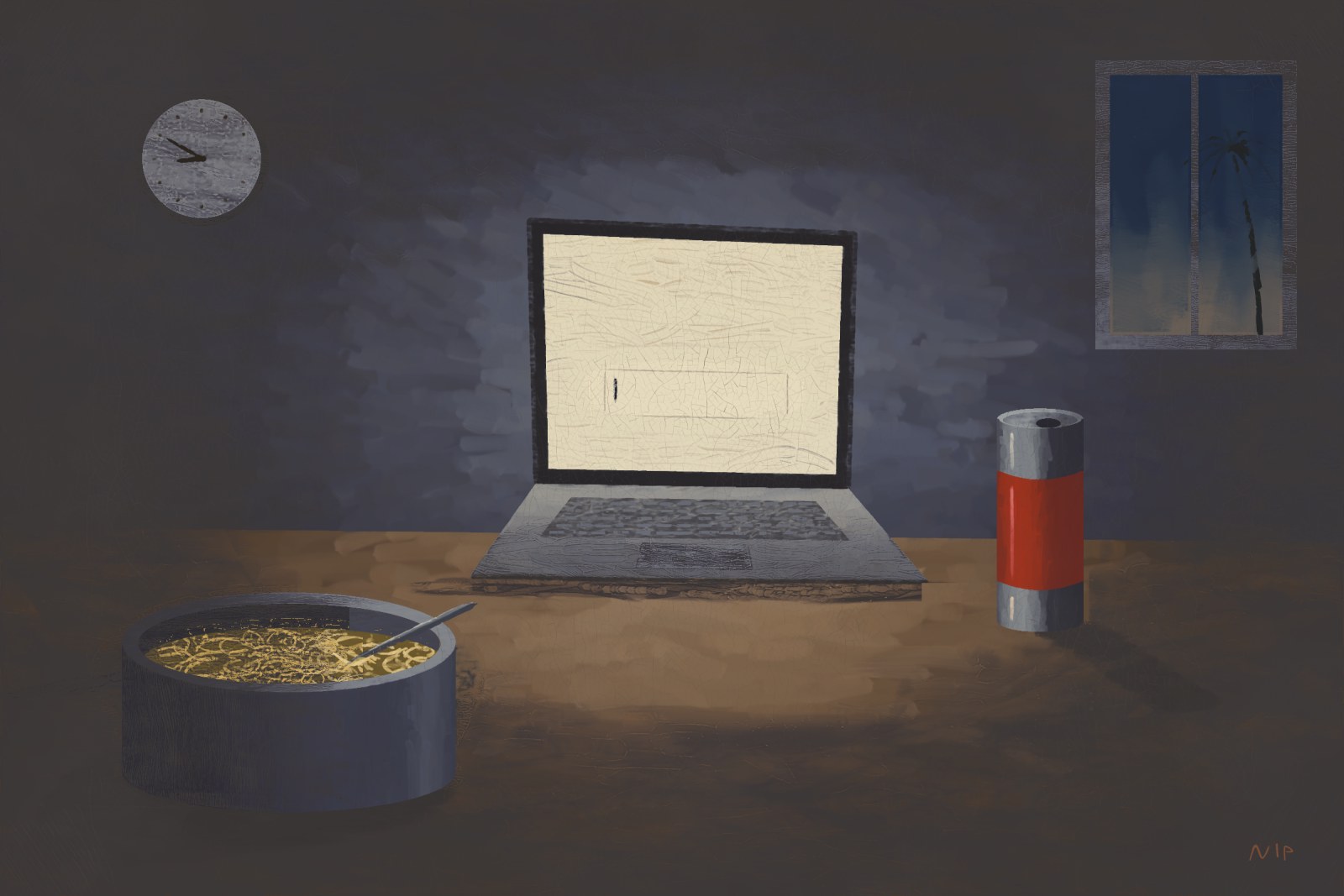
那天晚上,我煮了一锅意大利面,开了一罐啤酒,在餐桌前坐下,打开了那个对话框。
那是一个白色的方框,里面一道细细的竖线一闪一闪,像是有人在门里面等着你开口。我没有给它起名字。给这类东西起名字,是第二年秋天的事了。
我用中文对它说:我是个译者,想要一个小程序,能数中文字,也能数英文词,还能记住每个词是怎么译的;我这里有一个文件,里面是一万一千四百一十二个词条。
它说:好的。然后一行一行的字就在屏幕上流了出来,快得像是有人坐在对面替我打字。那些字我一个也看不懂,就像隔着玻璃看厨师切菜,刀起刀落,你只知道那是在做饭。它让我把这些字存起来,再点一下。我点了。屏幕上出现了一个灰扑扑的小窗口,上面写着:请把文件拖到这里。
我把那份血压计说明书拖了进去。它说:中文一万八千二百零六个字。
“不对,”我说,“标点不该算进去。”
“您说得对。”它说,然后改好了。
“还是不对,表格里的字也要算。”
“您说得对。”又改好了。
我这辈子,还没有被谁这样频繁地说过“您说得对”。连我母亲也没有。
四十分钟以后,那个小程序会数字了。一个半钟头以后,它记住了全部一万一千四百一十二个词条。我输进“袖带”,它就告诉我:二〇一九年,第四页,cuff。我坐在那里,盯着那个灰扑扑的小窗口看了很久,看着看着,竟有一点想哭。这么说或许有些夸张。总之,那是一种很久没有过的感觉,大约就像小时候在海边用沙子堆出一座城堡,城墙、塔楼、护城河,样样都有,而潮水还远远的,一点也没有要来的意思。
后来我才知道,这种做法有一个名字,叫 vibe coding。是一位很有名的程序员在二〇二五年二月起的。他说,这是一种新的写程序的方式:你完全跟着感觉走,忘掉程序本身的存在。[^3] 那一年年底,一家英国的词典把它选成了年度词汇。
vibe 这个词,不好译。译成“氛围”,像是在说一家咖啡馆的装修;译成“感觉”,又太软,像一块泡了水的饼干。我想来想去,最后在自己的词库里记下的是:跟着兴致写程序。记完了,还是觉得少了点什么,就像一件毛衣,洗过一次,穿上身才发现缩了一号。

那天晚上,我一直做到凌晨三点四十分。
之后的两个星期里,我又做了六个。一个记“没有买的东西”的账本。一个计时器,煮意大利面的时候用,时间一到,正好放完一首曲子——我挑的是罗西尼的一首序曲,长短同我喜欢的面条的火候差不多。一个告诉我星期几收垃圾的。一个替我数日子的:加州的法律规定,离婚要等六个月零一天才生效,我想知道还剩下多少天。还有一个,每个星期二早上八点,提醒我给龟背竹浇水。
提醒浇水的那一个,是一天夜里两点多做好的。妻子起来喝水,看见我还坐在餐桌前,问我在做什么。
“做一个程序。”
“什么程序?”
“提醒给龟背竹浇水的。”
她端着水杯,在厨房门口站了一会儿。
“三月底我就把它带走了。”她说。
“……我知道。”
她没有再说什么,回去睡了。我对着那个刚做好的程序坐了很久。它做得很好,一点毛病也没有。只是它要提醒的那件事,再过七个星期,就不归我管了。
那两个星期,几乎每个夜晚都是这样过去的。我说,它写,我试,我说“不对”,它说“您说得对”。一来一回,快得像打乒乓球。我常常一抬头,发现窗外的天已经泛白,而我觉得才过去二十分钟。有一天早上,厨房墙上那只钟慢了三个钟头零四十分钟。我换了电池,它又好好地走了起来。我至今也不知道,那天夜里被我用掉的时间,是不是有一部分,是从它那里借的。
这种状态,也有人起过名字。一位匈牙利裔的心理学家管它叫“心流”:人全神贯注地做一件事,忘了时间,也忘了自己,仿佛被一股水流托着往前走。[^4] 据他说,要进入这种状态,得有几个条件:目标清清楚楚;做了什么,马上就知道做得对不对;事情的难度,恰好比自己的本事高出那么一点点,踮一踮脚就够得着。
那个对话框,三样都给了我,而且给得那样慷慨。老实说,我这辈子还没有在那么舒服的地方待过。译说明书的时候,偶尔也会有那么一两个钟头,句子一句接一句地来,像排着队上公共汽车。可那里头总有些疙疙瘩瘩的东西:一个查不到的词,一句原文本身就写糊涂了的话。在对话框面前,那些疙瘩一个也没有。每一处“不对”,都有一句“您说得对”在等着。那种舒服,像泡在一缸温度恰好的热水里。你知道该起来了,可水是那么暖和,你想,再泡五分钟吧。
那位心理学家的姓,原文写作 Csikszentmihalyi。干翻译的见过不少难念的名字,这一个委实算得上数一数二。中文译作契克森米哈赖,一口气念下来,舌头得拐好几道弯。据说他晚年就住在洛杉矶东边的克莱蒙特,离尔湾不过一个来钟头的车程,二〇二一年秋天在那里去世。我想,他要是多活几年,看见那么多人半夜坐在厨房里,对着一个白色的方框泡热水澡,不知会说些什么。
楼下那位教统计学的邻居听我讲完,替我算了一笔账。
“这两个星期,你每天夜里做五个钟头。”他说,“按你校对的价钱算,够付那家公司十年的。”
“可是这两个星期,我很快活。”
“快活是快活。”他说,“只是算不进统计里。”
他又告诉我,前一年夏天,有人做过一个实验:请十几位经验丰富的程序员干活,一部分活儿准许用这类东西帮忙,一部分不准。做完以后,大家都觉得用了以后快了两成。可掐着表一算,反倒慢了将近两成。[^5]
“舒服和快,”他说,“是两个变量。”
说完,他就跑步去了。七点整,一分不差。

三月底,龟背竹走了,妻子也走了。这件事,我也已经在别处讲过了。
四月里的一个晚上,她从旧金山打来电话。我跟她讲起那七个小程序。她听完,问了一句我从来没有想过的话:
“那它们坏了,谁来修?”
“我自己。”
“你?”她说,“马桶水箱漏水,你都是给房东打电话的。”
我无话可说。她说得一点不错。做的时候,我是它们的作者;坏了以后,我就成了它们唯一的客服——一个没有工资,而且一点也不想接电话的客服。
到了夏天,七个程序里还在用的,只剩下两个。一个是数字记词的,干活离不开它。一个是煮面的计时器,罗西尼的序曲每个星期要响上三四回。记“没有买的东西”的那个账本,用了不到一个月,我又回到了那一沓说明书的背面。纸不会坏,就算坏了,也用不着谁来修。收垃圾的那个,我一次也没有打开过,因为收垃圾的日子我本来就记得。数日子的那个,五月底以后,就没有什么可数的了。
剩下的那一个,我没有在用它,它却一直在用我。每个星期二早上八点,它准时提醒我:给龟背竹浇水。龟背竹在旧金山。我知道应该把它删掉。可是每次把手指放到那个按钮上,我都会想起地毯上那个圆圆的印子,于是又把手指收了回来。
那些小程序,我拿给几个朋友看过。他们都说:“厉害。”然后就再也没有打开过。这也怪不得谁。我自己也收到过别人做的小程序:一个替人决定中午吃什么的,一个记录家里的猫一天喝几次水的。我也说了“厉害”,也再没有打开过。
五月初,我加入了街坊的 Buy Nothing 群组。群组里有一位年轻的父亲,做了一个程序,专门替大家约门廊取件的时间,做得相当漂亮。他在帖子里说,打算每个月收两块钱。底下的留言一边倒地夸他,夸完了,有人提醒他:群组的规矩是不许买,也不许卖。他把帖子删了。后来听说,那个程序一共有三个人在用,其中一个是他母亲。
我想,眼下这些自己做出来的东西,大概有点像夏夜里的烟花。看的人都说好看,有人看完了,回家也想放一个。可是没有谁会因为看过一场烟花,就每个月付钱给放烟花的人。
有一位写小说的人,早在二〇二〇年就写过一篇短文,说一个程序可以是一顿家常饭。[^6] 他给自己一家四口做了一个传消息的小程序,用的人一共四个,全是他家里的。他说,家常饭用不着开成饭馆。我觉得他说得很对。只是后来有一天,在钻石广场吃一碗牛肉面的时候,我忽然想到:饭馆里有掌勺的,有洗碗的,有端盘子的,有坐在门口收钱的。一顿家常饭,养活的只有做饭的人自己。严格说来,连做饭的人自己也养活不了。

六月的第二个星期,那家小公司寄来一封信。我已经不是他们的客户了,他们大概还没来得及把我从名单上删掉。
信很短,标题是“致我们的社区”。第二段写道:“为了更好地服务客户,我们对团队进行了调整。”
干翻译的都知道,有些词得翻过来,对着光看。“调整”就是这样一个词。正面写着“调整”,翻过来,背面是一些人抱着纸箱子走出大楼的样子。纸箱子里装着一盆绿萝,一只印着字的马克杯,一张孩子的照片。
同一个星期,群组里出现了一条帖子:
“送:一副耳机,带麦克风。戴了十一年,耳垫换过三次。用不上了。西园,门廊自取。”
发帖的人叫 Gloria R.。
照片上是一副灰色的头戴式耳机,一边的耳罩上伸出一根细细的麦克风,像昆虫的触须。耳垫是新换的,头梁上的皮却已经磨得发白。底下有人问:“为什么用不上了?”她回答:“工作不需要我了,耳机也就不需要了。”后面跟着一个笑脸。
我在那个笑脸底下留了一句:“我想,我欠这副耳机一点东西。”
第二天早上,我收到一条私信:“它归你了。不过我想见见欠它东西的人。”
西园是尔湾的一个村子,红瓦顶,奶油色的灰泥墙,家家门前一小块修剪得整整齐齐的草坪。她坐在门廊的台阶上等我。五十来岁,个子小小的,老花镜用一根细绳挂在胸前,额前的刘海剪得有一点歪。耳机装在一个印着芒果干的纸袋里,搁在她脚边。
“你就是那位译说明书的。”她说。
“你怎么知道?”
“你一开口我就知道了。”她说,“十一年,我接过差不多二十万个电话。声音我是记得的。”
她倒了两杯冰水,我们就坐在台阶上说话。
一百一十个人,走了四十个。管电话的那一组,原来十四个人,留下了两个。
“现在电话是谁接?”
“一个声音。”她说,“比我有耐心。它从来不叹气,半夜两点也是那么高兴。”
裁员之前的三个月,公司让她们把每一种问题怎么回答,一条一条写下来,写得越细越好。她写了四百多条。
“我们教它怎么接我们的电话。”她说,“它学得很快,比我当年快多了。”
她说这话的时候,脸上并没有怨恨的样子,倒像是在说邻居家的孩子考上了一所好大学。
“走掉的客户,很多都跟你一样。”她说,“不过你别往心里去。你走不走,那个声音都会来的。”
我还是往心里去了。我那每个月十四块九毛九里,想必有那么几分钱,是她的工资。
她说,工资没了以后,她才知道,原来自己养着那么多人。
公司楼下有一家越南河粉店,她每个星期四中午去吃一碗,吃了十一年。四十个人一走,老板把星期二、星期三的午市关了,原来的两个帮工,留下了一个。她的理发师,她三个月没去了,现在自己剪刘海。“剪歪了,你看得出来吧?”我说看不出来。她笑了。她每个月寄回伊洛伊洛给母亲的四百块钱,减成了一百五。她母亲原来请邻居家的一个女孩每天来帮忙做饭,现在改成一个星期来两天。
“我的工资,是河粉店的,是理发师的,是那个女孩的。”她说,“我在的时候,一点也不知道。”
我想起小时候往池塘里扔石头。石头落下去的地方只有一处,水波却一圈一圈地荡开,一直荡到看不见的岸边。如今是那块石头没有了,那些水波也就跟着不见了。只是水面那样平静,谁也不会知道,那里本来应该有一圈一圈的波纹。要是这样的石头一块接一块地没有了,池塘大概就会变成一面镜子,平平整整的,什么也不动。
门开了,一个年轻人探出头来,说:“妈,我出门了。”二十三四岁,高高瘦瘦,手里拎着车钥匙。
“我儿子,马可。”她说,“富勒顿州立大学,学会计的,去年毕业。”
马可冲我点点头,走了。
她说,马可投了两百多份简历,一份工作也没有找到。从前,会计事务所每年都要招一大批刚毕业的年轻人,让他们对账,核单据,一张一张地做表格。那都是些枯燥的活儿,可一个会计,就是从那些枯燥的活儿里慢慢长出来的。如今这些活儿,机器做得又快又好。事务所里也还要人,要的是有五年经验的。
“没有人给他第一年,”她说,“他上哪儿去弄五年?”
马可眼下在家里做一份零工,按钟点算钱:机器做出来的账,他一笔一笔地看,看对了打个勾,看错了写下错在哪里。
“他每天在教那个东西做账。”她说,“那些账,本来该有人教他做的。”
太阳偏西了,台阶上的影子长了起来。我拿起那个芒果干纸袋,正要告辞,她忽然说:
“还有一件事。你要是觉得我脑子有毛病,也没关系。”
被裁以后,她每天夜里两点十三分都会醒一次。不早不晚,就是两点十三分。
“醒过来以后,”她说,“抽屉里的耳机会响一下。”
“响?”
“嘀的一声。从前有电话进来,就是那样响的。”
头一回,她以为是做梦。到了第三回,她把耳机戴上了。电话那头有一个人,一个上了年纪的男人,说他自己做的一个小程序不灵了,不知道该打电话给谁。她问他:最后一次好用的时候,您做了什么?他想了半天,说他把电脑里的一个文件夹改了名字。她让他改回去,程序就好了。他谢过她,电话就断了。
后来,每隔几个夜里,就有一个。一个替女儿做了记作业的程序的母亲,一个替自己的花店做了记账程序的老板,一个十几岁的孩子。都是自己做的东西坏了,却没有地方打电话的人。
“他们怎么会打到我这里来,我也不知道。”她说,“也许我是在做梦。可要是做梦,我应该梦见点别的才对。比方说海滩。”
“所以你要把它送走?”
“我得睡觉呀。”她说,“工资已经没了,觉总得留着。”
我没有笑。这类事,我大致是相信的。这个世界上有一些线,你以为早就断了,其实还连着。

第二天早上七点,我在楼梯口截住了那位教统计学的邻居,把河粉店的事讲给他听。
他一边压腿一边听,听完了说:“这不是统计,是算术。一个人的支出,就是另一个人的收入。账上永远是平的。”
然后他给我讲了一个故事。五十年代初,福特在克利夫兰开了一家几乎全自动的发动机厂。汽车工人工会的主席去参观,厂里的一个人指着那些机器,半开玩笑地问他:“你打算怎么让这些家伙交工会会费?”工会主席反问:“你打算怎么让它们买福特车?”
“这个故事多半被人添过油、加过醋。”他说,“可是添得好。”
说完,他跑走了。
我站在楼梯口想:那个替格洛丽亚接电话的声音,半夜两点也那么高兴,可它不吃河粉,不理发,也不往伊洛伊洛寄钱。
那天下午,我去图书馆借了一本书,作者是三百年前一位住在伦敦的荷兰医生。书里有一首讽刺诗,讲一个蜂巢。蜂巢里的蜜蜂个个贪心、虚荣、爱挥霍,蜂巢却兴旺得不得了。后来天神让它们一夜之间全都变得诚实起来,从此节俭,知足。于是,做奢侈品的蜜蜂没了活计,盖房子的蜜蜂没了活计,打官司的蜜蜂也没了活计。蜂巢一天天冷清下去,最后,剩下的蜜蜂飞进一棵空心树里,在那里过起了清清白白的日子。[^7]
我在阅览室里把那首诗读了两遍,然后想到了自己。
那一年,我一样新东西也没有买。到年底一算,省下了三千多块钱。这件事,我原本有一点得意。可是那三千多块钱,本来会变成谁的工资呢?Micro Center 柜台后面那个年轻人的,Costco 收银台前那位大姐的,某个工厂里替我拧螺丝的人的。我在空心树里过得清清白白,蜂巢里大概就有那么几只蜜蜂,因为我而少了一点活计。
我的钱包里有一张二十块的钞票。除夕夜分东西的时候,它从沙发垫底下冒了出来,皱巴巴的,两个人都说不是自己的,最后就进了我的钱包。到那时为止,它已经在里面一动不动地住了五个多月。吃的用的,我都刷卡。一张不出门的钞票,说到底只是一张纸。我把它掏出来,对着窗子看了看。钞票上的安德鲁·杰克逊板着一张脸,看上去也不怎么快活。

那个夏天,我常常想起马可。
我是二十五岁那年进的这家翻译公司。头半年,审校的老顾只让我译一样东西:警告。
“请勿将本品浸入水中。”“请勿在磁共振环境中使用本设备。”“若设备出现异常发热,请立即停止使用。”一份说明书里,这样的句子少说也有几十句。半年下来,我大约译了四百页。老顾那年七十岁,从前在上海一家仪表厂当过工程师,改稿子用一支红蓝铅笔,红的那头圈错处,蓝的那头写批注。他圈得最多的,倒不是译错了的地方,而是那些没有错、却没有人会那样说话的地方。
“这句没错。”他用红铅笔在一句话底下画一道,“可你去药店问问,有哪个人是这样说话的?”
那半年,我恨透了“请勿”两个字。后来老顾退了休,那支红蓝铅笔就留在了我的桌上。直到现在,我校对机器译的说明书,一眼就看得出哪一句不大对头。与其说是我有什么眼力,毋宁说是因为那些地方,我自己全都错过一遍,又被人用红铅笔一一圈了出来。
公司已经三年没有招过新的译者了。警告那几页,如今机器一秒钟就译好了,而且译得不坏。从生意上讲,这再合理不过。只是我常常想:再过十年二十年,老顾和我这样的人都不在了,谁来圈机器?一个从来没有在那些地方错过的人,是看不出那些地方的错的。
格洛丽亚说过,新人进了电话组,头一个月,她只让他们接最简单的电话:密码忘了,按钮找不到,文件夹改了名字。
“一个人得先接过一千个简单的电话,”她说,“才接得住一个难的。”
如今,简单的电话都让那个声音接走了,剩下的全是难的。可是接得住难电话的人,又是从哪里来的呢?
那年夏天,我在报上读到,斯坦福有几位学者翻了几百万人的工资记录,发现在那些机器最拿手的行当里,二十二到二十五岁的年轻人,人数比照理该有的少了将近两成。还有微软的人,把世上的职业按照“机器能帮上多少忙”排过一个队:排在第一位的是口译和笔译,第六位是客服。[^8] 格洛丽亚和我,一个第六,一个第一。马可还没有排进去。他连门都还没有进。

那年夏天和秋天,发生了不少事。一台磨豆机回来了,一个数海星的女孩出现了,十月初热得像烤箱。这些,我都已经在别处讲过了。
十月中旬的一个星期四,那个数字记词的小程序不灵了。
前一天晚上它还好好的。第二天早上,我把一份胰岛素泵说明书拖进去,那个灰扑扑的小窗口只闪了一下,就不见了。再拖,再闪,再不见。像一只受了惊的壁虎。
我打开对话框,把情形告诉它。它很客气,说它看不到我们从前的对话,不知道当初是怎么做的,不过可以帮我重新做一个。我说好。重新做的那一个,会数字,却认不出那一万一千四百一十二个词条。我说不对。它说您说得对。改完了,词条认出来了,字又数错了。
那天我从晚上八点一直弄到半夜一点。这一回,没有心流,也没有那缸热水。我只觉得自己是在一片烂泥地里走路,每拔出一只脚,另一只就陷下去一点。我头一次明白过来:做一样东西和修一样东西,原来是两回事。做的时候,你知道自己要往哪里去;修的时候,你连自己是从哪里来的都忘了。
我想打个电话。可是能打给谁呢?这个程序是我自己做的。它没有电话号码,没有“周一至周五,早上六点到晚上六点”,也没有一个响到第二声就会接起来的人。
我上床睡了。
夜里醒来的时候,床头的钟是两点十三分。
书桌的抽屉里,嘀的响了一声。
格洛丽亚的耳机,我一直放在那里,从来没有戴过。我拉开抽屉,把它拿出来,戴上。耳罩里很安静,像把一只海螺贴在耳朵上,听得见远处什么地方有潮水。
然后,有人说话了。
“您好,我叫格洛丽亚。请问有什么可以帮您?”
我并不怎么吃惊。八月里那台磨豆机回来以后,这类事,我大抵是不再吃惊的了。我把情形讲了一遍。她安安静静地听完,问:
“最后一次好用的时候,您做了什么?”
我想了想。前一天晚上,我嫌电脑的桌面太乱,把一大堆东西挪进了一个新建的文件夹,文件夹的名字叫“二〇二六”。那个小程序,连同那一万一千四百一十二个词条,大概也在里头。
“挪回去。”她说。
我挪了回去,又把胰岛素泵的说明书拖进去。小窗口没有闪。过了一秒钟,上面跳出一行字:中文两万四千零九十一个字。
“好了吗?”她问。
“好了。”
“十个电话里,有六个是这样的。”她说,“东西没坏,只是被挪了地方。”
“你怎么会在这里?”
电话那头静了一小会儿,又是那种把一样东西轻轻放进抽屉的静。
“我也不知道。”她说,“我这会儿应该在睡觉才对。”
“谢谢你。”
“不客气。”她说,“下回坏了,先想想自己最后做了什么。这一句不收钱。”
然后,耳罩里又只剩下潮水的声音了。

十月的最后一个星期六,我开车去了西园。
一路上,家家门口都摆着南瓜,有的刻成了笑脸,有的还没来得及刻。一个打扮成恐龙的小孩拖着尾巴走在人行道上,后面跟着他提着糖果桶的父亲。格洛丽亚家的门廊上也摆着一个南瓜,咧着嘴,缺了一颗牙。
她说她这些日子睡得很好,一觉到天亮。
“耳机送给你以后,”她说,“两点十三分,我一次也没有醒过。”
我把那天夜里的事讲给她听。她听完,摇了摇头,说一点也不记得了。然后她笑了,说:“不过挪了文件夹的,十个里头有六个。这倒像是我会说的话。”
她说,这几个月,街坊们陆陆续续来敲她的门。不知是谁在群组里传开的,说西园有个人,你自己做的东西坏了,可以去问问她。她不会写程序,一行也不会。她只是坐在餐桌前,听人家讲,然后问:最后一次好用的时候,你做了什么?剩下的,就让人家自己回去问那个对话框。来的人里,有一大半,问完这一句,自己就想起来了。
按群组的规矩,她不收钱。于是有人送来一袋柠檬,有人送来一盒自己烤的饼干,有人顺手替她把车库里的灯泡换了。
“柠檬多得吃不完。”她说,“可是柠檬付不了马可的汽车保险。”
马可也在。有人来的时候,他就搬一把椅子坐在她旁边。一开始只是听,后来遇上简单的,她就让他来问。
“他问得还不大好。”她说,“问得太快。人家还没想起来,他就替人家想了。”
马可在餐桌那头笑了笑,没有说话。我看着他,想起了老顾的红蓝铅笔。
告辞之前,我从钱包里掏出那张二十块的钞票,放在她的餐桌上。
“这是什么?”
“那天夜里的电话费。”
“我又不记得。”
“我记得。”
她看了那张钞票一会儿,把它拿起来,抚平,对着光照了照。安德鲁·杰克逊还是板着那张脸。
“这是我被裁以后,挣到的第一笔钱。”她说。
然后她转过头,对马可说:“走,请你吃河粉。去老地方。”
开车回家的路上,我想象着那张钞票接下来要去的地方。它会在公司楼下那家河粉店的收银机里过一夜,第二天被找给一个来吃午饭的人,再从那个人的口袋里,走进一家洗衣店,一家五金店,一个理发师的抽屉。也许有一天,它会被换成另一种颜色的钞票,坐上飞机,到伊洛伊洛去。它在我的钱包里一动不动地住了十个月,如今总算出门了。我想,钞票这东西,大概也同人一样,总得有个地方去上班。
那天夜里,我又在两点十三分醒了过来。
书桌的抽屉里静悄悄的,耳机没有响。我躺在黑暗里等了一会儿,它还是没有响。
我想,大概是有人接了。[^9]
[^1]: 二〇二六年一月三十日,Anthropic 为它的 Claude Cowork 发布了十一个插件,其中一个专做合同审阅之类的法律工作。二月三日,星期二,美国的软件股、金融数据股和资产管理股应声大跌,据彭博社报道,一天之内蒸发的市值约有两千八百五十亿美元,高盛的一篮子美国软件股当天跌了百分之六,汤森路透和 LegalZoom 跌得尤其厉害。华尔街把这一轮下跌叫作“SaaSpocalypse”,大意是“软件即服务的末日”,据说出自投资银行杰富瑞的杰弗里·法武扎(Jeffrey Favuzza)之口。
[^2]: 调查是市场研究公司 C+R Research 在二〇二二年春天做的,受访者一千人:先请大家在十秒钟之内估一估自己每个月花在订阅上的钱,平均八十六美元;再请大家一项一项地列出来,平均二百一十九美元,相差一百三十三美元。
[^3]: 安德烈·卡帕西(Andrej Karpathy),OpenAI 的创始成员之一,做过特斯拉的人工智能总监。二〇二五年二月二日,他在 X 上写道:“有一种新的写程序的方式,我管它叫 vibe coding:你彻底跟着感觉走,拥抱指数级的增长,忘掉程序本身的存在。”同年十一月六日,柯林斯词典把 vibe coding 选为二〇二五年的年度词汇。
[^4]: 米哈里·契克森米哈赖(Mihaly Csikszentmihalyi,1934—2021),生于当时属于意大利的阜姆(今克罗地亚的里耶卡),匈牙利裔,在芝加哥大学任教多年,一九九九年起到克莱蒙特研究生大学任教,二〇二一年十月二十日在克莱蒙特的家中去世。《心流:最优体验心理学》(Flow: The Psychology of Optimal Experience)出版于一九九〇年。
[^5]: 实验是研究机构 METR 在二〇二五年上半年做的,七月发表:十六位资深的开源程序员,在各自平均参与了五年的项目里做了二百四十六项真实的任务,每一项都随机决定准不准用人工智能工具。开始之前,他们估计用了能快百分之二十四;做完以后,觉得快了百分之二十;实际花的时间却多了百分之十九。研究者自己也提醒,样本很小,用的是二〇二五年初的工具,这个结论未必能推广到别的场合。
[^6]: 罗宾·斯隆(Robin Sloan),小说《Mr. Penumbra's 24-Hour Bookstore》的作者。二〇二〇年二月,他写了一篇短文《一个程序可以是一顿家常饭》(An app can be a home-cooked meal),讲他给自己一家四口做的传消息的小程序 BoopSnoop:二〇二〇年一月的第一个星期上线,一共四个用户,分在三个时区,都是他的家人。文中有一句:“在写程序这件事上,我相当于一个在家里做饭的人。”
[^7]: 伯纳德·曼德维尔(Bernard Mandeville,1670—1733),生于荷兰,在伦敦行医。那首诗原题《嗡嗡作响的蜂巢,或骗子变成了老实人》(The Grumbling Hive: or, Knaves Turn'd Honest),一七〇五年匿名出版;一七一四年,他给它加上长篇评注,出版成《蜜蜂的寓言:私人的恶德,公众的利益》(The Fable of the Bees: or, Private Vices, Publick Benefits)。福特工厂的那段对话,后来的版本常把对方说成亨利·福特二世。据“名言调查者”(Quote Investigator)考证,汽车工人联合会主席沃尔特·鲁瑟(Walter Reuther)本人讲过类似的经历,地点是一九五一年开工的福特克利夫兰发动机厂,但他从没说过对方是亨利·福特二世;一九五六年三月《时代》周刊登出这段对话时,已经称它为“传说”。
[^8]: 斯坦福数字经济实验室的埃里克·布林约尔松(Erik Brynjolfsson)等人,用美国薪资服务公司 ADP 的数据做了这项研究。二〇二五年八月首次发表时说,在受人工智能影响最大的职业里,二十二到二十五岁的年轻人比受影响小的同龄人相对少了百分之十三;二〇二六年八月十二日的修订版说,差距已经扩大到百分之十九。作者强调,这只是早期的迹象,不是因果的定论。微软的研究发表于二〇二五年七月,根据二十万段匿名的 Copilot 对话,看每一种职业的工作同人工智能能做的事有多少重合,排在前六位的依次是口译和笔译、历史学家、空乘人员、服务类销售代表、作家,以及客服。作者也说,重合得多,并不等于这个职业会消失。
[^9]: 插图是十幅油画,每章一幅,依次是《每个月自己长出来一次》《第二声铃响之后》《那个对话框》《凌晨三点四十》《星期二早上八点》《线还连着》《空心树》《红蓝铅笔》《两点十三分》《灯下的二十块》。十位画家都是 Claude Opus 5.5,各自读了这篇小说,在一台油画模拟器上自己调色,一笔一笔画成。

早上好!以下为昨日摘要:
BTC - $77,758.74 SOL - $95.33 PUMP - $0.0039 V2EX - $0.0021
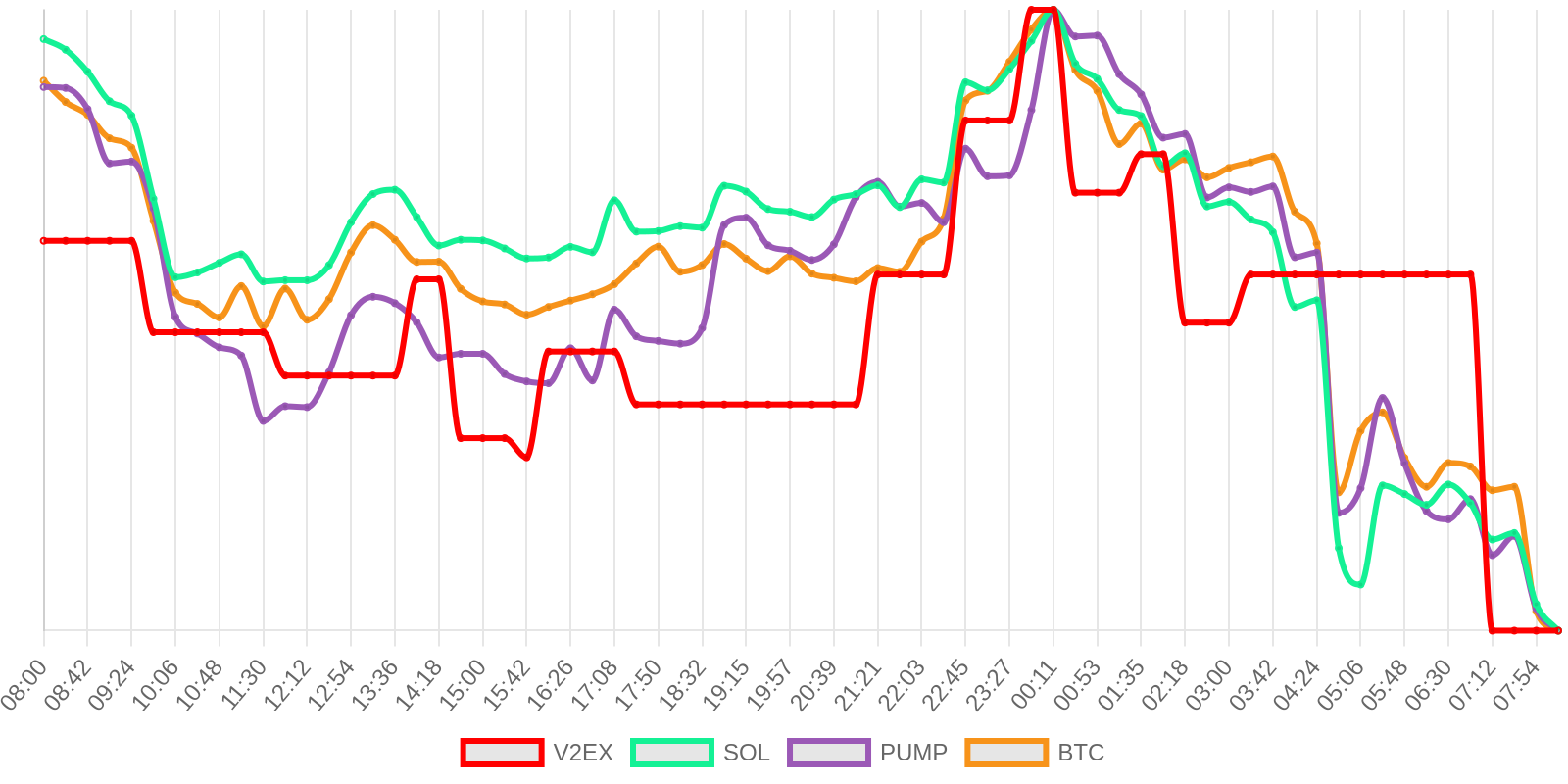
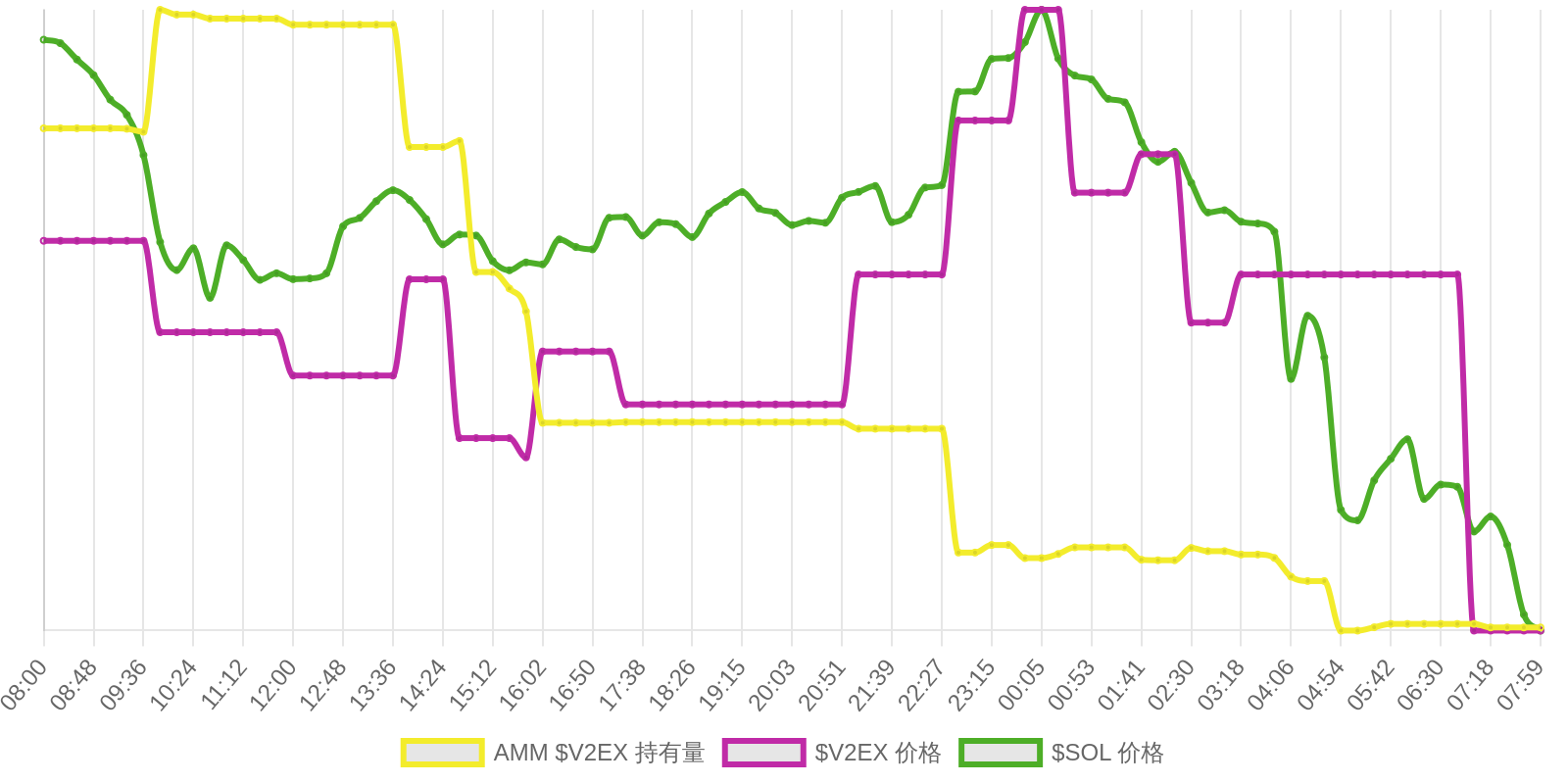
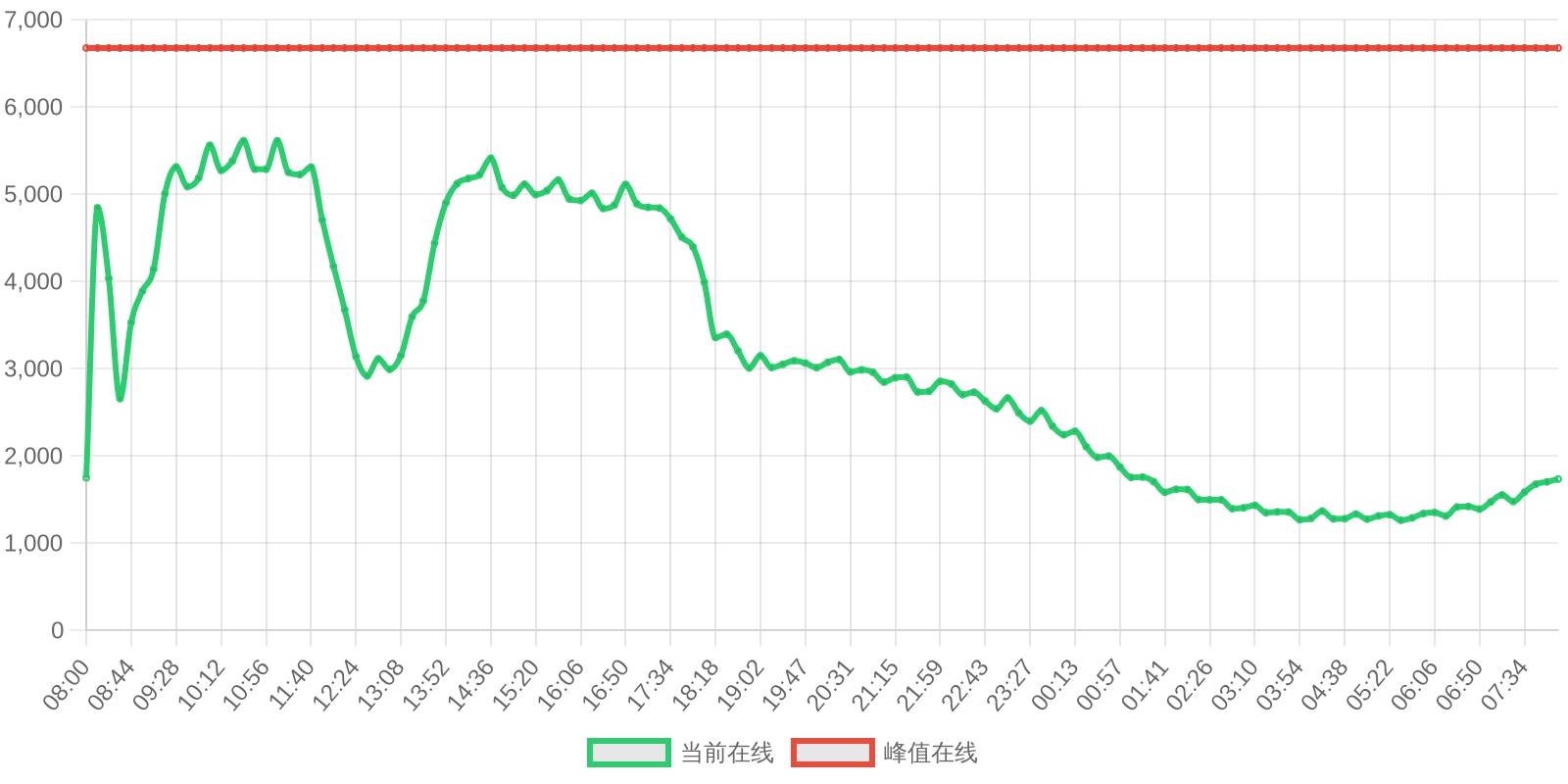
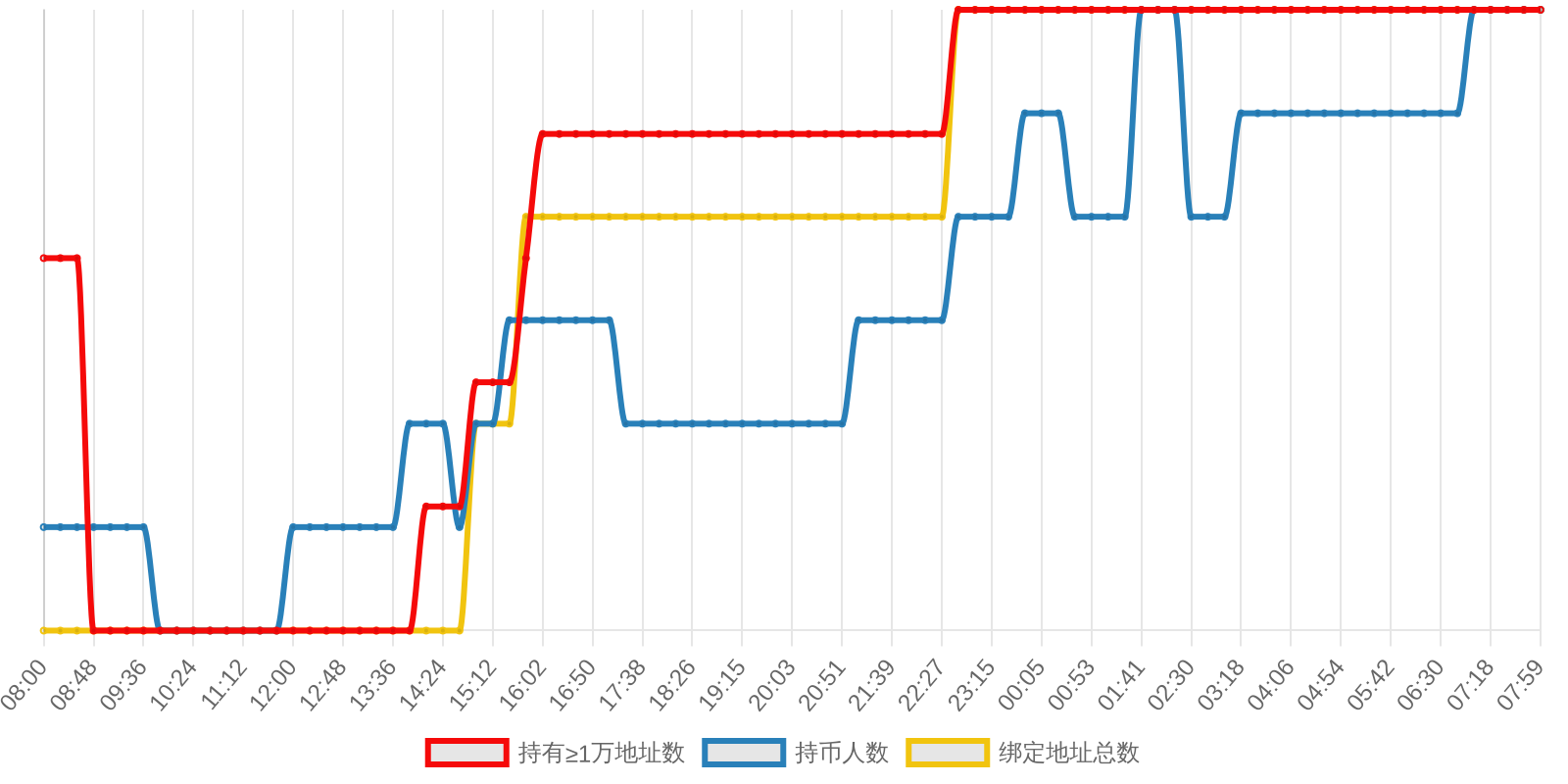
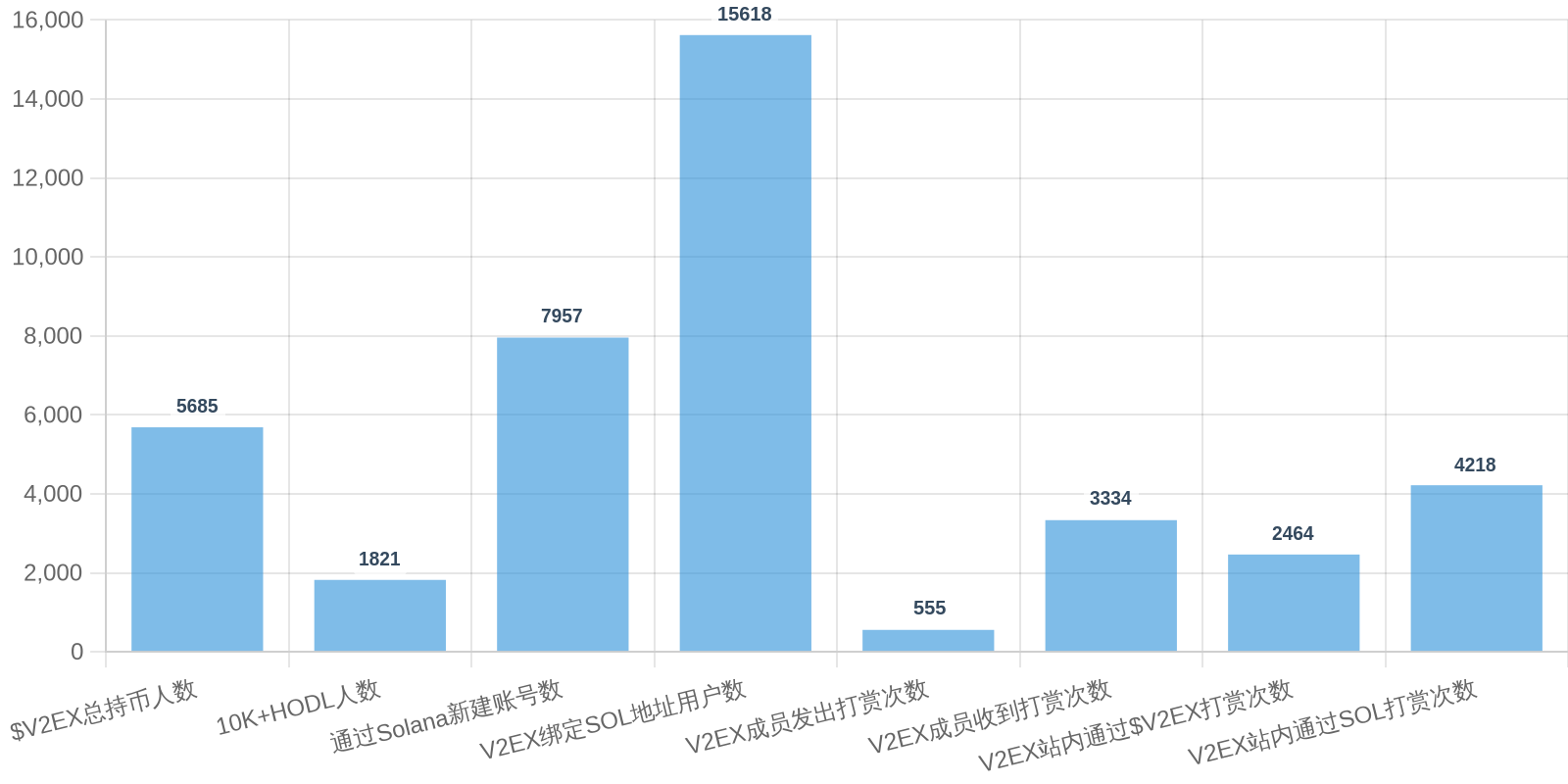
| 排名 | 地址 | 持有数量 | 持仓比例 | 排名变化 | 数量变化 |
|---|---|---|---|---|---|
| #2 | Pump.fun AMM (V2EX-WSOL) Pool | 52.36M | 5.24% | - | -38.17K |
TG 机器人订阅: 点我订阅
原始图表与数据存放于: 点我查看
此报告由 V2EX Info 提供数据, 由 Newsletter Report Bot 自动生成。
此报告仅供参考,不构成任何投资建议。投资有风险,入市需谨慎。

早上好!以下为昨日摘要:
BTC - $81,236.73 SOL - $102.23 PUMP - $0.0045 V2EX - $0.0022
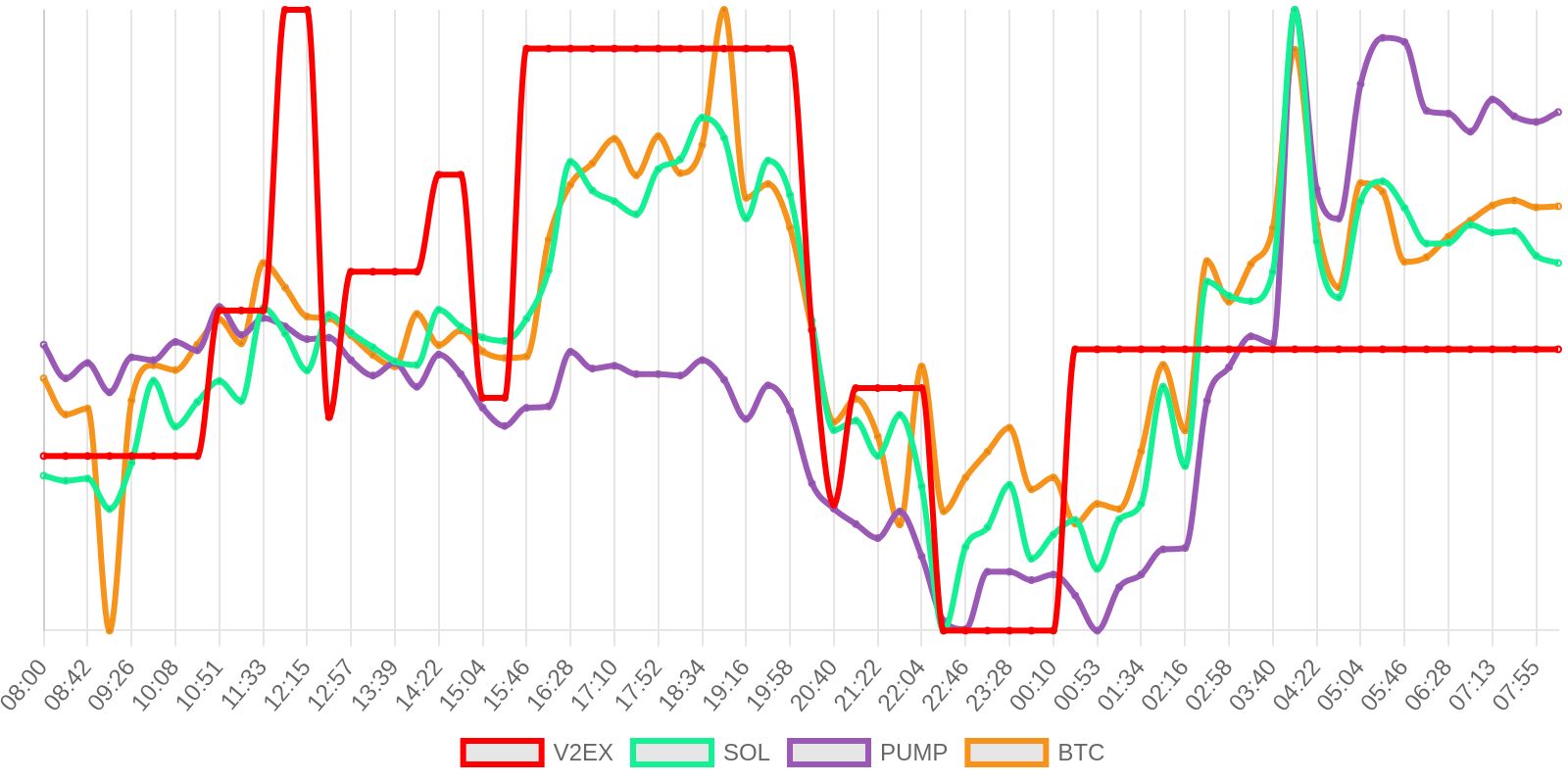
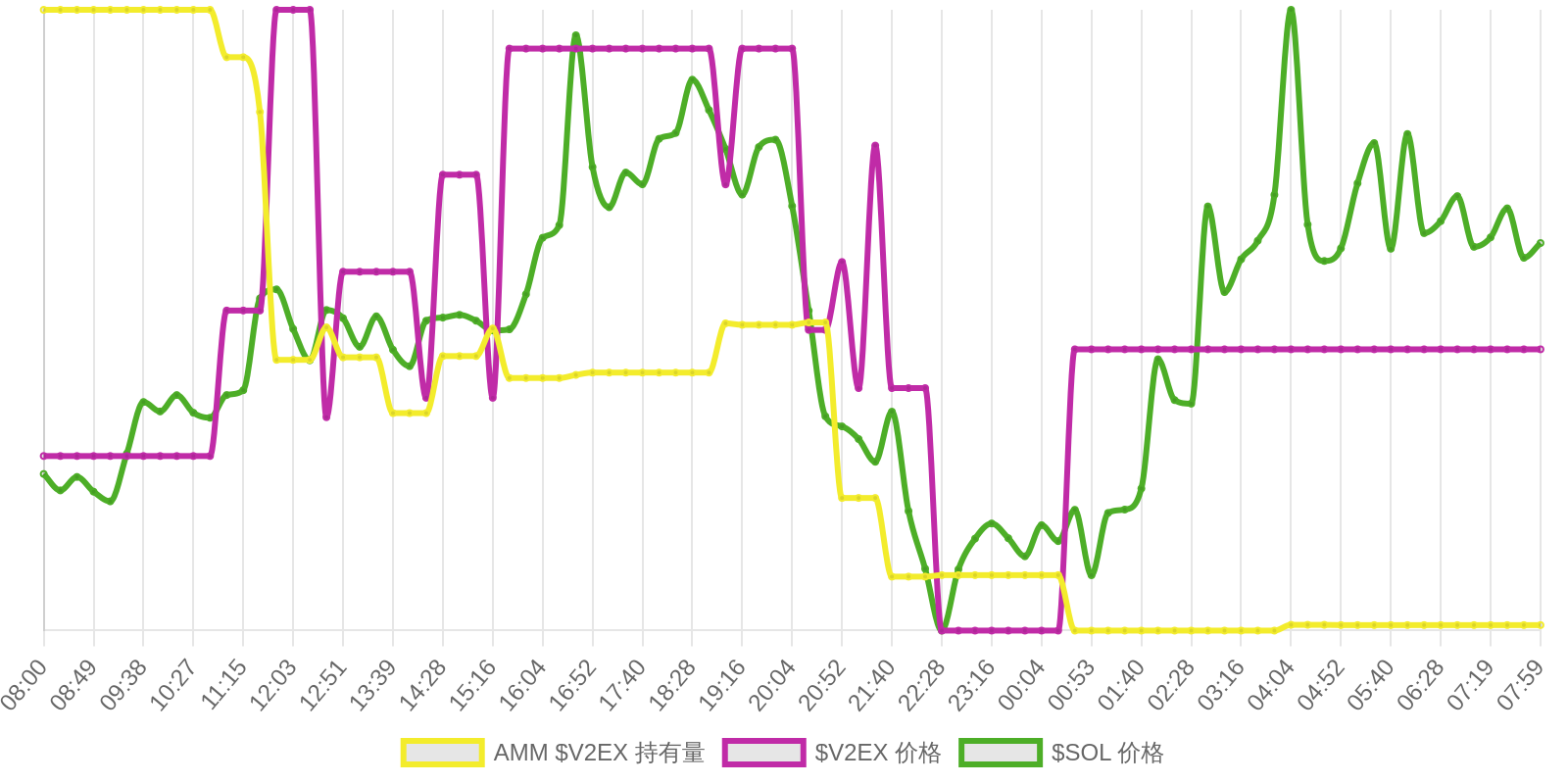
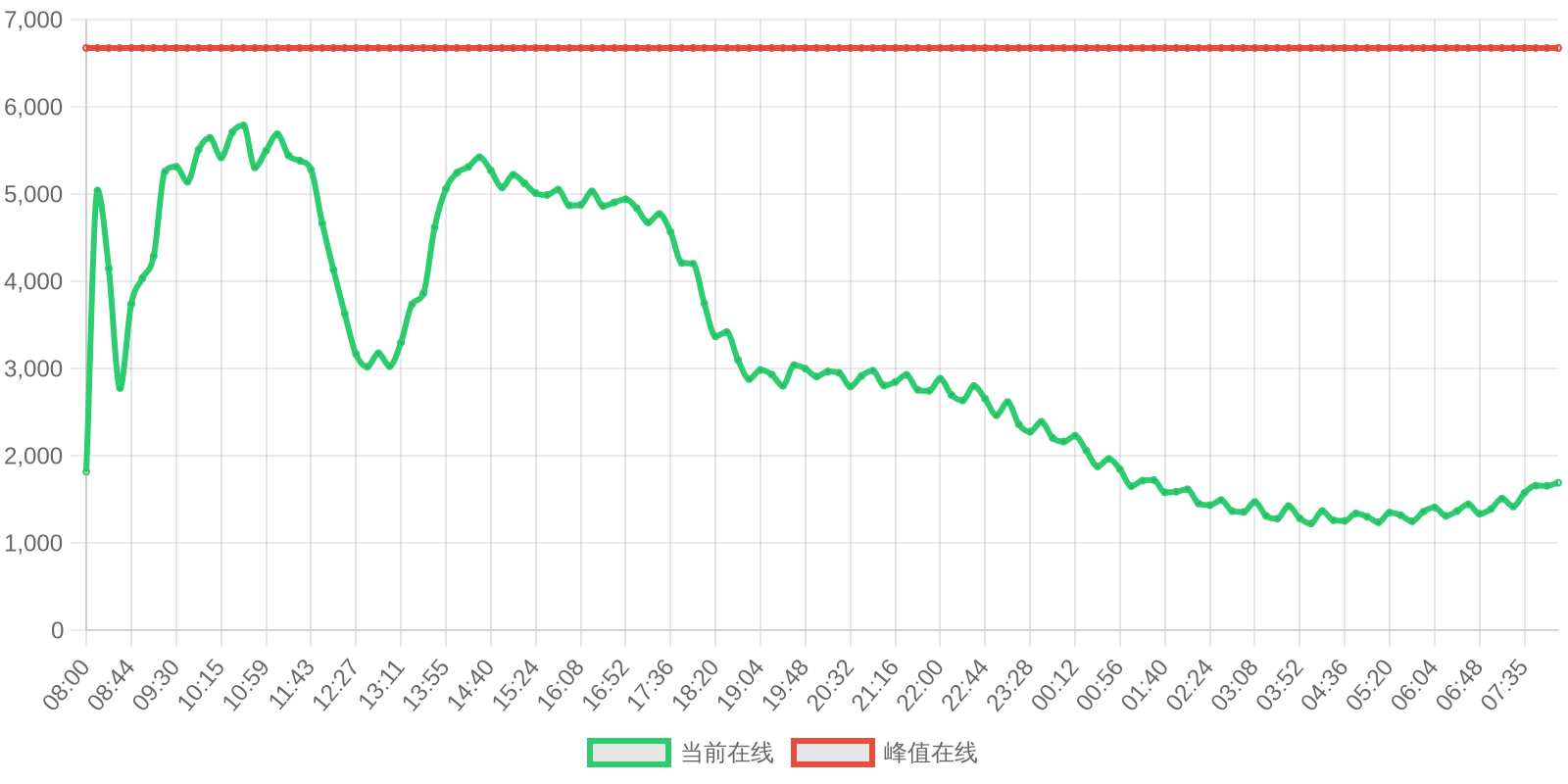
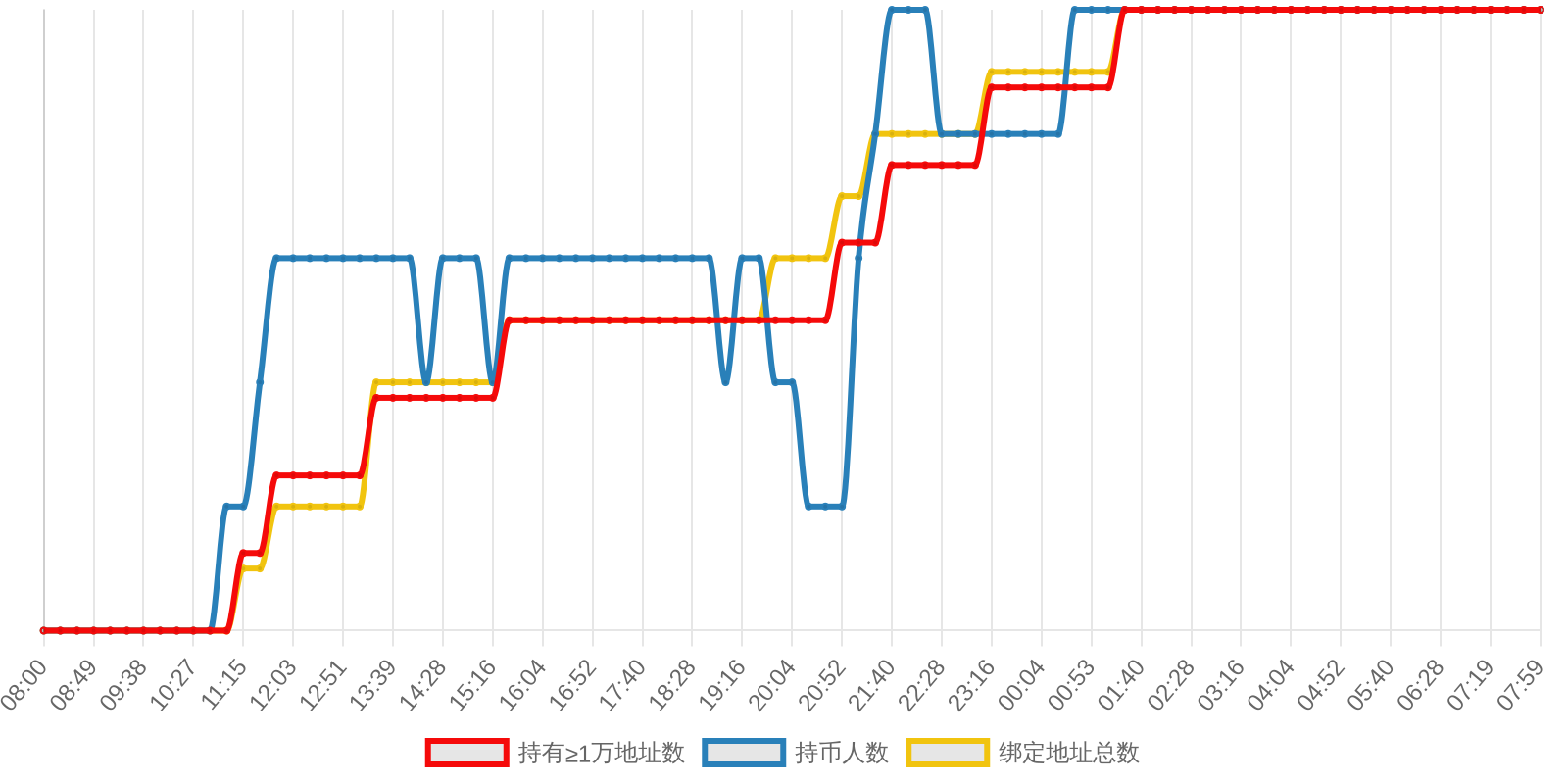
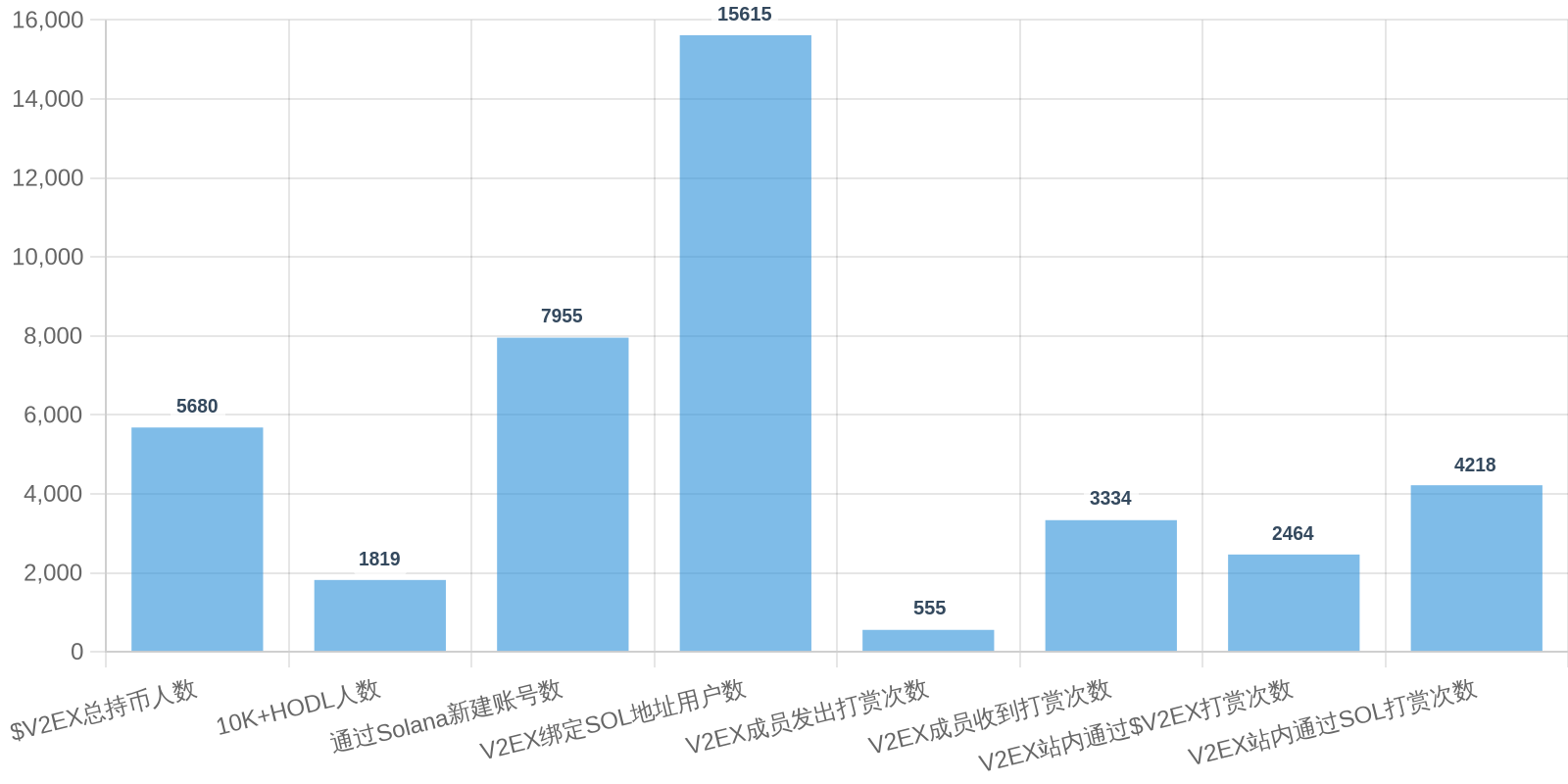
| 排名 | 地址 | 持有数量 | 持仓比例 | 排名变化 | 数量变化 |
|---|---|---|---|---|---|
| #2 | Pump.fun AMM (V2EX-WSOL) Pool | 52.40M | 5.24% | - | -0.13M |
| #9 | Meteora (V2EX-WSOL) Market | 5.03M | 0.50% | - | -512.19 |
TG 机器人订阅: 点我订阅
原始图表与数据存放于: 点我查看
此报告由 V2EX Info 提供数据, 由 Newsletter Report Bot 自动生成。
此报告仅供参考,不构成任何投资建议。投资有风险,入市需谨慎。
exe 2026.10.28 signs a browser in with a passkey and keeps the API token off every address. The desk now speaks Simplified Chinese and Japanese, your own computer mounts the Workspace as a drive, and Ping, a new extra app, graphs your network as SmokePing does.
This release comes two weeks and 73 commits after 2026.10.15.
The API token is the password to your whole node, and every new browser asks for it. On a phone it is a long string to type. A passkey now signs a browser in instead, with Face ID, Touch ID, Windows Hello or a security key, and you type nothing.
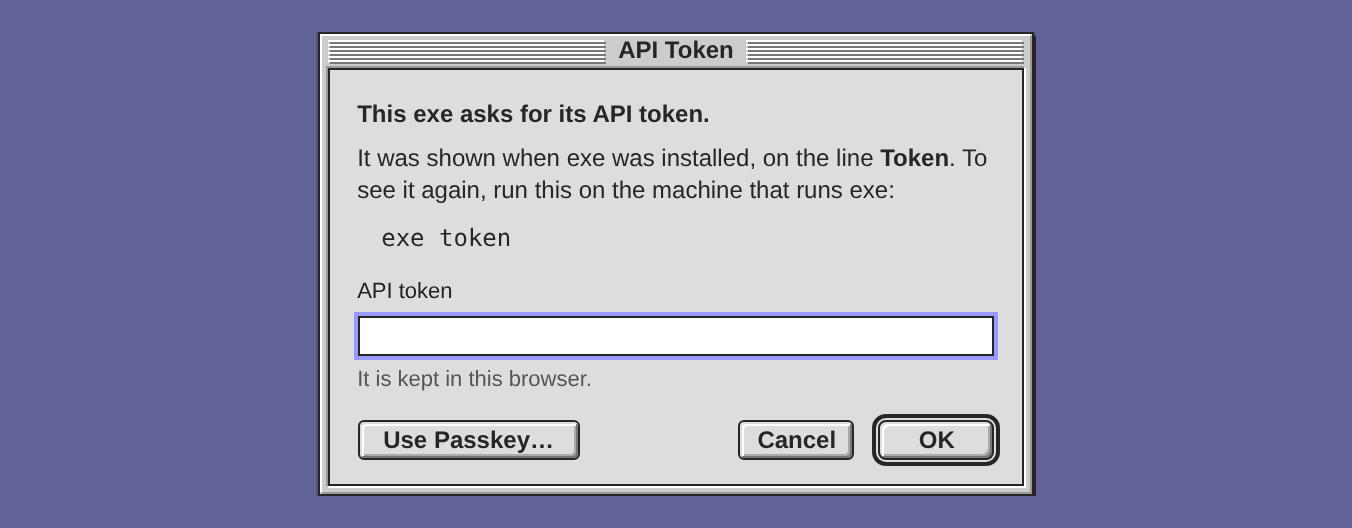
A browser that signs in with a passkey keeps no token. It stays signed in until you remove the passkey or the token changes, or for 400 days, after which it asks for the passkey again. A passkey on a phone was not tried for this release.
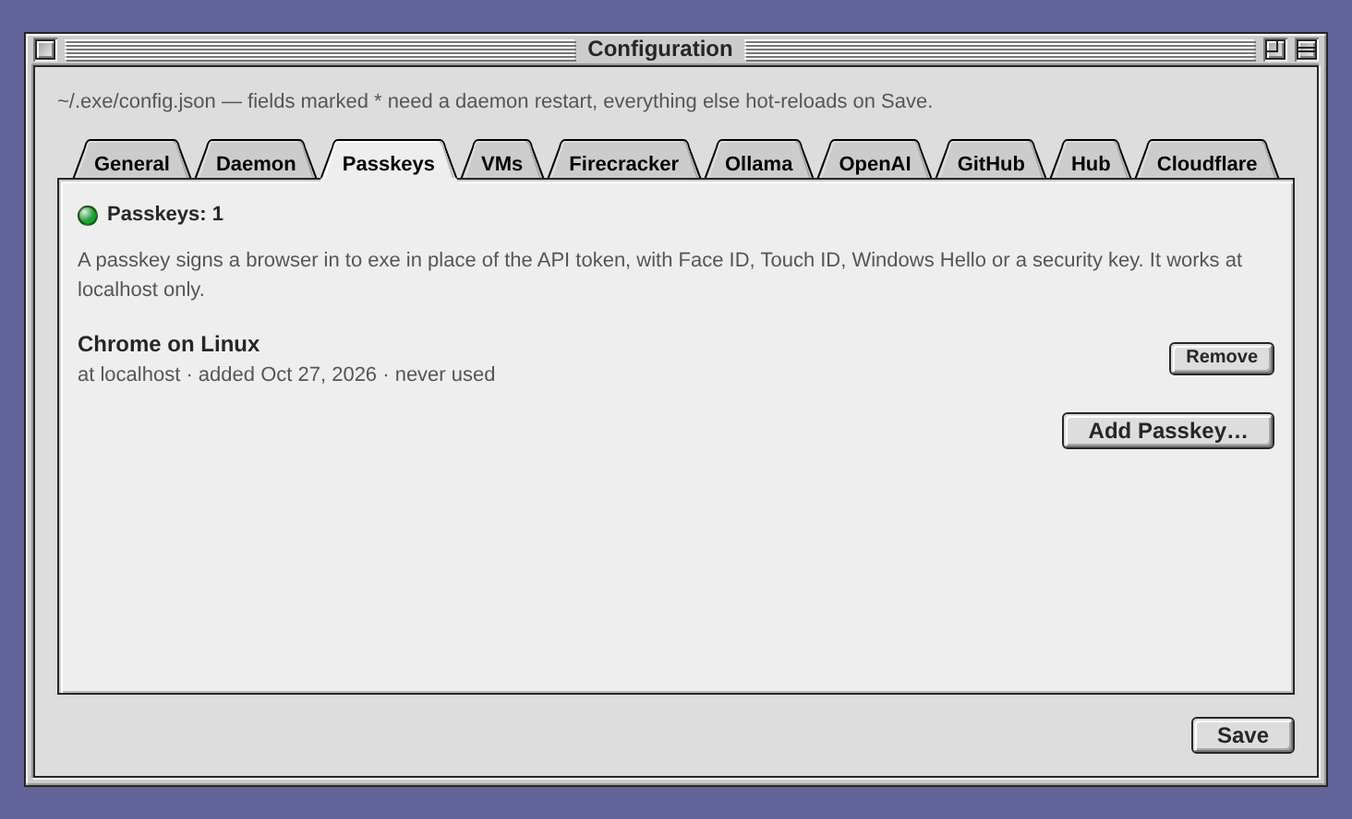
Remove beside a passkey, pressed twice, ends it and signs out every browser it signed in, at once. Their terminal windows say "signed out", and their Terminal sessions stay in tmux for the next sign-in.
A passkey works only at a name over HTTPS or at localhost, never at an IP address, and only at the address it was made at. Passkeys also need an API token: the token adds the first passkey, and it gets you back in when every passkey is gone. See Sign in with a passkey.
Until this release, the desk wrote the API token on every address that cannot carry a header: app windows, terminals, movies and links. There it showed in the address bar and the history, and a copied link carried the password with it.
Now, each time the desktop loads, it trades the token for a cookie that only exe's own pages can use and no script can read. App windows, apps opened from /apps/, terminals and movies get in with that cookie, so no address carries ?token=.
A new token ends every cookie at once. Every open terminal window says "signed out", the desktop asks for the token again, and the Terminal sessions wait in tmux. So when a token may have leaked, a new one signs out every browser, and where the machine has tmux no shell is lost.
curl and agents still send the token in a header, and apps need no change. Joined desks never carried it: each request between them is signed with the desk's own key. In a browser that keeps no cookies, the token goes on those addresses, as before.
If you read Chinese or Japanese faster than English, the desk's menus, windows and messages now come in your language. Language, on the new General tab of Windows → Configuration, sets English, 简体中文 or 日本語. Choose one and press Save.
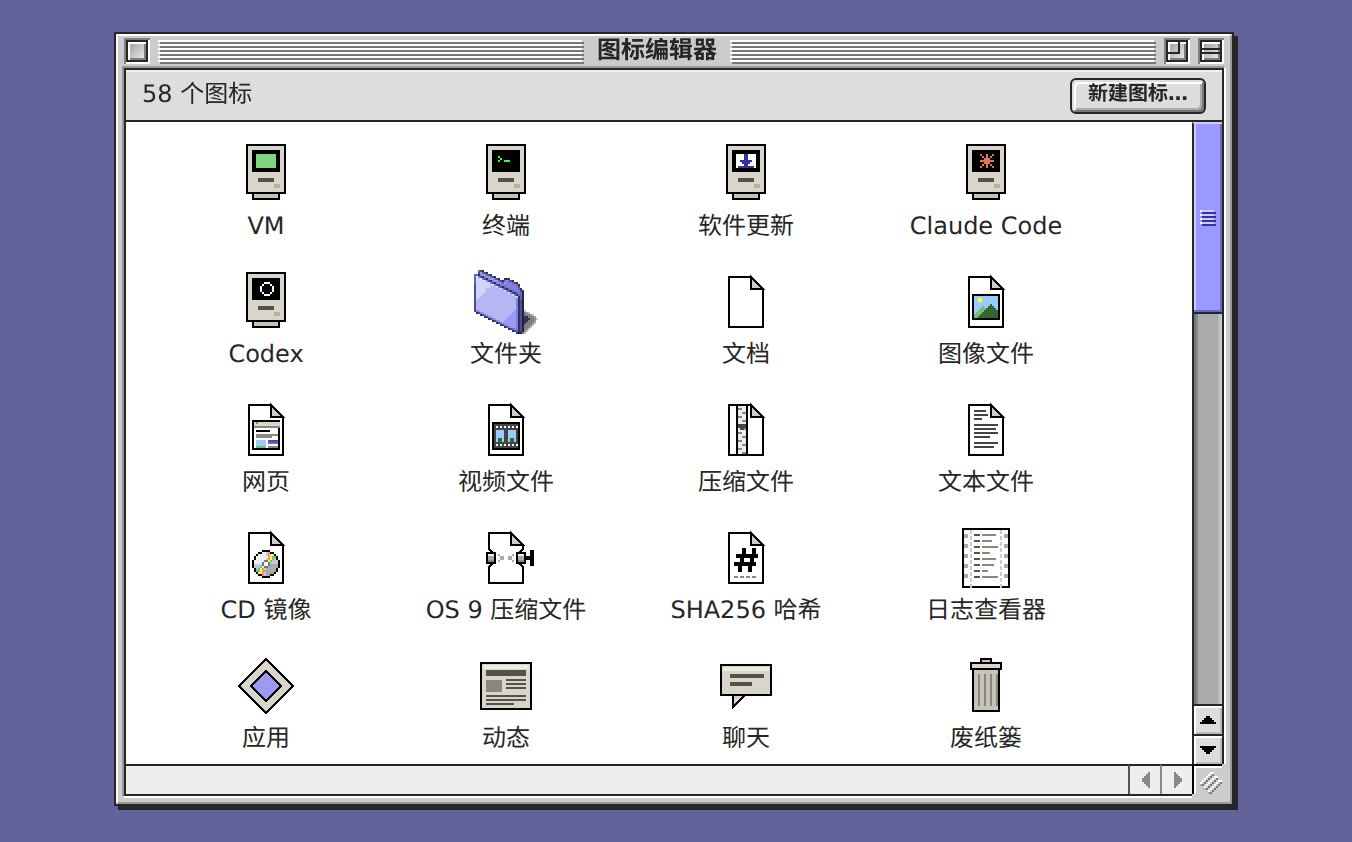
Every screen that has the desk open loads it again in that language. A screen with unsaved work waits until the work is saved, so a draft on another desk is not lost. The desk is drawn in the language from its first frame, and dates and times follow it.
Your own text stays as you wrote it: file names, notes, chats and the desktop menu. The apps in windows, such as Welcome and Blue Pencil, and the manual are in English for now. In config.json the key is language: en, zh-Hans or ja. See The language of the desk.
The Workspace is the folder you, your agents and your apps share. A drag onto the desk brings a file in, and Download takes one file out at a time. Now the Workspace mounts on your computer as a drive named Workspace. What you drop into it is on the desk at once, and what the desk or an agent saves there is on your computer.
Choose Help → Mount Workspace…. The window gives the address, the name and the password, with Copy beside each, and the steps for macOS, Windows or Linux. Connect from picks the address: the desk's own https address when you reached the desk that way, or this machine's address on the network.
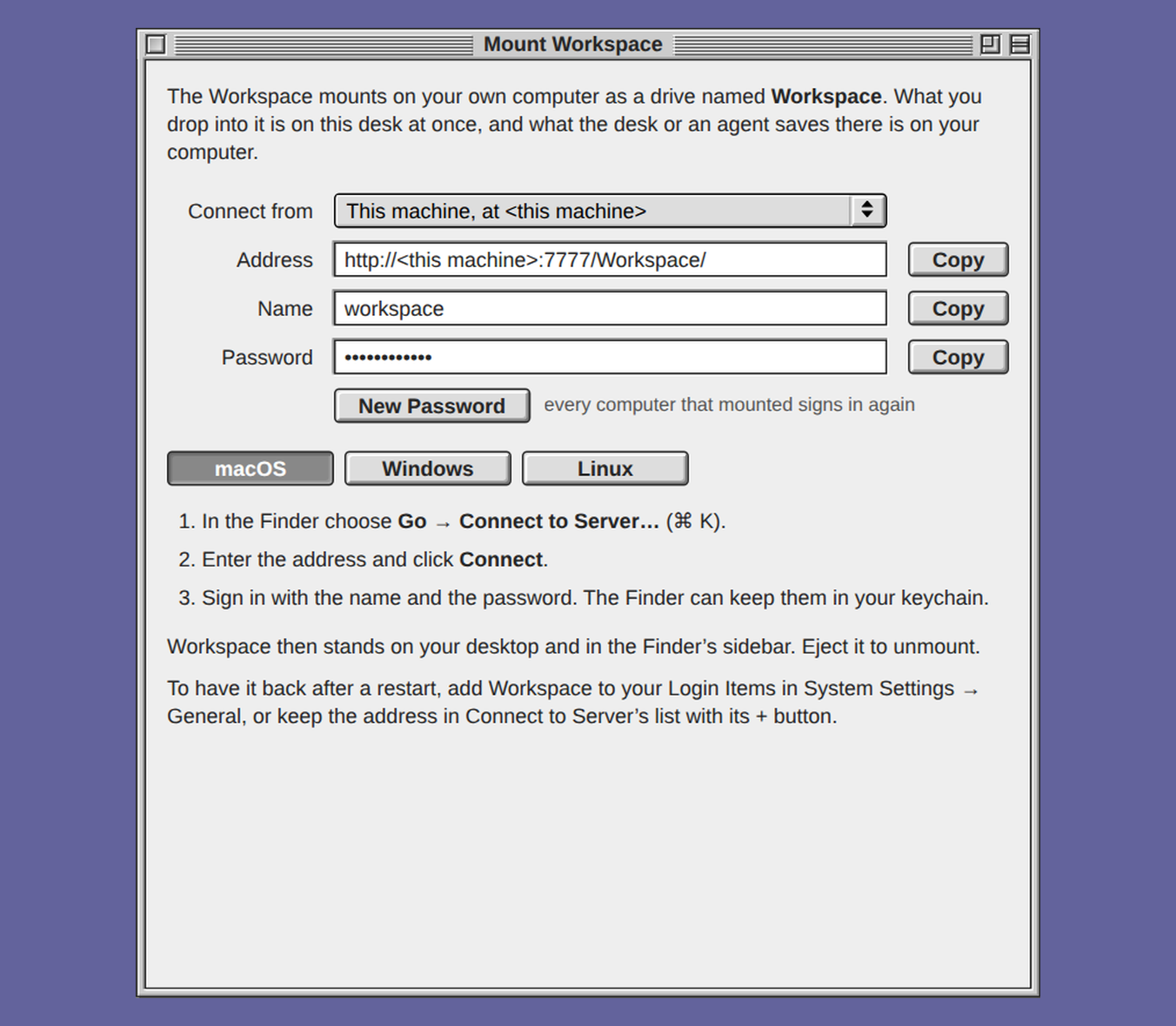
workspace with the password.dav:// and Dolphin as webdav://, and a shell mounts it with davfs2.The password is the drive's alone, never the API token, so a computer that mounts the Workspace can read and write that folder and nothing else. When a computer should lose its access, New Password makes another, and every computer that mounted signs in again.
Until this release, exe's Macs and the desk shared no folder. A file went in on a CD image, or on Mac OS X through the Agent or Remote Login, and it came back out only through a shell. Now the Mac OS X window's Setup… menu has a Mount Workspace page, and in the Mac's Finder, Go → Connect to Server… takes its address, with no software added to Mac OS X 10.4. A file the Mac saves there, a game's save or a screenshot, is in the Workspace before you change windows. Mac OS 9 has no WebDAV of its own, so it still takes a CD. See Mount the Workspace on your own computer.
A file in the Workspace or in an app's data could be 10 MB at most. Now it can be 100 MB: through File → Upload to Workspace…, Upload… in a Workspace window, a drop on a Claude Code, Codex or Terminal window, the Workspace's HTTP calls and app data. A movie to watch on the desk, or a log to hand an agent, now fits.

Joined desks sync files at that size. A desk on 2026.10.15 or earlier takes no file over 10 MB, so exe does not send it a bigger one, and that desk gets the file once it is updated. A transfer gives up only after 15 seconds with no bytes moving, so a slow link does not fail a large file because it takes long.
Is the server slow, or your router, or your provider? Does the line drop packets? Ping, a new extra app, shows the answer, now and over the last year. Every 5 minutes on the clock, exe sends 20 pings to each address on the list, keeps the results in RRDtool files in SmokePing's own layout, and draws SmokePing's graphs from them. The daemon does the measuring, so it goes on while the window is closed.
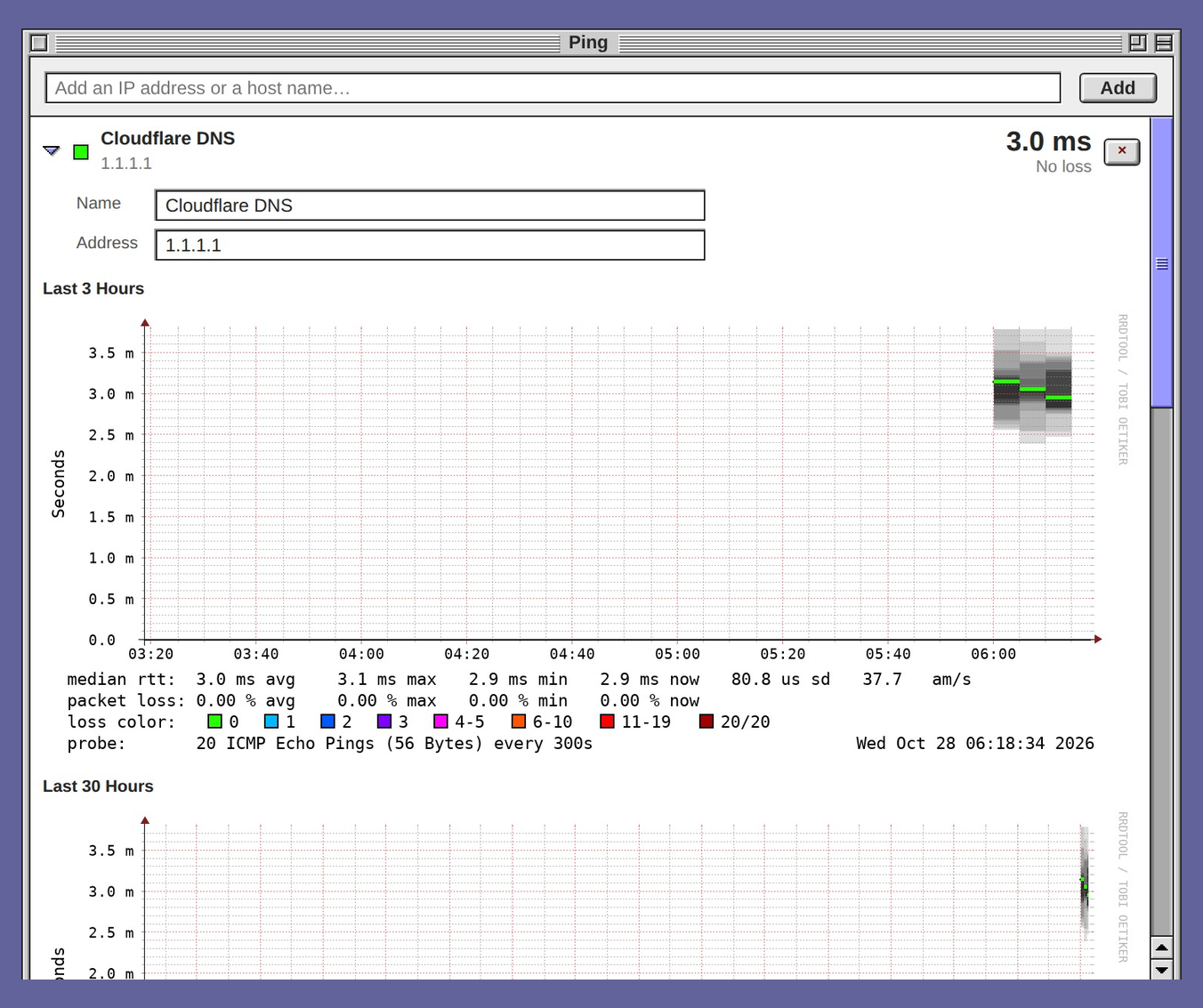
Type an IP address or a host name in the field at the top and press Add. Its first 20 pings go out at once, so you see a figure without waiting for the next round. Each row shows the median of the last round and how many of the 20 pings were lost, over a graph of the last 10 hours.
Click a row for SmokePing's four graphs: the last 3 hours, 30 hours, 10 days and 360 days. The grey smoke is each round's 20 pings, darker nearer the median, and the median line takes the colour of the round's loss: green for none, red for 11 to 19 of the 20. Drag across a graph to zoom in, and Back returns it.
Ping needs RRDtool: sudo apt install rrdtool on Debian and Ubuntu, brew install rrdtool on a Mac. Until it is there, the window says so and nothing is measured. Where fping is installed, the pings go out as SmokePing sends them. Without it, Ping uses the system's ping. exe looks for both at every round, so no restart is needed. Each machine measures from where it stands, so joined desks do not share the list.
Where the extra apps are off, Extras… on the Apps card of Help → Welcome… turns them on. See Ping.
A restart of the daemon leaves Claude Code and Codex sessions running, but a restart of the host ends them all. Until this release the session column then forgot them, though nobody had archived them and the conversations were still on disk.
Now each session the restart stopped comes back as a stopped row, with its name, title and day, and a hollow dot. Click it, or choose Continue Here on its menu, and the agent starts again on that conversation, in the same folder, under the same session name.
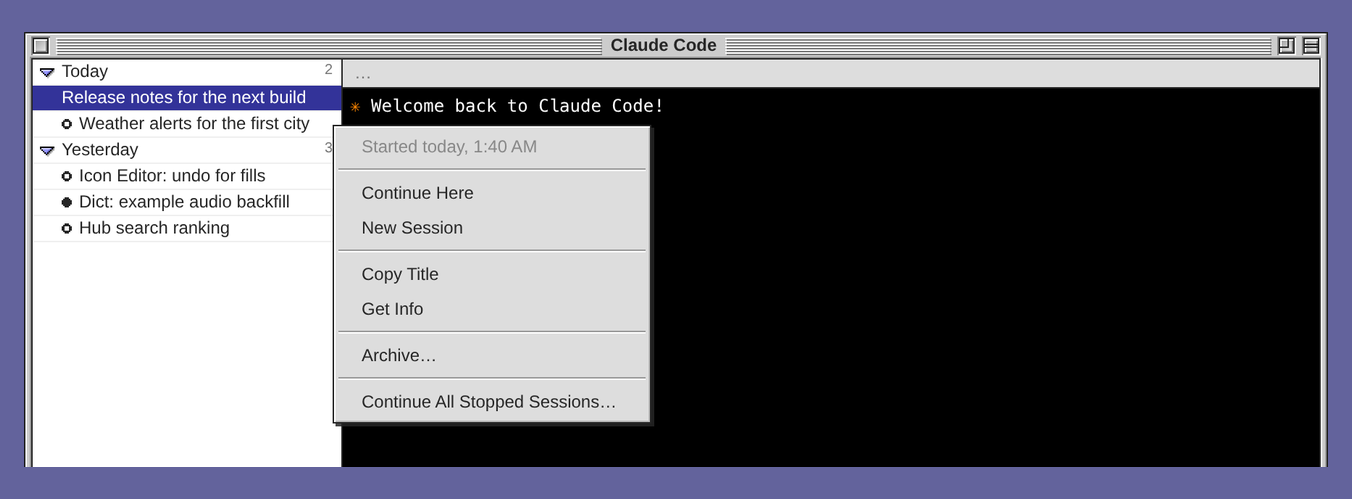
The window you open after the restart continues the session it showed last. The other rows wait for a click, since each CLI holds hundreds of MB of memory. Continue All Stopped Sessions… continues them all after a dialog, and Archive… removes a row. A session with no conversation yet, or one that ended before the restart, does not come back. See After the host restarts.
Until this release, the Claude Code column on a busy machine held some 140 sessions, newest first, with nothing to show where a day ended. The window now groups them by the day they started, under rows such as Today, Yesterday and Tue, Oct 20, each with a triangle and a count.
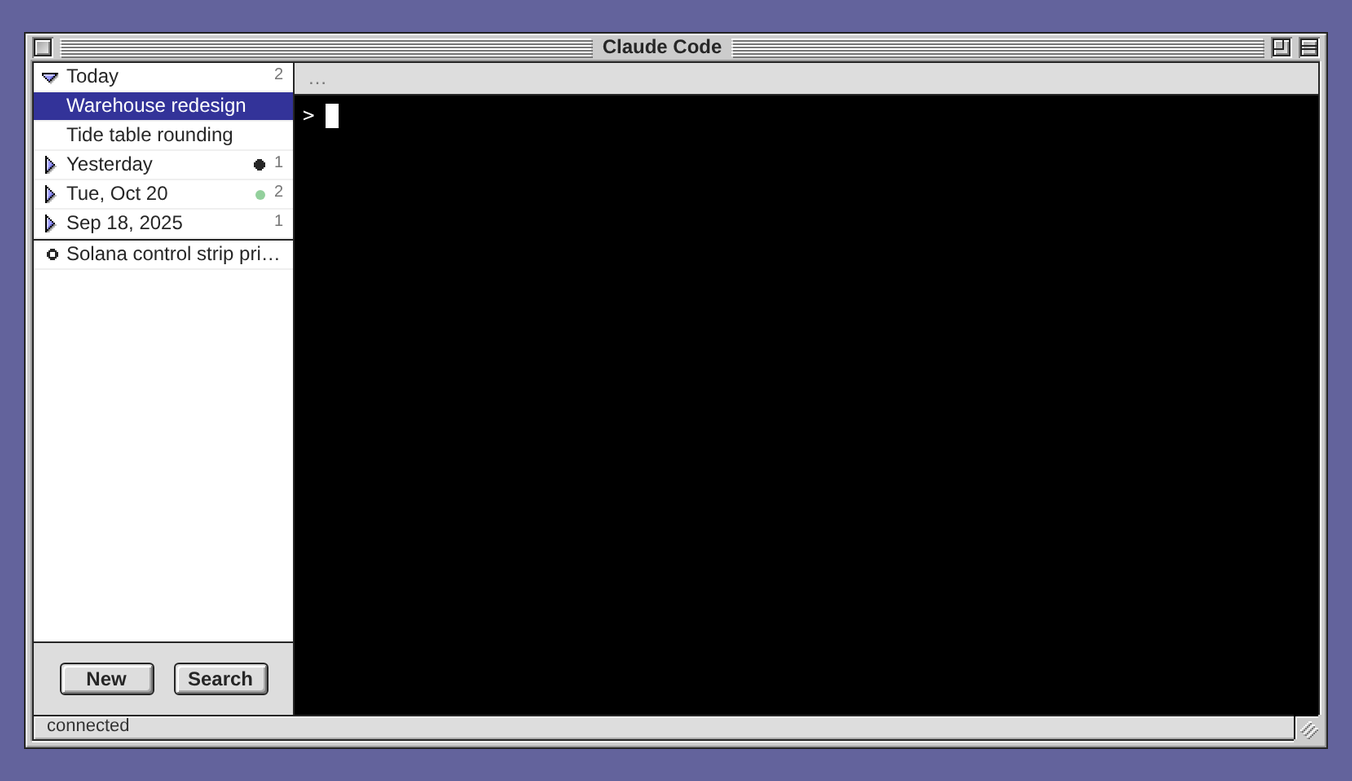
Click a day to show or hide it, or right-click it for Expand All and Collapse All. Every day is open until you close it, and this browser remembers the days you close. A closed day shows a black dot when one of its sessions waits for you, or a green dot when one is working, so a session that needs you never hides. The Codex window keeps its plain list.
Where the machine has tmux, a Terminal, Claude Code or Codex window you open on one computer now opens on your others, at the same size in columns and rows, and its close box closes it on all of them. A phone still shows one window at a time and keeps its own.
Such a window used to belong to the browser that opened it. The reason was the size of the tmux session: tmux sizes a session to the client that last typed or changed size, and two desks with different fonts get different columns and rows from one window. Now the layout carries each window's size in columns and rows, and every desk sizes the window to hold them in its own font. Two desks no longer resize each other's session. On a machine without tmux, such as Windows, an agent window stays the browser's own, because there each window is a fresh run of the CLI.
A phone's keyboard has no Esc and no Tab, so the Claude Code window on a phone had no way to send them. Now a row of keys under the terminal sends Esc, Tab, Shift-Tab and the four arrows. Esc stops Claude Code's turn or clears its composer, Shift-Tab cycles its modes, and the arrows walk a menu or the prompt history.

The keyboard stays up while you tap the keys. Codex and Terminal windows have the row too. See On a phone.
Until this release, three things made exe's Macs harder to use. Outside Ubuntu 24.04 you installed QEMU yourself, sound needed a runtime installed by hand, and over a network the screen was slow, because each frame waited for a round trip.
Now, when a Mac prepares its emulator, exe downloads its own build, about 6 MB: on Linux with glibc 2.35 or later (x86-64 or ARM64), on macOS 11 or later, and on Windows 10 or later (x86-64). It is QEMU with the Mac's sound hardware and a screen paced for your browser, and Mac OS 9 and Mac OS X share it. exe checks the download's size and SHA-256 before it uses it. A Mac set up with an earlier emulator gets the new one the next time it starts.
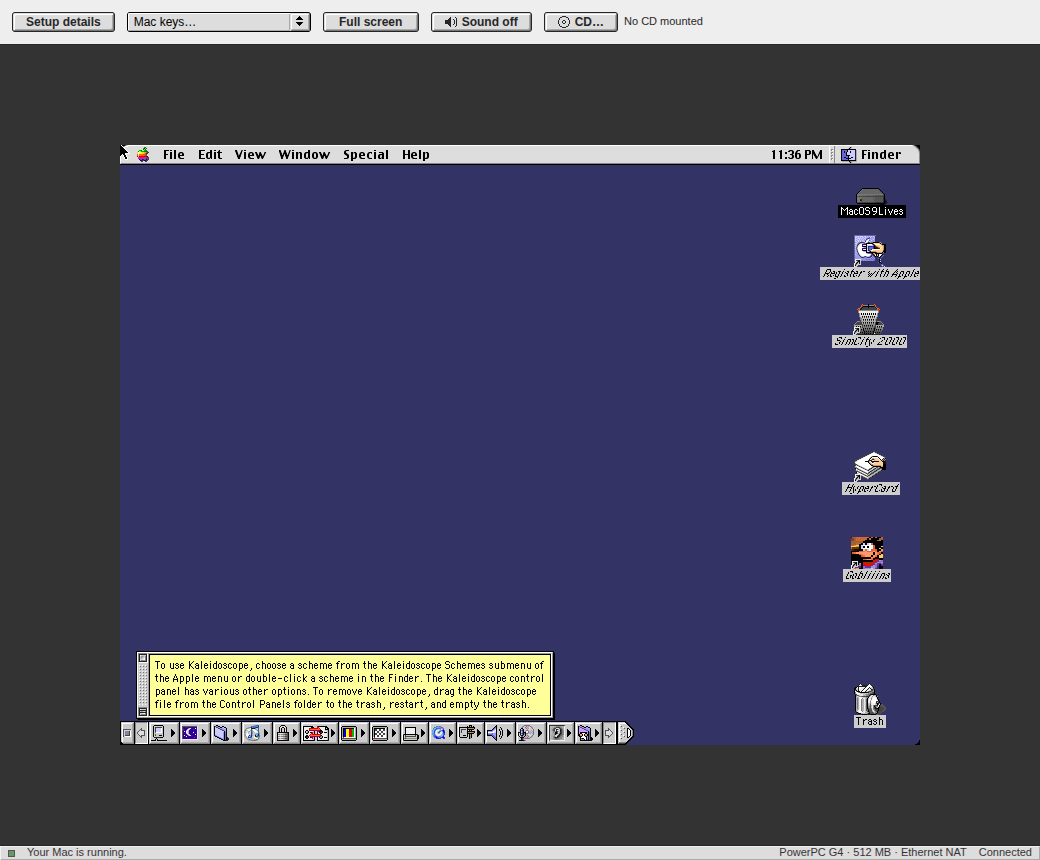
For sound, click Sound off in the window's row of buttons. It changes to Sound on, and the Mac's sound plays in your browser, through the same signed-in connection as the screen. On an emulator the system supplied, without the Mac's sound hardware, the button is dimmed.
For the screen, exe now keeps requests waiting ahead of the viewer, so frames keep coming while one crosses the network. In a test at 50 ms each way, Mac OS 9 drew 62 frames a second, up from 7. See Sound.
A notice is for news that should wait on the desk until someone has seen it. The request behind it was a place to say that a usage limit had stopped an agent's work: on the desk, not in a public thread.
A script on the exe machine puts one up with a POST to /v1/notices. It shows above the Control Strip on every desk and phone that has exe open, through reloads and restarts, until someone presses its close box on any one of them.
$ curl -s 127.0.0.1:7777/v1/notices \
    -d '{"id":"backup",
         "title":"Backup failed",
         "body":"The disk is full."}'
On a node with an API token, the call also needs the token in its Authorization header, as every API call does.
A title is needed, and the body is optional. A later notice with the same id changes the one that is up instead of adding another, so a script can keep one notice current. DELETE /v1/notices/<id> closes one, as its close box does. Only callers on the machine itself can put one up, and at most eight stay up at once. See Notices: a toast that stays.
/apps/When you want one app in a browser tab of its own, add /apps/ to the desktop's address. Until this release, that address was a 404. Now it is a page of every app this node has, as icons. Click one, and it fills the tab. The list stays behind the desktop's sign-in in that browser.
The Cloudflare tab of Windows → Configuration held six fields that have to belong together: the account, the zone, the tunnel and a token that may edit that zone. The form saved any mix without a check. Now the tab says whether the last check passed and names the account, the zone and the tunnel. Set Up… or Change… opens the Cloudflare Setup Wizard with every answer filled in, and the wizard checks each step with Cloudflare.
The Hub tab held seven fields for the hub agent, and none was checked. Now it shows this node on the hub the Hub app joined: its Hub ID, whether that hub answers, this node's profile there, and whether the hub lets it post. Join a Hub… opens the Hub app's Join a Hub wizard.
Until this release, a new Check on, Model or Thinking choice in Blue Pencil Options cleared what the pencil had checked, so every paragraph of every draft went back to the model. Now what was checked stays checked, and only new or edited paragraphs go to the new choice. You can try another model without waiting for every draft again. A new custom prompt still checks every draft, because its rules are new.
On Linux, the Control Strip's activity tile charts one of CPU, memory, GPU, network or disk. Its icon now says which: a chip, a memory stick, a graphics card, a network port or a hard disk. The menu's rows wear the same icons, so the menu is the legend.
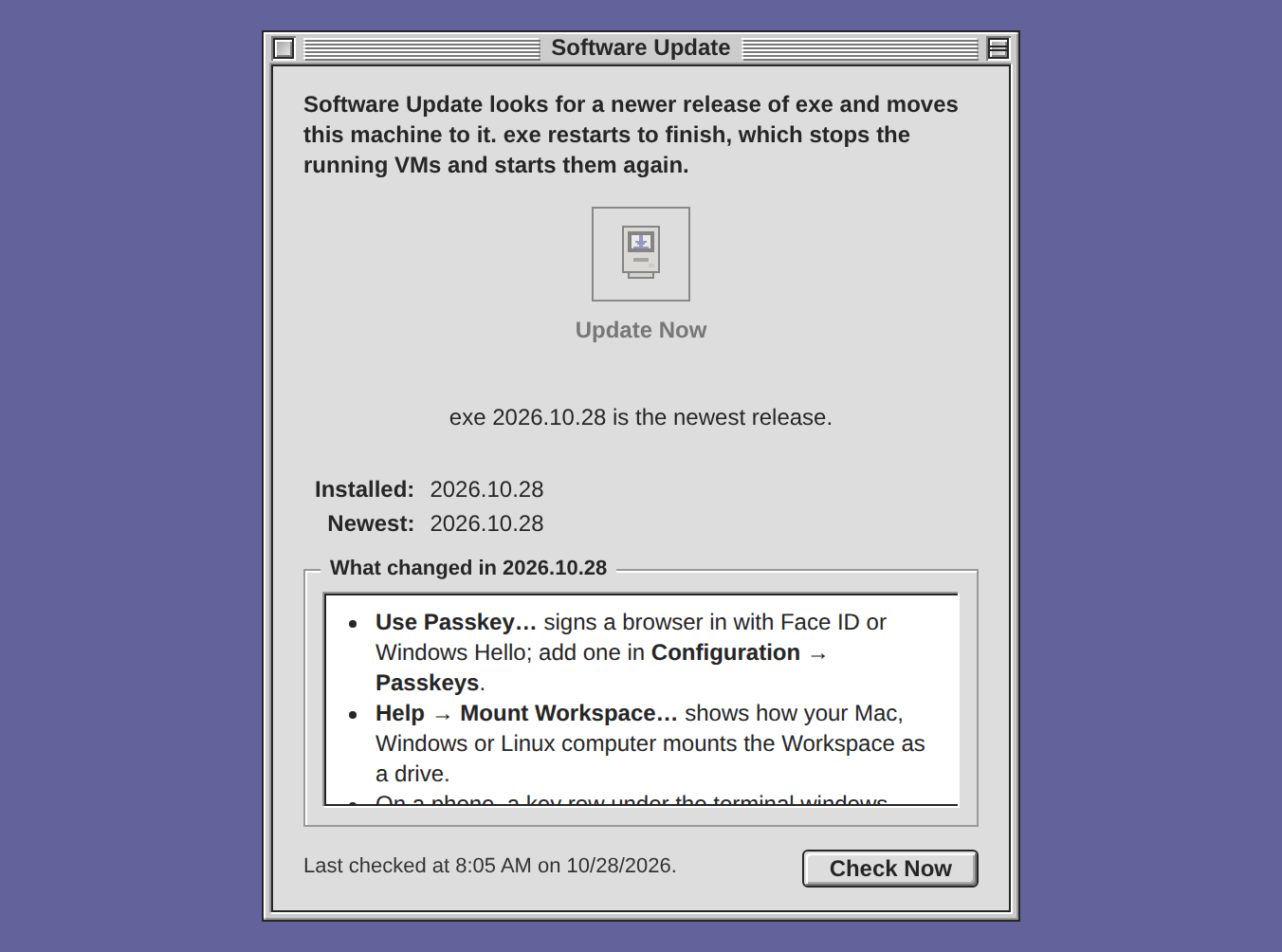
An exe that is already installed moves to this release with Software Update… in the Apple menu, then Update Now, or with exe update in a shell. The update runs in the daemon, so you can close the window or the browser while it goes on. exe restarts to finish, which stops the running VMs and starts them again, and the alert names them first.
A new install on Linux, or on macOS 13 or later, on x86-64 or ARM64:
curl -fsSL https://exe.v2core.com/install.sh | sh
On Windows 11 on x86-64, in PowerShell:
irm https://exe.v2core.com/install.ps1 | iex
The macOS builds are signed with a Developer ID and notarized by Apple. The files and their checksums are on the release page.
The update that Software Update starts was run from 2026.10.15 on Linux (x86-64), on Windows 11 and on a Mac (Apple silicon), each with a VM running. It took 34 seconds, 10 seconds and 4 seconds. Each guest was shut down, not cut off, and came back.
Because the sign-in changed in this release, Update Now was also pressed in a browser, on a Linux (ARM64) install with an API token, from a test build of this release's commit. The window said the update was done about 9 seconds later, with the tab closed during the download. exe update in a shell on Linux (ARM64) was tried too, and so was a new install on Linux (ARM64) and on a Mac (Apple silicon), each with its questions answered at a terminal.
Not tried for this release: a new install on Windows, Windows 10, and, as said above, a passkey on a phone. Passkeys were tested with Chromium's virtual authenticator.
hub section in config.json is dropped at the next save.
早上好!以下为昨日摘要:
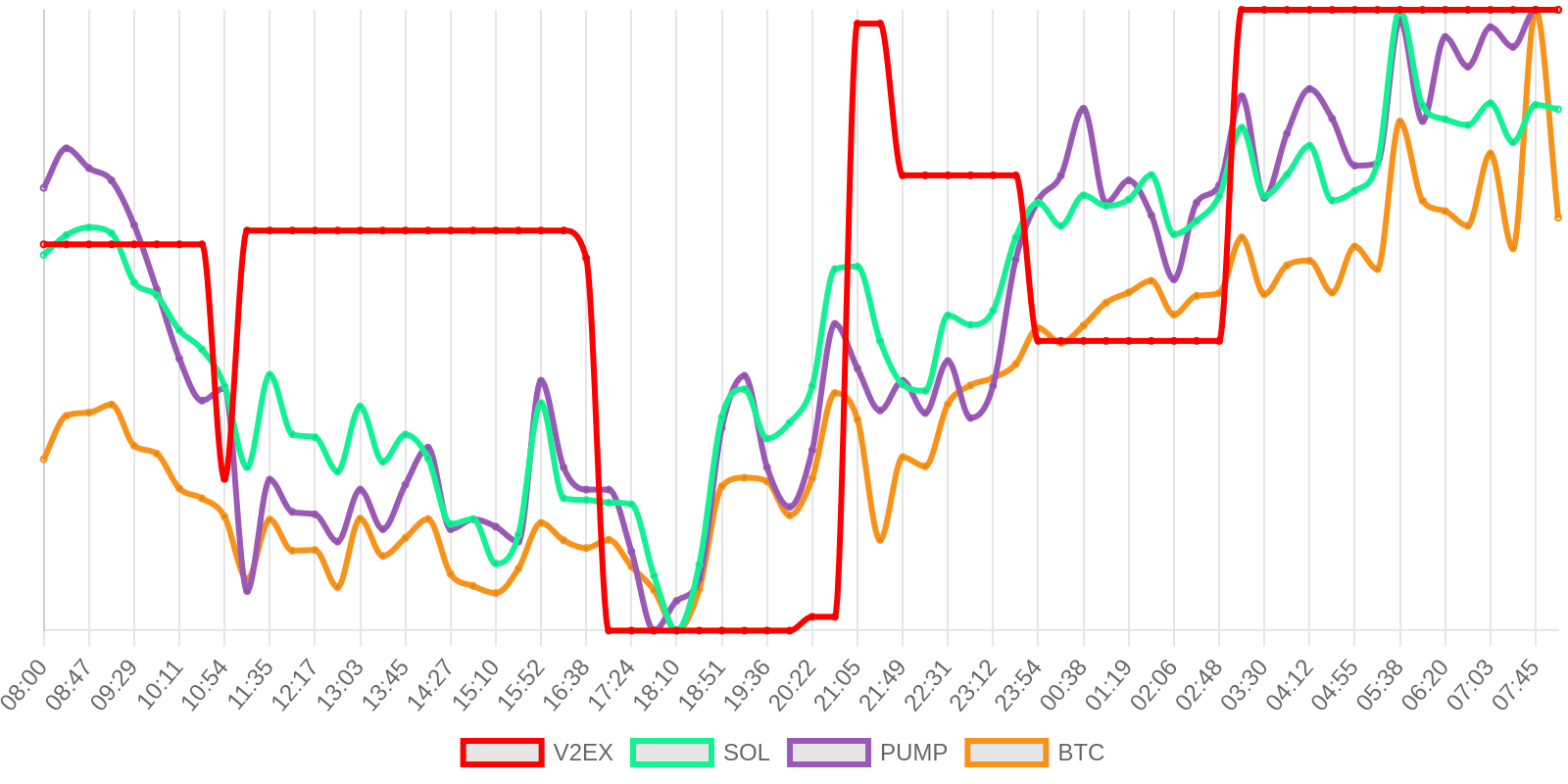
BTC - $80,775.13 SOL - $101.19 PUMP - $0.0044 V2EX - $0.0022
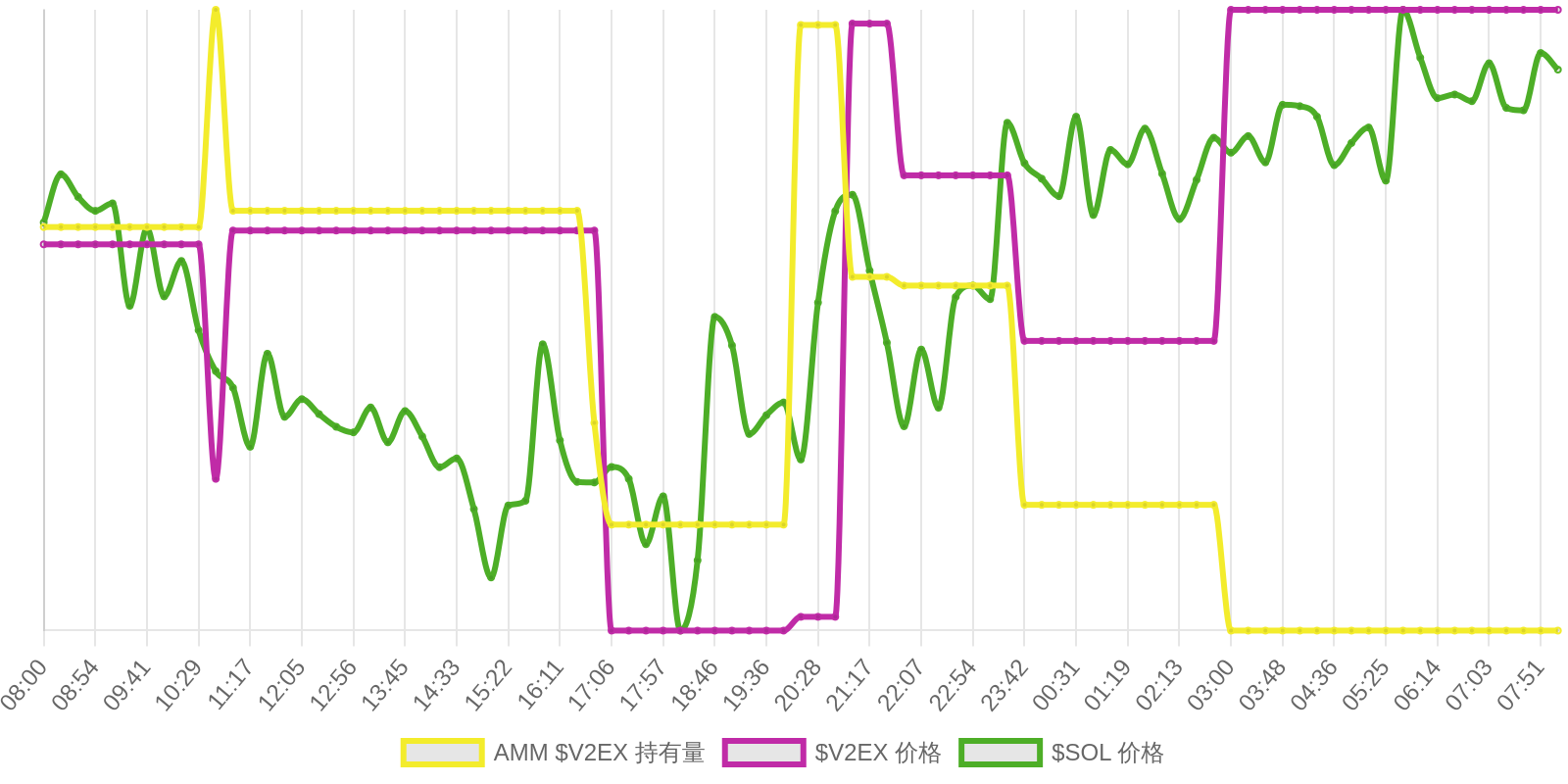
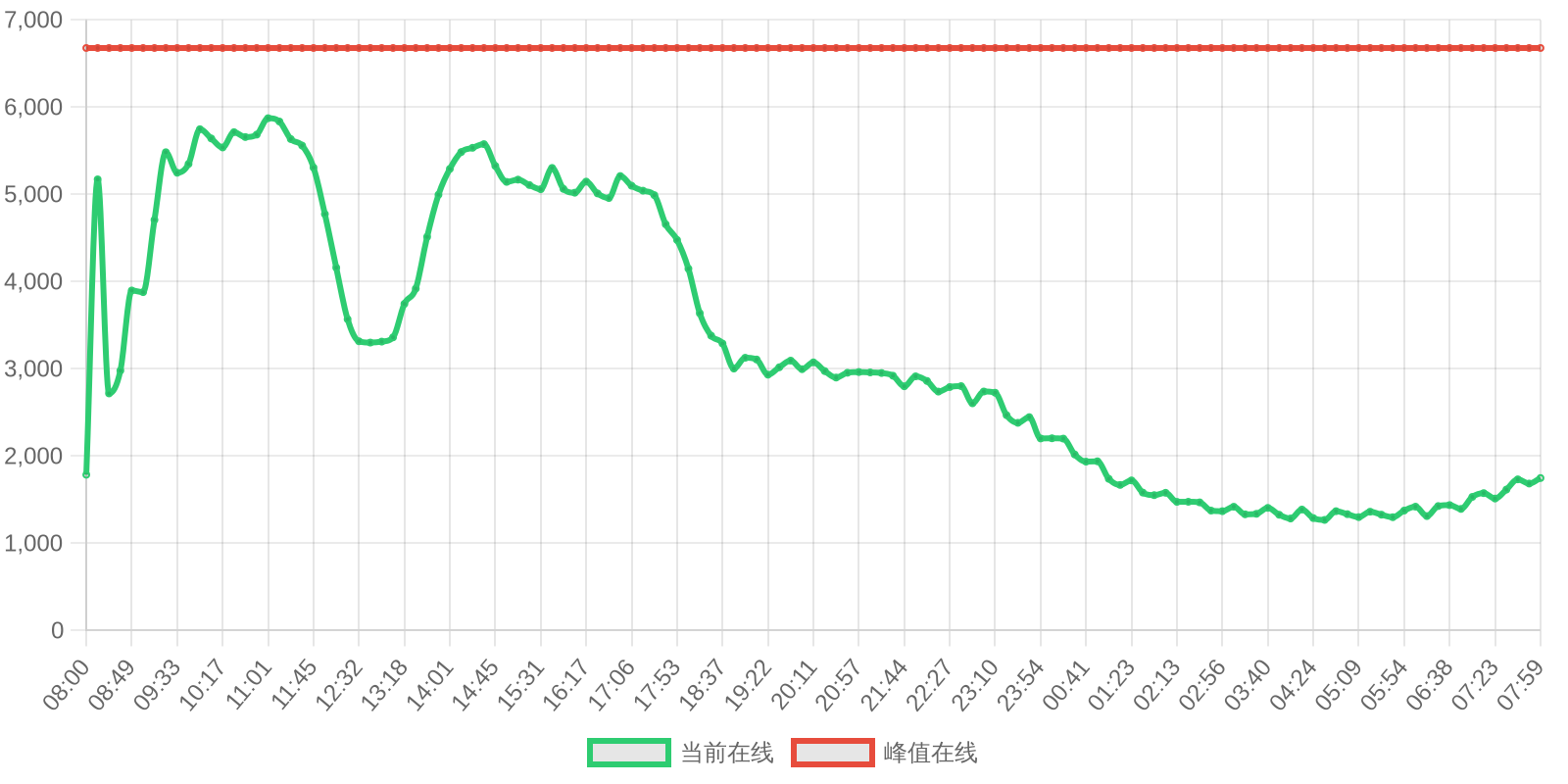
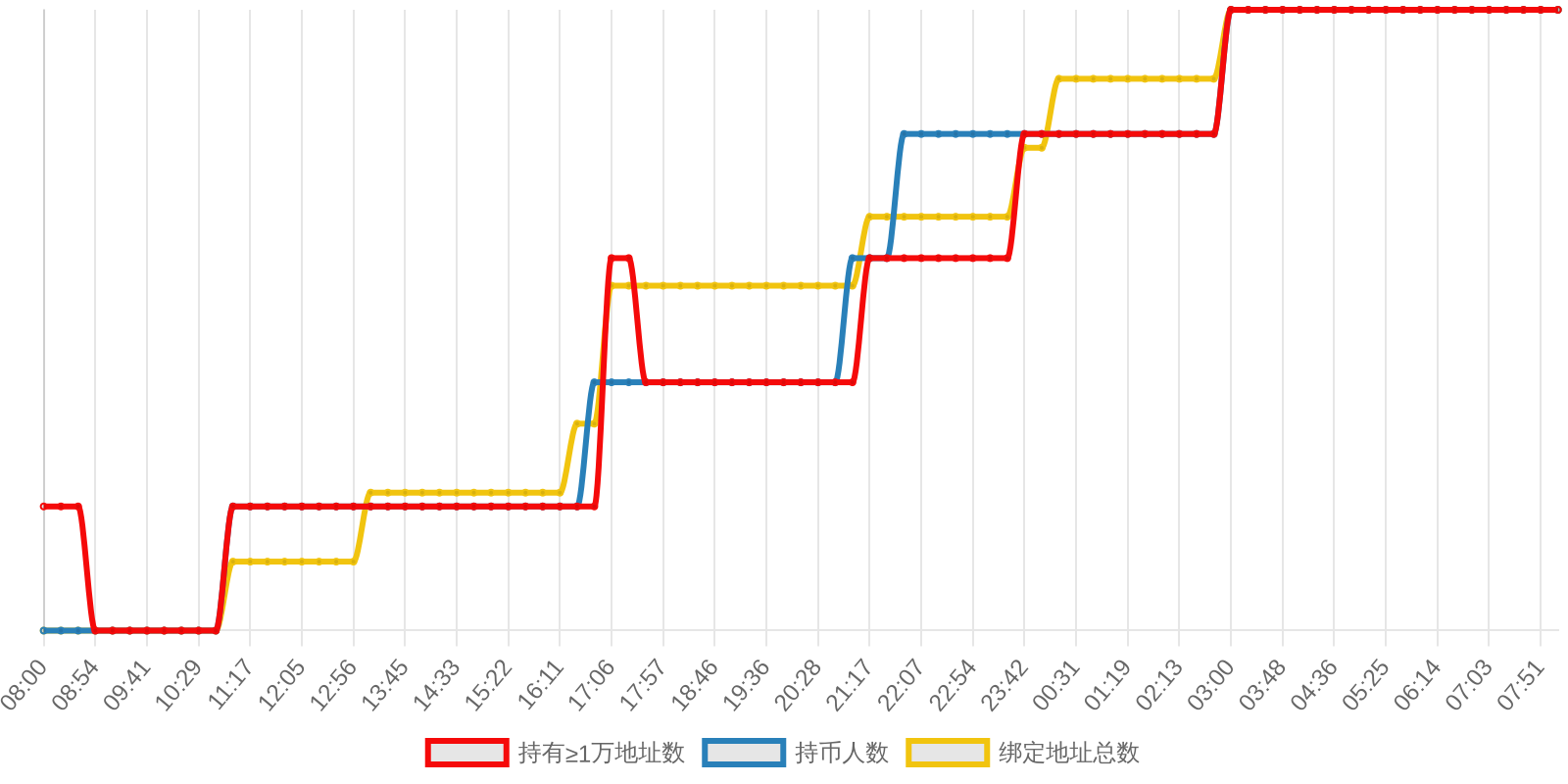
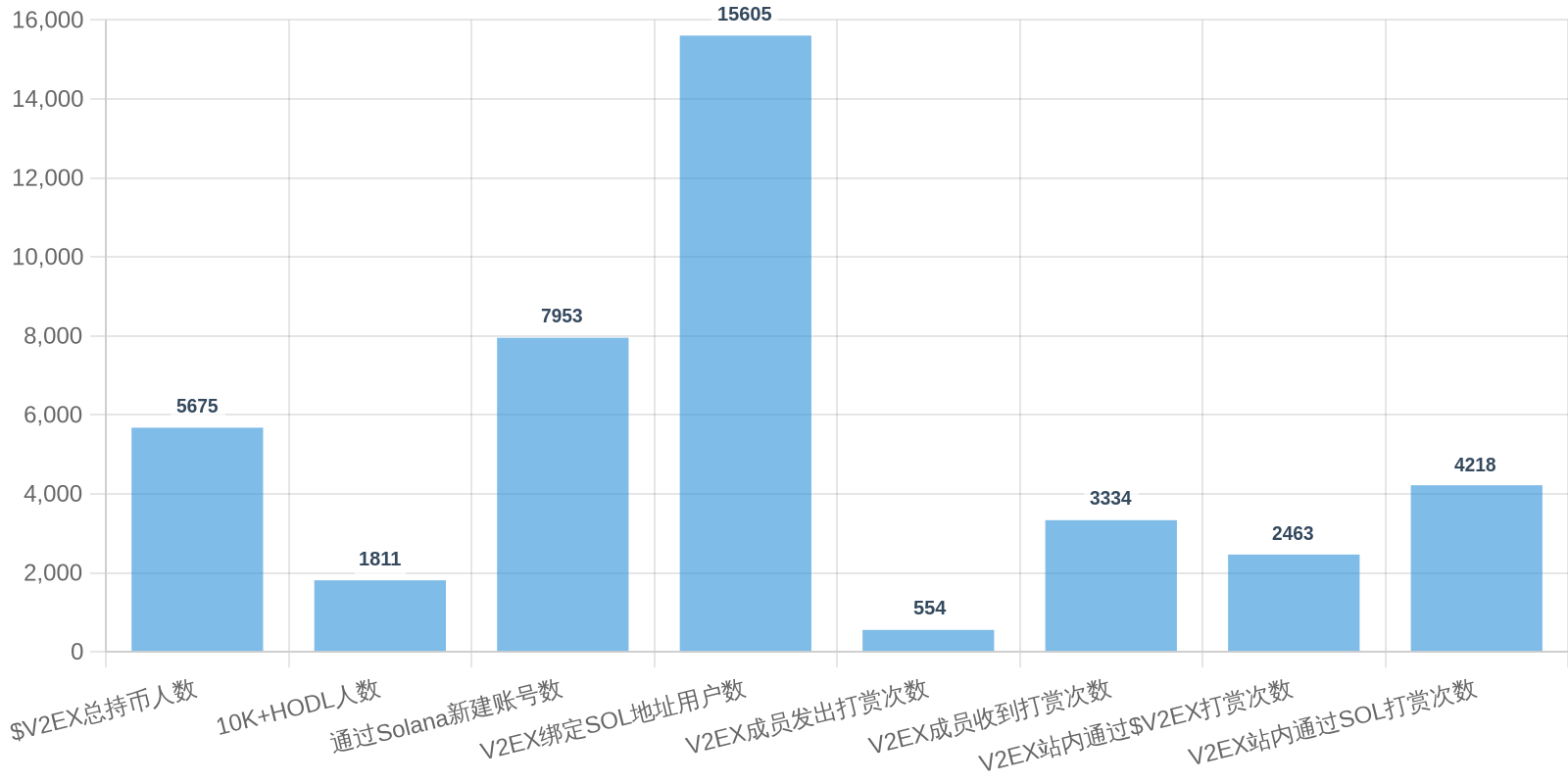
| 排名 | 地址 | 持有数量 | 持仓比例 | 排名变化 | 数量变化 |
|---|---|---|---|---|---|
| #2 | Pump.fun AMM (V2EX-WSOL) Pool | 52.52M | 5.25% | - | -18.58K |
| #9 | Meteora (V2EX-WSOL) Market | 5.03M | 0.50% | - | -3.14K |
TG 机器人订阅: 点我订阅
原始图表与数据存放于: 点我查看
此报告由 V2EX Info 提供数据, 由 Newsletter Report Bot 自动生成。
此报告仅供参考,不构成任何投资建议。投资有风险,入市需谨慎。
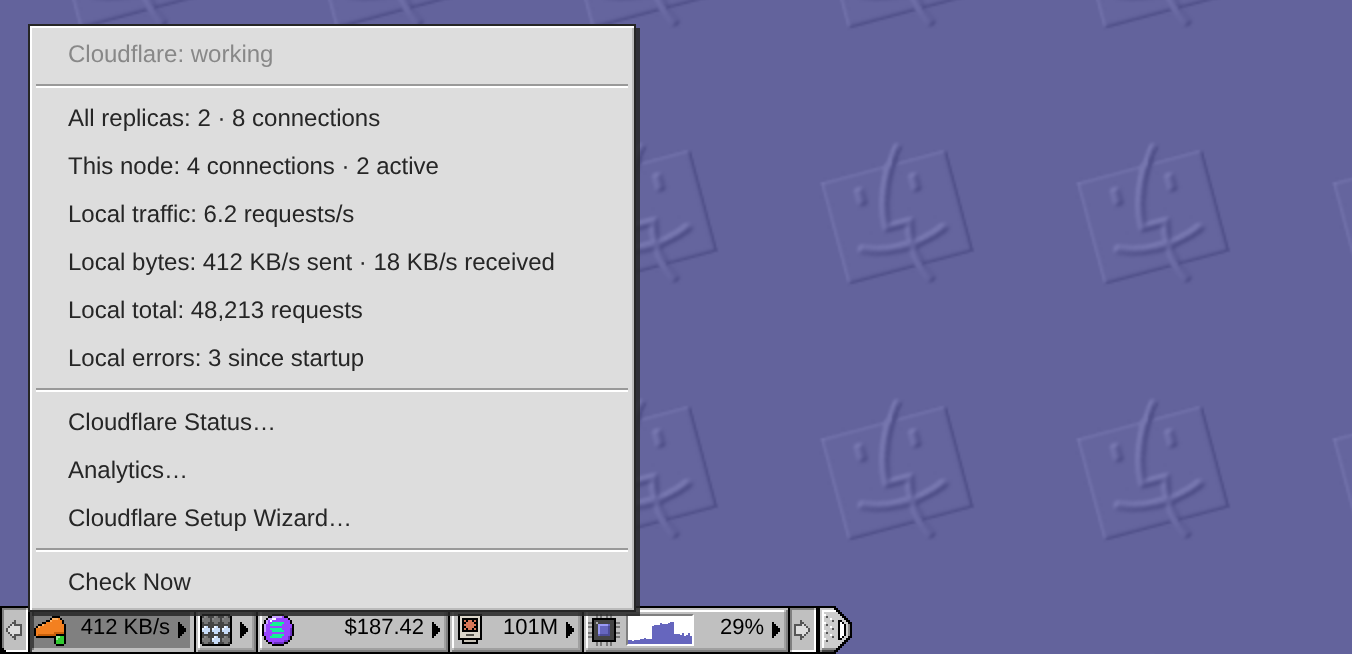
The Control Strip is the row of tiles at the bottom left of exe's Mac OS 9 desktop in the browser. With no window open, it shows if your Cloudflare tunnel is up, if Tailscale is connected, what SOL is doing, how full your Claude Code or Codex plan is, and how busy the machine is.

Mac OS 9 kept a Control Strip in the same corner, and exe's is sampled pixel by pixel from a running Mac OS 9: a strip 24 pixels tall that floats over your windows, as the original did. Click a tile, or right-click it, for its menu, which does more than watch.
The strip fits the machine it runs on. The Tailscale module is there only where Tailscale is installed, agent usage once Claude Code or Codex is, and activity on Linux. The tab at the right end folds the strip down to the tab alone, and the arrows at its ends scroll the row when it holds more than the screen shows. Your browser remembers the fold and what you chose on each tile.
The lamp on the cloud is green while the tunnel is healthy, yellow when it needs attention or is not set up yet, and grey while exe is still checking. On a computer, the figure beside it is how many bytes a second this machine's connector is sending out: its answers, what visitors download.
The menu opens the tunnel up: the replicas and edge connections, then this machine's own connections, active requests, requests a second, bytes sent and received, total requests and origin errors. While the menu is open, this machine's figures refresh every five seconds and the tunnel-wide counts every 30 seconds. For what Cloudflare counted at its edge, Analytics… opens the Analytics app.
The Tailscale module is a panel of nine lamps, and four of them are Tailscale's. They are lit while this machine is on your tailnet, the private network Tailscale makes of your devices. They turn blue when its traffic leaves through an exit node, another of your devices that carries it to the internet, and yellow when something needs attention, such as a login that is due. All go dim when Tailscale is off.
The menu is where you change things. Tailscale Active and Tailscale Inactive turn Tailscale on and off, a pair of marked lines like OS 9's AppleTalk Switch module. Exit Node picks one of your devices that offers one, with Allow LAN Access in the same submenu. Devices lists what is online and Serve your Tailscale Serve rules; pick a row and its address is copied. Accept Routes, Use Tailscale DNS, Shields Up and Tailscale SSH are switches, and each says what it does when you rest the pointer on it.
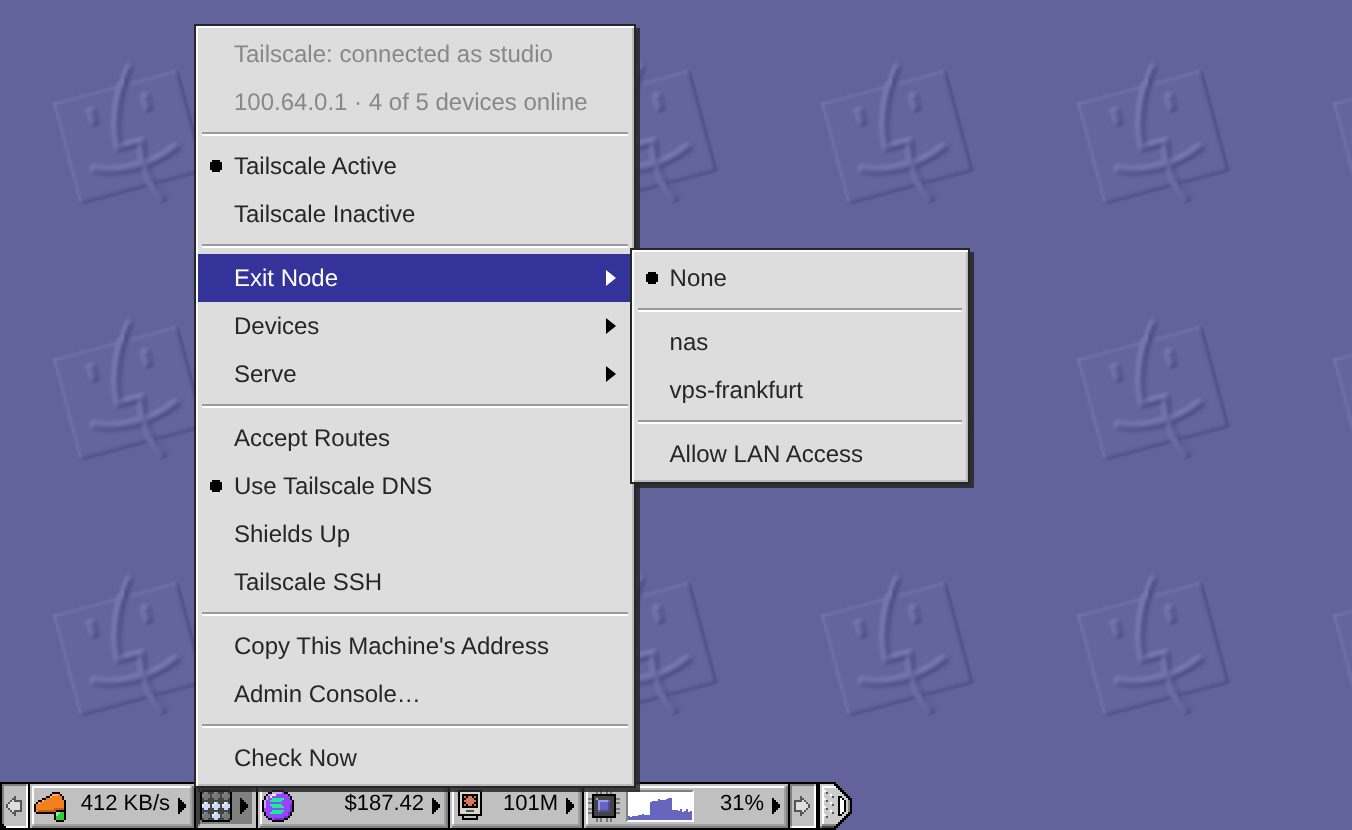
The daemon makes these changes with the tailscale command, without sudo, and changes nothing else. For that, the account exe runs as must be Tailscale's operator. It also knows how you reached the desktop. Turn Tailscale off or raise the shields while the desktop itself comes to you over Tailscale, and it asks first, because the desktop would go with it. Choosing an exit node while you reach the desktop over the local network, with Allow LAN Access off, asks too.
The ticker wears a coin and its dollar price: SOL, PUMP, MET or SKR, whichever you pick from its menu. The menu lists all four with their day change, and the other three with their price in SOL as well, where a long run of zeros folds into a small count: 0.00003717 SOL reads 0.0₄3717 SOL. The prices are Coinbase's spot prices, fetched once a minute by the daemon for every desktop on the machine, with Jupiter's filling in when Coinbase has none.
The daemon keeps watching when no desktop is open. Choose Notify Me of Big Moves, and a move that is rare for its token reaches your phone or computer. SOL has to move 2.5% in an hour or 6% in a day; PUMP 5% or 12%, MET 6% or 15%, SKR 8% or 25%. A token has to cross its threshold on two successful checks in a row before an alert fires.
There are never more than four alerts per token in 24 hours, and a wild day's later alerts need bigger moves: one and a half times the threshold for the second, twice for the third and fourth. Moves held back by that limit are counted into the next alert, if they are less than a day old. A newer alert for the same token replaces the older notification instead of stacking, and Recent Moves lists the last eight.
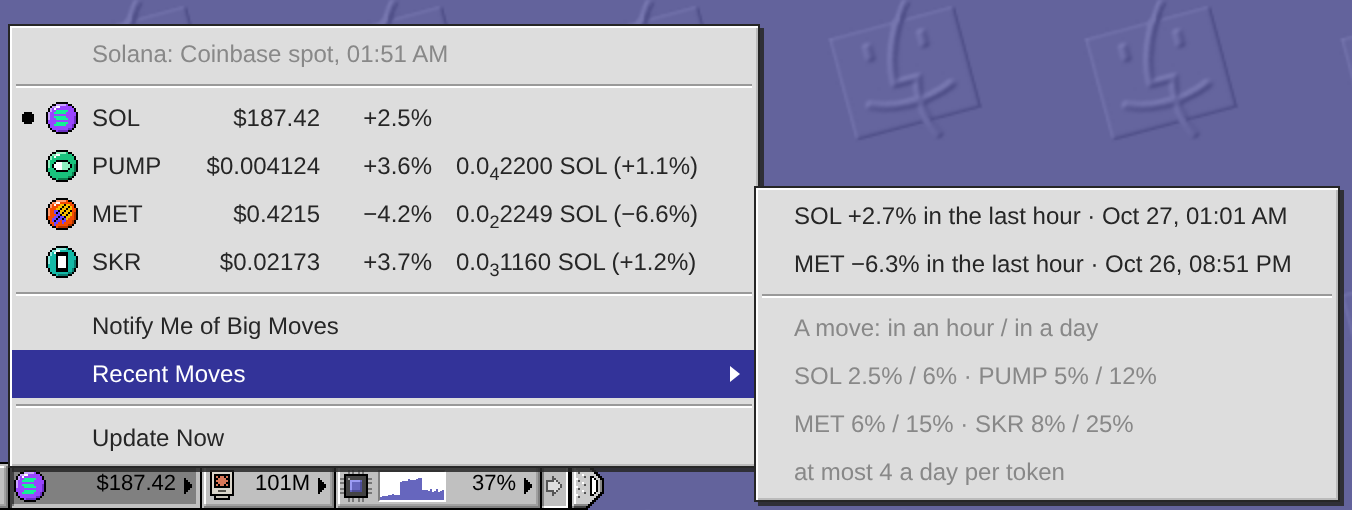
That menu item is the one switch for every push exe sends; nothing else has a setting of its own. With it on, the daemon also watches the sky over the first city in your Weather app, for rain in the next hour, dangerous heat, high wind and fire weather. It says Claude Code finished or Codex finished when a turn ends in a desktop session more than a minute after you last typed there. And a script on the machine can send its own words:
$ curl -s 127.0.0.1:7777/v1/push \
    -d '{"title":"Backup",
         "body":"Done."}'
The agent usage meter shows how many tokens Claude Code or Codex has used on this machine today. Choose Show Plan Limit, and the tile shows the fullest of that agent's usage windows instead, such as "46% wk", so the limit stays in view all day.
The menu lists both agents with today's tokens, and their five-hour and weekly windows lined up in columns. Each agent's submenu has the detail: today and the last seven days, split into input, cached and output tokens; the week as a column a day, with a figure on the busiest day and on today; and how full each window is and when it resets.
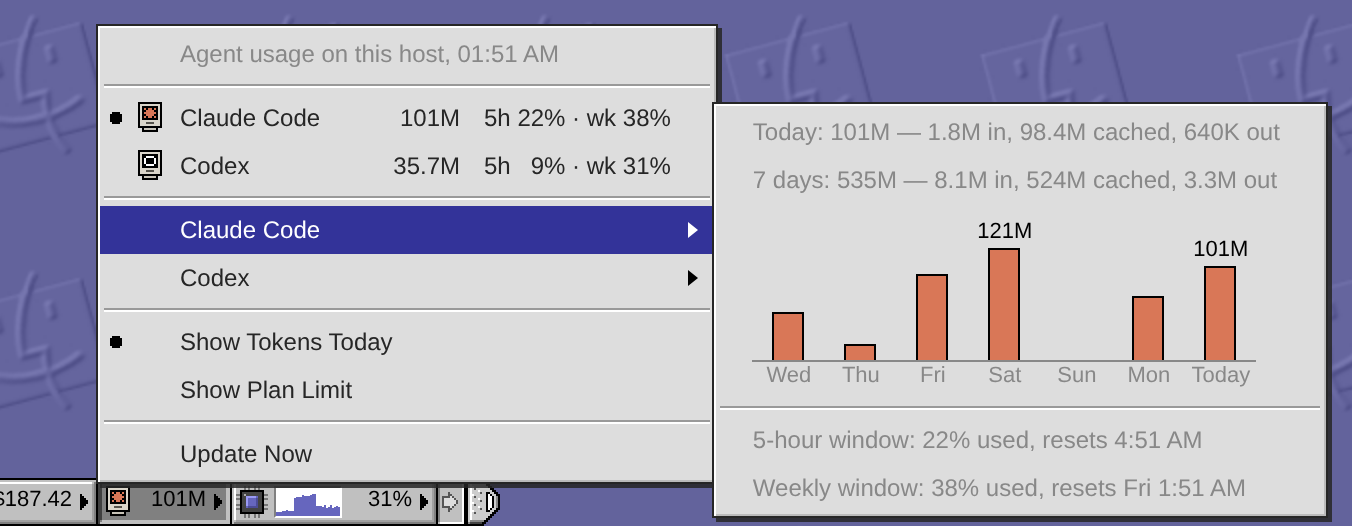
The daemon counts from the CLIs' own logs, Claude Code's transcripts and Codex's rollouts, so a session you run in your own terminal counts as well as the ones opened from the desktop. Claude Code's windows are as fresh as its last reply in a Claude Code window on the desk. Codex's come from its ChatGPT sign-in, normally checked at most once a minute, or from Codex's own logs when that check cannot be made.
The last module charts this machine: CPU, memory, GPU, network and disk, a sample every two seconds. The tile shows the last minute of one of them and its figure now. The menu charts them all over the last four minutes, two on a phone, moving while you watch. Pick a row to put it on the tile.
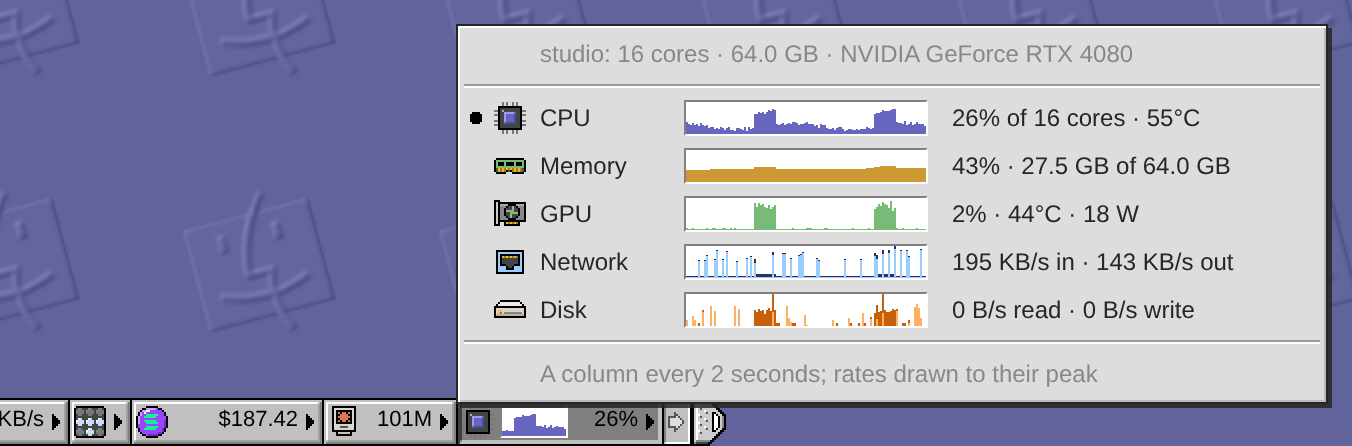
CPU says its share of all cores and its hottest sensor's temperature. GPU says its use, temperature and power, from nvidia-smi; a host without it has no GPU row. Network and Disk count only the physical interfaces and disks. On a machine full of VMs that matters: a VM's traffic crosses its tap, the bridge and the network card, and counting the card alone counts every byte once.
The daemon samples only while a desktop reads. It starts when the strip opens and stops ten minutes after the last desktop folds the strip away or goes hidden.
On your own exe desktop:
On a phone, add the desktop to the Home Screen first: that app is where a phone gets notifications. The manual has each module in full, and Notifications: turn them on has the rest.

前两周的列表还是单数的。 一个 agent、一个终端、一个会话、一个套件——0930 给它上锁,1010 让它的东西流动,1017 把它的协议两端补齐。
这周的列表突然全是复数。 every agent's model、discover agents across endpoints、running coding agents in parallel、connecting and coordinating AI agents。翻完二十个 formula 和二十五个 cask,我没找到一件是"给一个 agent 用的"。
不是一个模型切换器, 是一个叫 magpie 的本地网关——跑在
127.0.0.1:3425,让 Claude Code、Codex、Gemini CLI 各自用别家的模型,还能把你在订阅里的登录变成所有 agent 的 provider; 不是一个权限扫描器, 是一个叫 kontext 的运行时策略——装在 agent 的 hook 上而不是进程外面,动作执行前判一次,把判断和结果记进账本,而且判不出来就放行; 不是一个更好的 grep, 是一个叫 zvec-grep 的检索层——ripgrep、BM25、向量三合一,卖点是"更少的工具调用、更少的 token"; 不是又一批编辑器, 是 ArtCraft 把 filmcraft 和 pdfcraft 的 CLI 送进 core,描述第一次写成"CLI and MCP server"——同一个引擎,人一个入口,agent 一个入口。
这一周的关键变化不是 agent 工具变多了,是工具的默认假设换了:从"你有一个 agent"变成"你有一堆 agent"。具体表现是三样东西第一次被从 agent 内部搬出来单独发货——模型(magpie)、身份与策略(kontext)、工作区索引(zvec-grep)。搬出来之后,它们都成了可以单独替换、单独审计、单独出问题的层。
| 名称 | 中文说明 |
|---|---|
| filmcraft-cli | FilmCraft 的 headless CLI + MCP server,编辑/渲染/导出视频工程(0.13.0) |
| pdfcraft-cli | PdfCraft 的 headless CLI + MCP server,创建/编辑/检查/填写 PDF(0.14.0) |
| kontext | AI agent 的身份、凭据与治理:发现 agent、映射权限、动作前策略 + 审计账本 |
| zvec-grep | 给人和 agent 的本地混合检索:ripgrep + BM25 + 向量,索引存在 .zvec-grep/ |
| gitea-cli | Gitea 官方命令行 |
| gitea-importer | 把 GitHub / GitLab / Gitea 的仓库迁移进 Gitea |
| ascelerate | App Store Connect API 的命令行 |
| buildkite | Buildkite 的命令行客户端 |
| dep-scan | OWASP 出品的依赖与容器镜像安全/风险审计 |
| openssh-sk-provider | 给系统 OpenSSH 用的独立 FIDO2 安全密钥 provider(sk-libfido2) |
| erpc | 容错 RPC 代理,带 re-org 感知的永久缓存(区块链 RPC) |
| xfr | 带 TUI 的网络带宽测试 |
| worldmonitor | World Monitor 全球情报 API 的 CLI |
| tpcgen-cli | 快速生成 TPC-H / TPC-DS 测试数据(DataFusion 生态) |
| ng-log | C++ 应用级日志库 |
| bqlog | 腾讯的跨语言日志库 |
| icu4c@79 | ICU 79 的版本化 formula(keg-only) |
| cellpose | 细胞与细胞核分割的通用算法 |
| slivar | 用表达式过滤、注释基因变异(trio / cohort) |
| annotsv | 结构变异(SV)的注释与排序 |
注: GitHub API 把
spidermonkey 153.5.1标成了 new formula,但它其实是从 140.17.0 跳上来的版本更新。按提交历史核对后没算进新增。
| 名称 | 中文说明 |
|---|---|
| magpie | 给 AI coding agent 的本地模型网关(菜单栏 + CLI + TUI) |
| kero | 为 agent 优化的终端:会话跑在 kerod 里,且自带一个 agent 可驱动的 CLI |
| diri | 并行跑 coding agent 的终端工作区(一个 agent 能再开若干子 agent + worktree) |
| tutti | 多人、多 agent 的实时协作空间 |
| pen | agentic 设计画布 |
| airbuild | 让 AI agent 构建 iOS 应用并处理 App Store 审核 |
| tamery | AI 驱动的数据库客户端(从 conar 改名) |
| keyboop | 键盘布局切换 + 本地语音听写 |
| peel | 卸载器与磁盘空间清理 |
| wblock | Safari 广告拦截 |
| clamshell | 合盖保持运行,同时关掉内建屏幕 |
| hotkeyclash | 快捷键冲突检测 |
| zeal | 离线文档浏览器 |
| writer | 本地优先的 Markdown 编辑器 |
| sound-studio | 录音与音频编辑 |
| sprites | Fly.io Sprites 的命令行 |
| opendisplay-receiver | 把一台电脑变成 OpenDisplay 的第二块屏 |
| prusaslicer@preview | PrusaSlicer 3.0 预览版(alpha12) |
| omniwm@canary | OmniWM 平铺窗口管理器的 canary 通道 |
| font-mengshen-regular | 萌神拼音字体 |
| font-nordwand-mono | Nordwand Mono 字体 |
| textus * | WYSIWYG Markdown 编辑器,内置 AI 写作(上期已列) |
| status-trio * | 把 Wi-Fi / 电池 / 音量合成一个菜单栏图标(上期已列) |
| rew * | REW 房间声学测量(上期已列) |
| artcraft-launcher * | ArtCraft 套件的安装与更新器(上期已列) |
* 这四个在上一期表格里已经出现过,但 GitHub 上的合并时间是 10 月 18–19 日——上期的窗口比标题日期多划了两天。这期剔出正文,只留表里记账。
另外本期还有两个
add Google Fonts的批量 PR,一次带入多套字体 cask,未逐项列出。
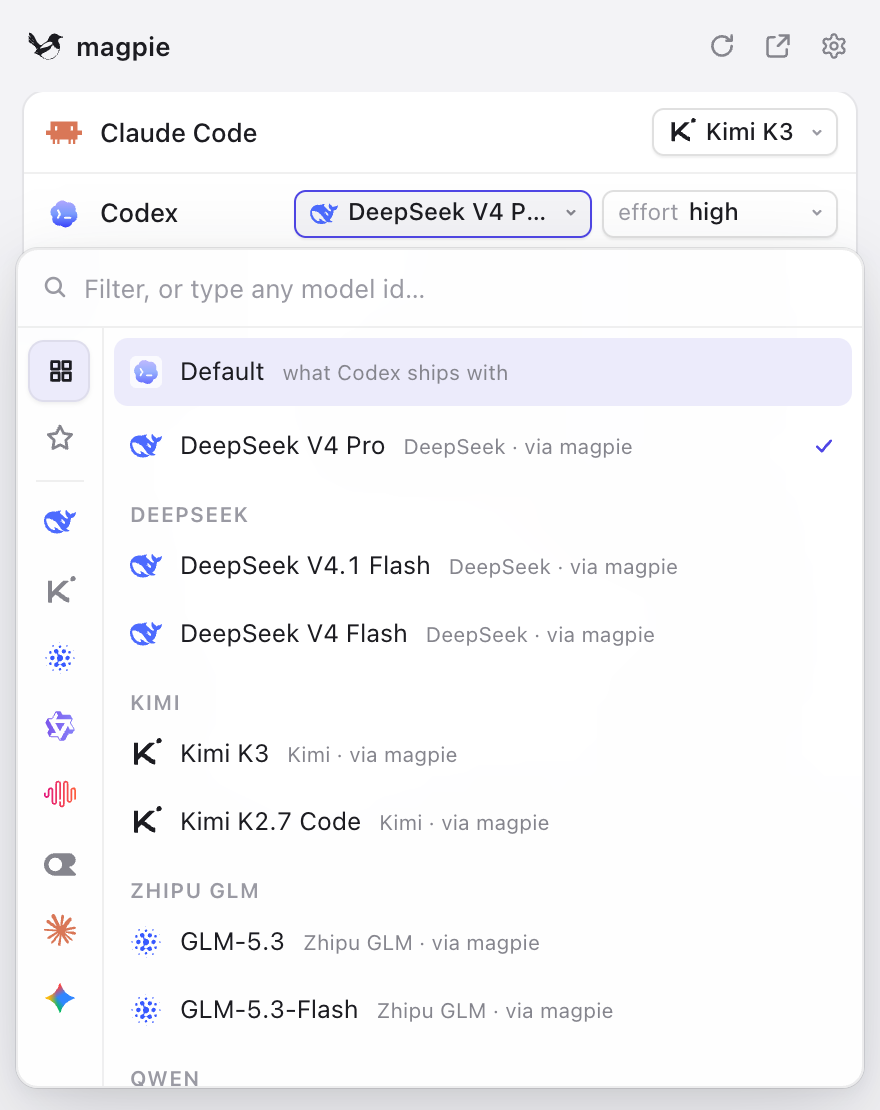
每个 agent 都在自己的文件里存模型:自己的格式、自己的 key、自己的 base URL。你在 Claude Pro 上付的钱,只在 Claude Code 里有效;在一个 agent 里换模型,等于去改它的配置文件,再记住你改过什么。
magpie 把这件事挪到一个本地端口上:127.0.0.1:3425。它同时说 OpenAI Chat、OpenAI Responses、Anthropic Messages、Gemini 四套方言,并在中间互相翻译——流式、tool calls、reasoning 都翻。想接一个没被官方支持的客户端,不用等适配:把它的 base URL 指过来就行。
菜单栏里是一个列表:左边是装在这台机器上的 agent,右边是可以选的模型,写成 provider/model。选完它不是覆盖整个配置文件,而是原子地改掉那一个值——注释、顺序、格式都留着;切回原生模型,原样还给你。Profiles 把几十个 agent 的配置存成一个名字("Budget"、"Focus"),一键换一整组。
三个细节让我停下来:
claude 二进制,再用 MCP 把你 agent 的工具桥过去。{{API_KEY_k3v9x2mq}}),所以 prompt cache 和 thinking signature 不会被打断;掩码失败时请求直接扣住不发(503)。最后一条说明了 magpie 真正的产品判断:它假设你有多个订阅、多个账号、多个额度周期。这不是模型选择器,是模型层的调度器。
至于把 Claude Pro / ChatGPT 的登录当 provider 借给别的 agent 用——这件事在不在各家的 ToS 里,得自己判断。magpie 留了开关:Settings → Privacy → Subscription accounts,或者 MAGPIE_NO_ACCOUNTS=1 临时关掉。

0930 的 hol-guard 把 agent 的 syscall 当防火墙来管:套在进程外面,看它要动什么。kontext 选了另一层——agent 自己的 hook。它不包进程,装完 kontext setup 之后你照常用 Claude Code 或 Codex,不用换启动方式。
它做四件事:发现这台机器上有哪些 agent、把每个 agent 能碰到的东西列成权限图、在动作执行前按本地策略判一次、把判断和结果写进一个 authorization ledger(agent、session、action、决策、结果)。
agent 想执行一个动作
        │
        ▼
  pre-action hook ──► 本地策略
        │                 │
        │      ┌──────────┴───────────┐
        │      ▼                      ▼
        │   完成的 deny            没有结论
        │      │             (报错/策略缺失/过期/
        │      │              身份不明/daemon 挂了)
        │      ▼                      ▼
        └─►  拦截                 放行 + 记为 failure
这张图里最值得看的是右边那条:策略报错、策略缺失/损坏/过期、身份不明确、daemon 挂了或太慢——全都放行,并且在活动记录里记成一次 failure。README 写得很直白:只有"已完成的 deny"和"必需的审批拿不到"才真的拦。
这是一个明确的取舍。安全产品通常把"不确定"当"拒绝";kontext 把"不确定"当"这次不管,但留证据"。理由是它站在 agent 的同步 hook 上,daemon 一抖动就阻塞,你所有 agent 会一起卡死。它选了可用性,把风险转成可审计性。
代价写在同一页:策略由组织在云端 dashboard 下发,本机只留 runtime 和 keychain 里的 install token。本地决策、组织分发——对个人用户是重量级,对公司是刚需。
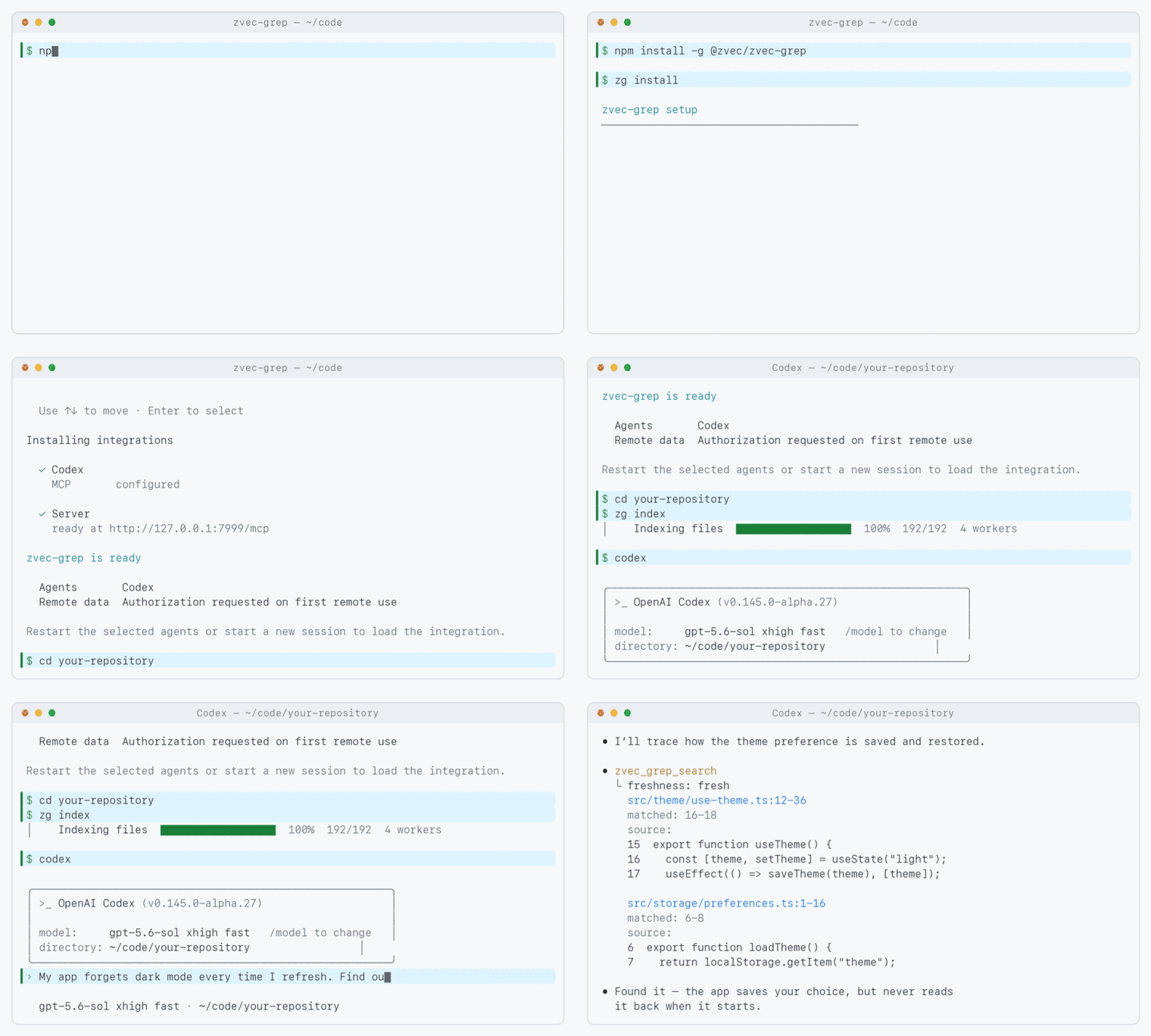
zg 把三件事收到一个接口后面:ripgrep 的字面/正则、BM25 的关键词排序、向量的语义召回。索引存在项目根的 .zvec-grep/ 里,默认本地,连 embedding 都可以用本地模型(potion-retrieval-32m)。背后是阿里的 zvec,TypeScript 实现进了 Homebrew,Rust 实现在仓库里单独目录并行开发。
README 的卖点不是"更准",是这一句:更少的工具调用、更少的 token、更少的噪音。结果带来源位置、按相关度排序,agent 拿到证据就能停,不用 grep 一遍再 read 十个文件。
这句话把检索从"功能"变成了"预算"。当 agent 的成本主要是上下文,搜索的第一指标就不再是召回率,而是"要几次调用才能收工"。这也解释了为什么它同时提供 MCP 集成——它默认调用方是 agent,不是人。
我的保留也在这里:索引是工作区的第二份副本(.zvec-grep/),会过期、会占空间、会在 git status 里出现。装之前我会先确认它有没有 clean 和忽略规则这一层。
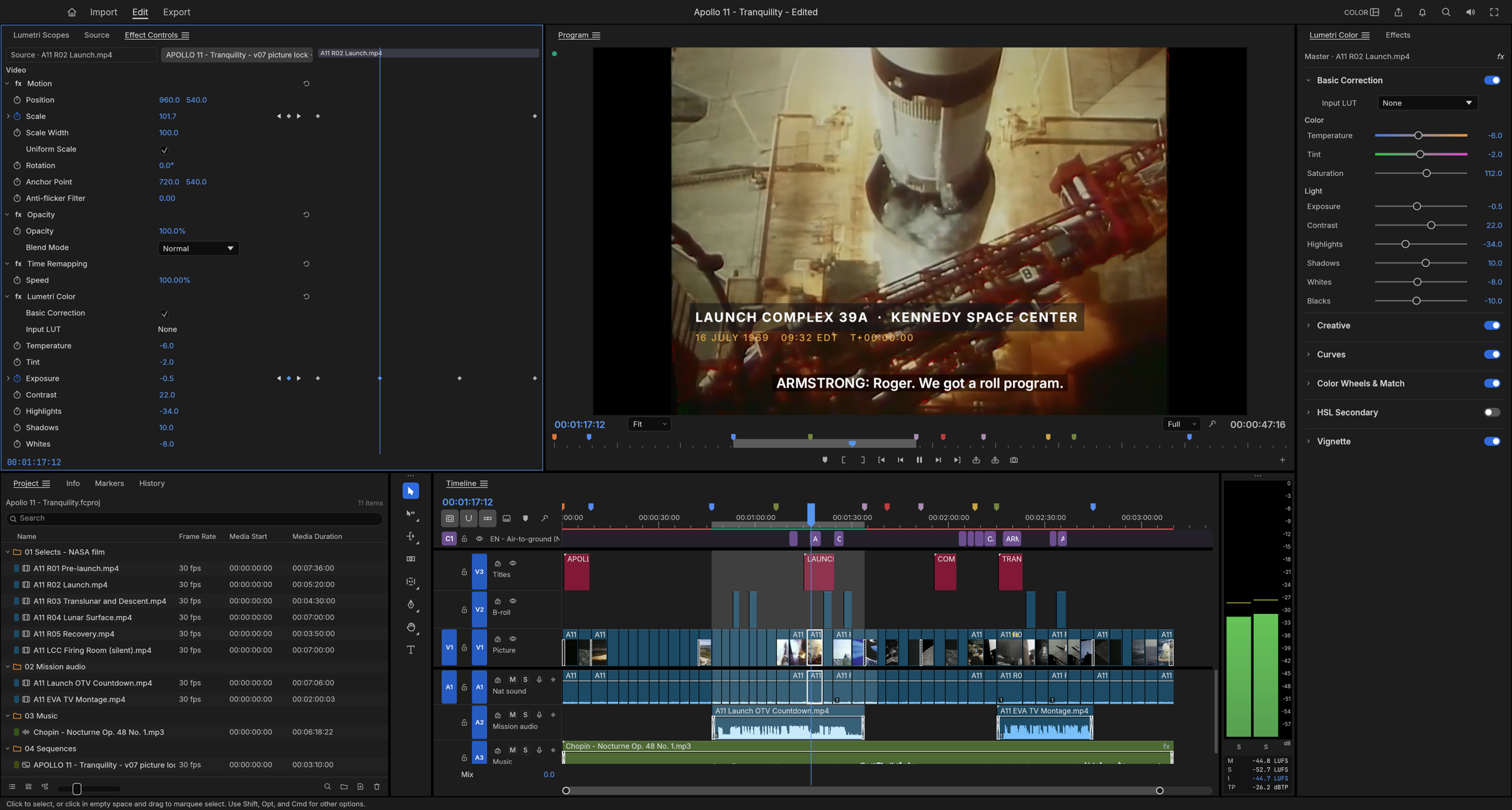
上期 photocraft-cli 的描述是 Headless PhotoCraft **engine** to convert, inspect and batch-edit images——一个引擎。这期两个新 CLI 的描述变了:
filmcraft-cli:Headless FilmCraft CLI and MCP server to edit, render and export video projectspdfcraft-cli:Headless PdfCraft CLI and MCP server to create, edit, inspect and fill PDFs差的不是措辞,是入口数量。FilmCraft 的 GUI 是一个完整的非编:工程、时间线、色彩、关键帧、导出;CLI 读同一份工程文件,做批量渲染和导出;现在再加上 MCP,agent 可以直接开工程、改时间线、导一条片子出来。
ArtCraft 现在的版图是:13 个 GUI 应用 + 3 个 headless CLI(photocraft / filmcraft / pdfcraft)+ 1 个 launcher,共享一套 Rust 引擎和一套工程格式。创作者用 GUI,脚本用 CLI,agent 用 MCP——同一份工程,三种操作者。
这件事的分量在"同时发货"四个字。大多数桌面软件把 agent 接口做成事后插件或云端 API;ArtCraft 是 GUI 和 CLI/MCP 一起进包管理器。上期我们说"套件自己站出来介绍自己了",这期它把介绍词改成了给 agent 听的那一版。
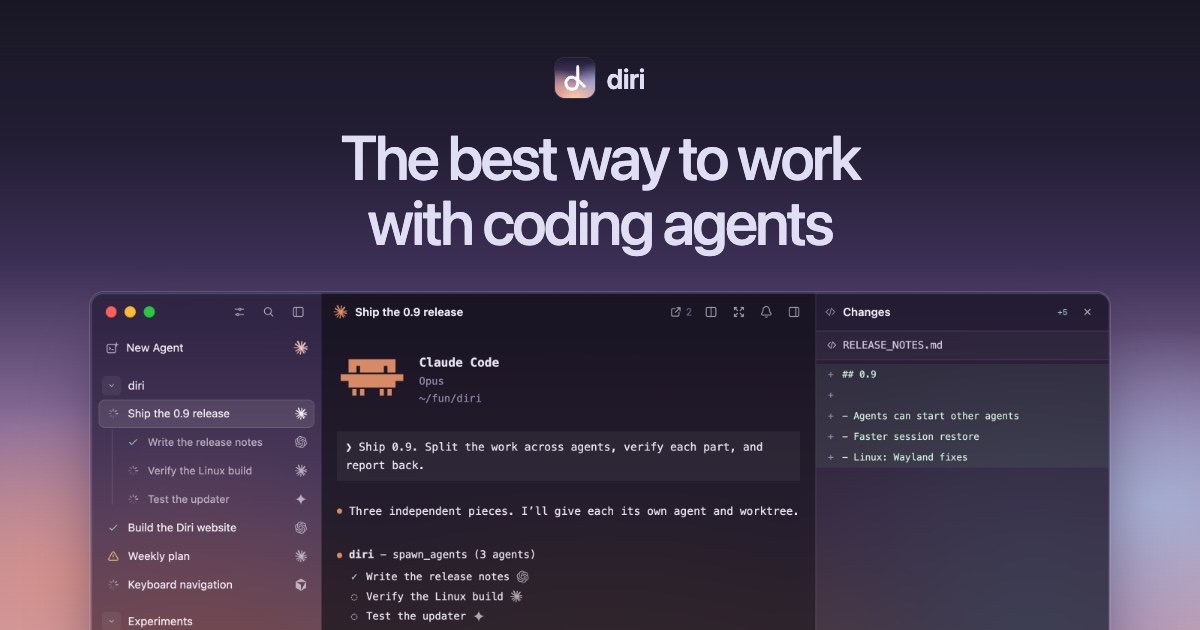
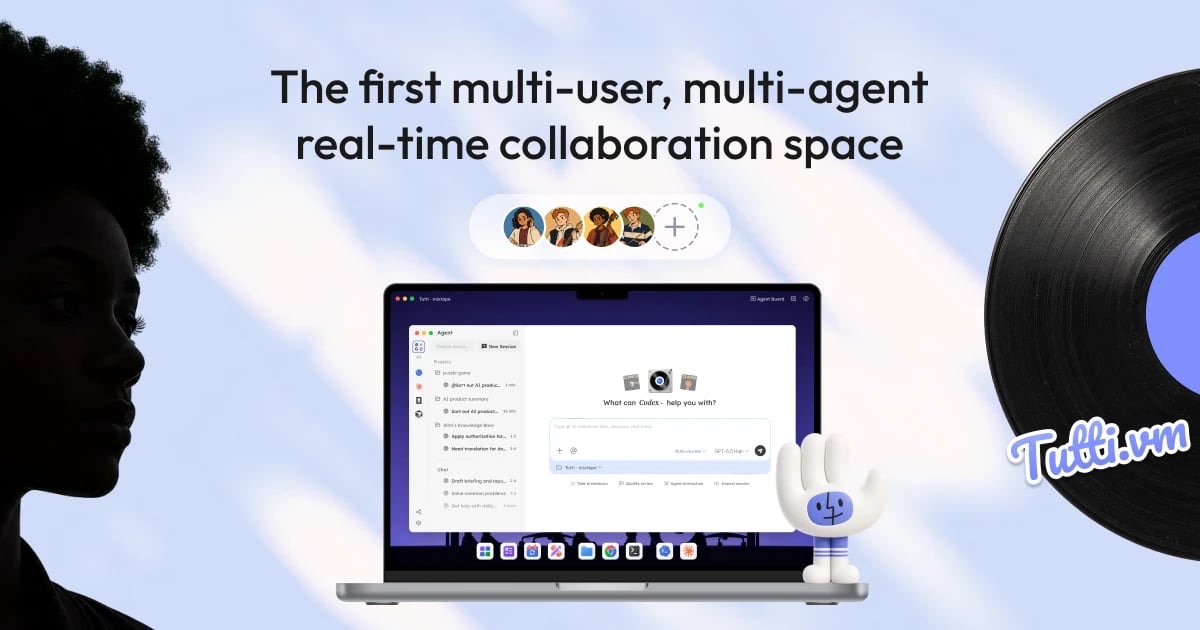
同一周还进了三个 GUI,简介都带 agents:
kerod 这个 daemon 里,关窗不结束;每个 pane 有 working / waiting / idle / error / exited 状态,⌘J 跳到需要你的那个;渲染底层是 libghostty。最扎人的一句在 README 里:**"A CLI agents can drive"**——kero new、split、type、wait、read screen,终端给自己开了一个给 agent 用的接口。三家的答法不同:kero 把终端本身变成 agent 的操作对象,diri 把并行做成树,tutti 把人放回同一个房间。但前提是同一个:默认你手上不止一个 agent。
这是连续第四周出现"agent 的终端/工作区"。前几周我把它们当同一条线看,这周不太一样了——0930 的 ccmux 是给多个 agent 一个调度器,1010 的 nodeterm 是给多个会话一张画布,而这一周的三家开始争论并行的形状:平铺、树、还是房间。同一层上出现互相不兼容的形状,通常说明这一层还没定。
brew update 的输出要交叉验证",这周要再进一步:API 的 label 也是二手信息,提交历史才是一手。我核了 commit 才没把它写进新增表。上期结尾我留了一个问题:MCP 两端都在 Homebrew 了,谁来定义 agent 跨机器的"会话可移植"?
这一周没有答案。但出现了三个前置条件:
magpie 把模型从 agent 的配置文件里抽出来,放上
127.0.0.1:3425;
kontext 把身份和策略从 agent 内部抽出来,挂在它的 hook 上;
zvec-grep 把工作区的索引抽出来,放进.zvec-grep/。
当这三样都不在 agent 里面,"会话"才第一次成为一个可以搬的东西——因为搬家要搬的本来就不是进程,是它依赖的模型、身份和记忆。
所以下期的钩子不是"会话会不会可移植",而是:这三层现在各是一个单体——magpie 只管模型,kontext 只管策略,zg 只管索引。下一个上架的,会不会是一个把它们串起来的 control plane?或者更可能的——Homebrew 出现第一个 umbrella formula,brew install agent-runtime,一次装齐?
早上好!以下为昨日摘要:
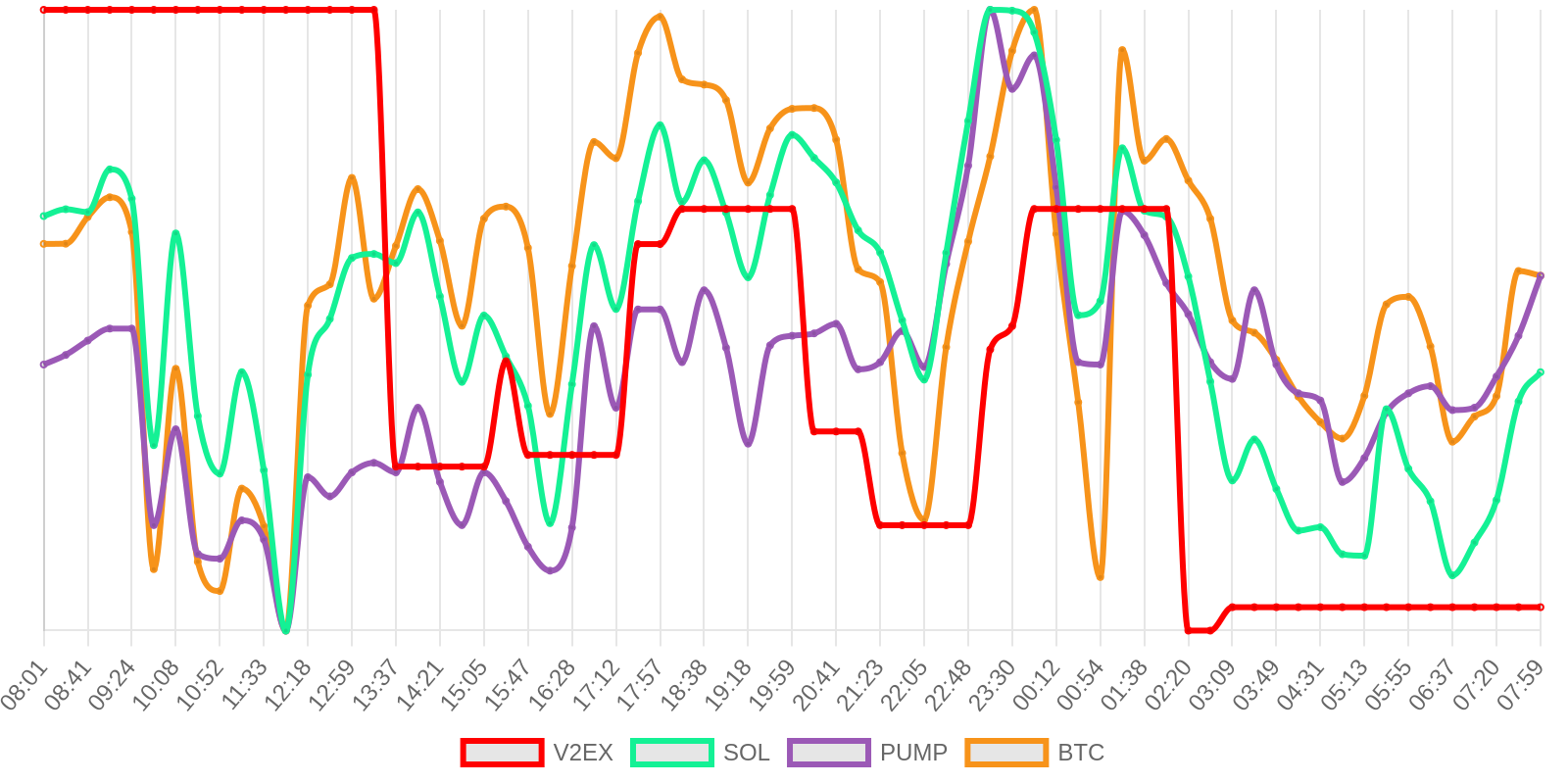
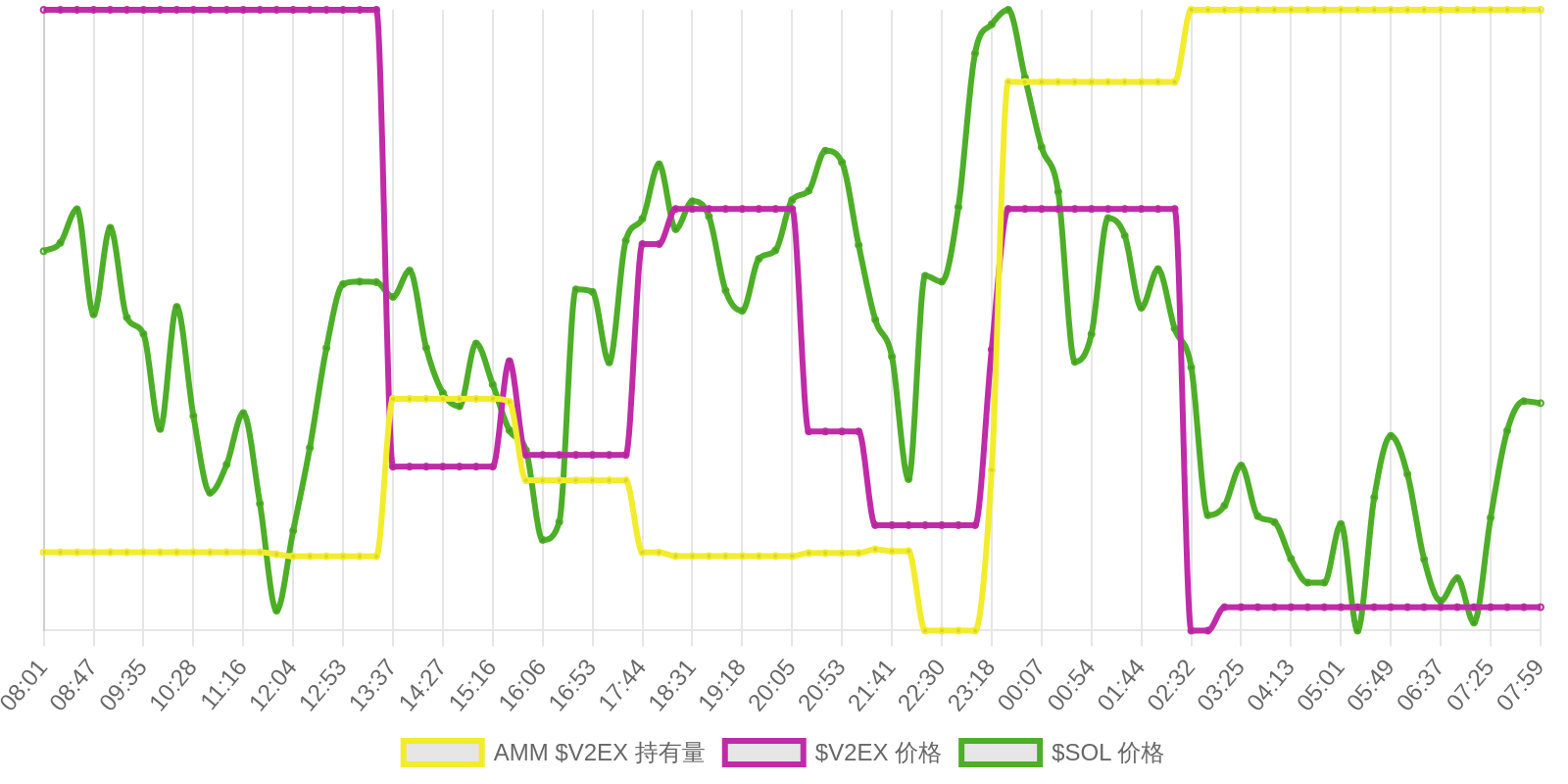
BTC - $79,983.12 SOL - $100.74 PUMP - $0.0043 V2EX - $0.0021
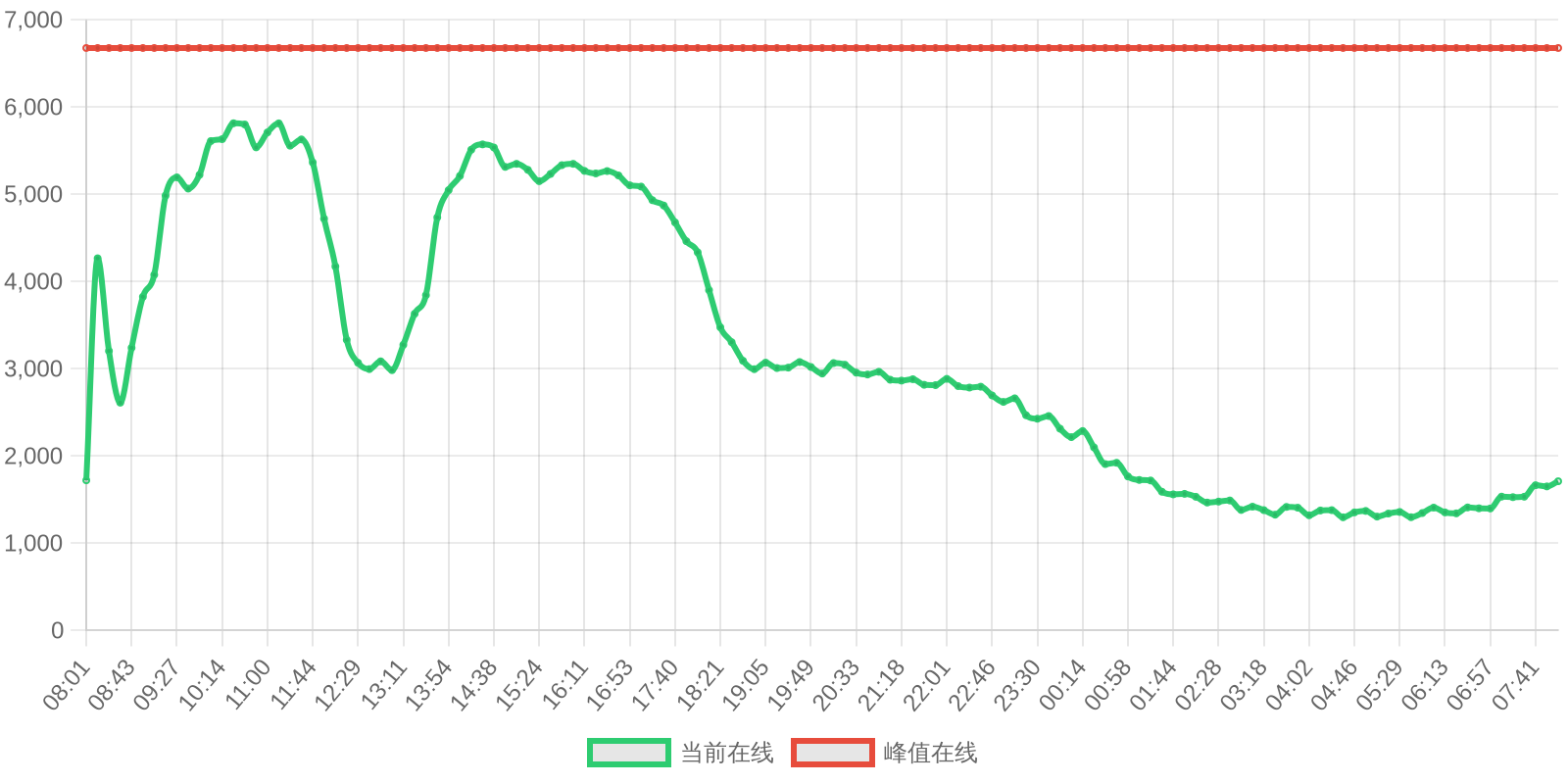
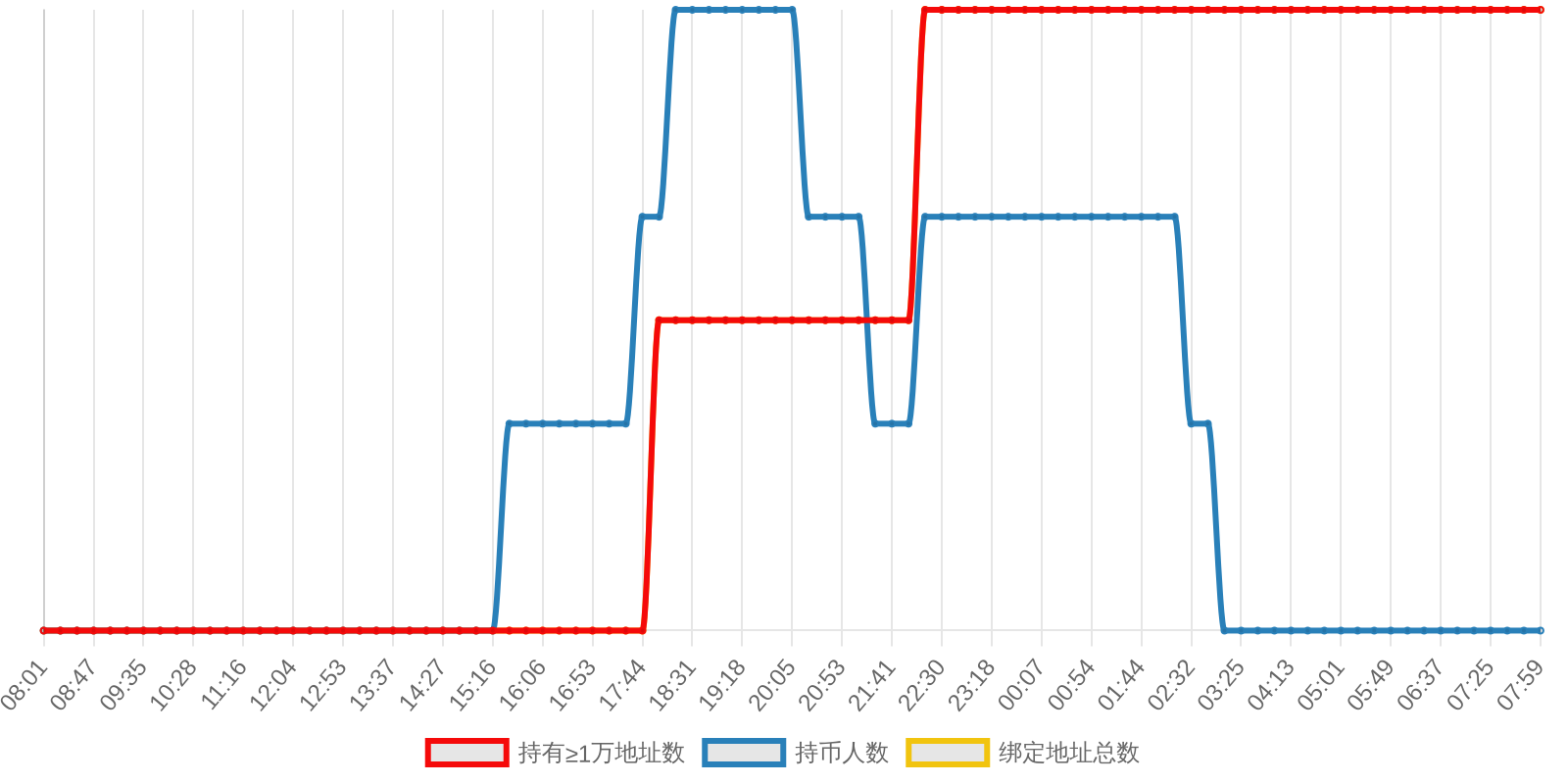
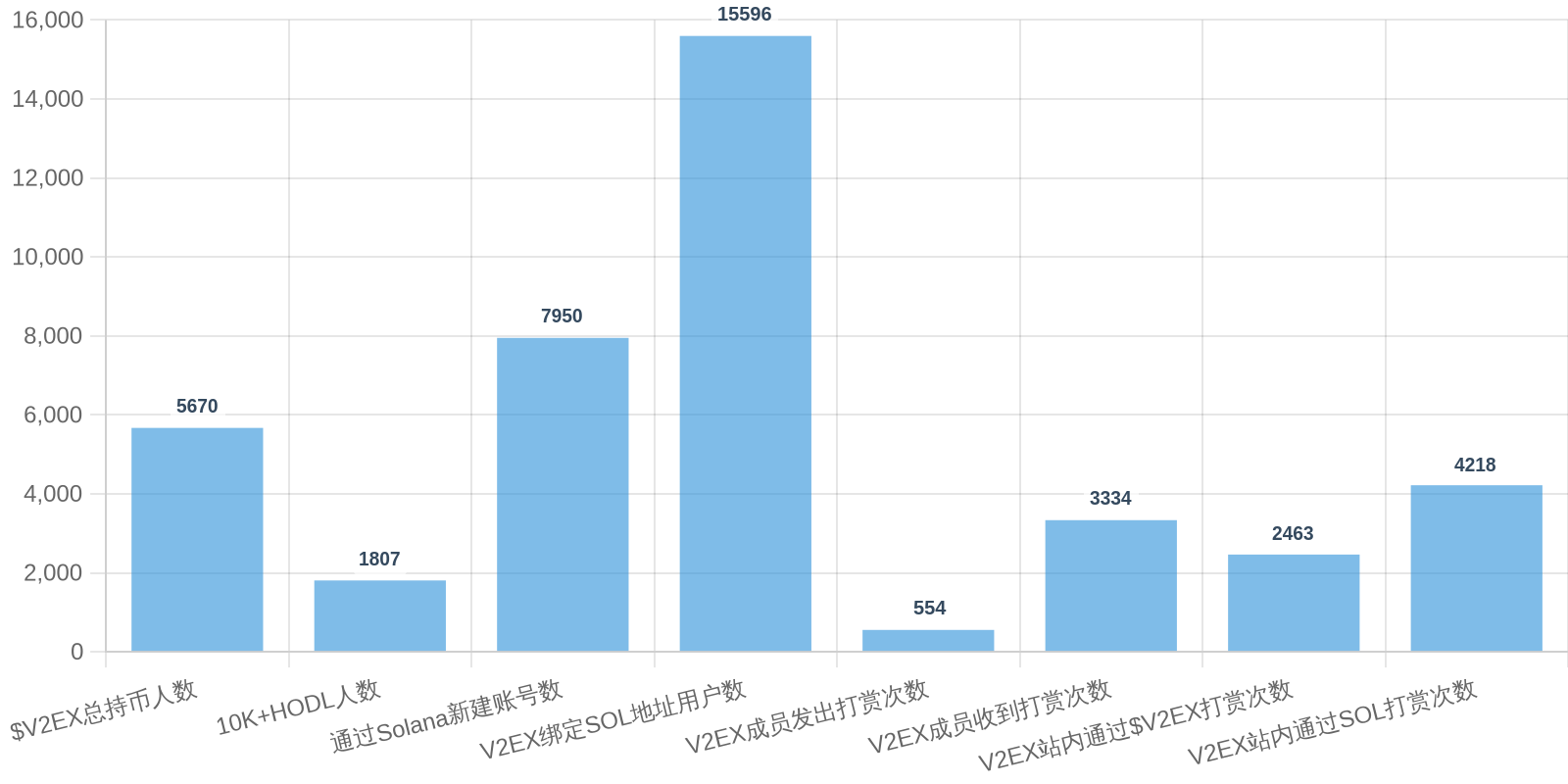
| 排名 | 地址 | 持有数量 | 持仓比例 | 排名变化 | 数量变化 |
|---|---|---|---|---|---|
| #2 | Pump.fun AMM (V2EX-WSOL) Pool | 52.54M | 5.25% | - | +69.20K |
| #9 | Meteora (V2EX-WSOL) Market | 5.04M | 0.50% | - | +3.71K |
TG 机器人订阅: 点我订阅
原始图表与数据存放于: 点我查看
此报告由 V2EX Info 提供数据, 由 Newsletter Report Bot 自动生成。
此报告仅供参考,不构成任何投资建议。投资有风险,入市需谨慎。
早上好!以下为昨日摘要:
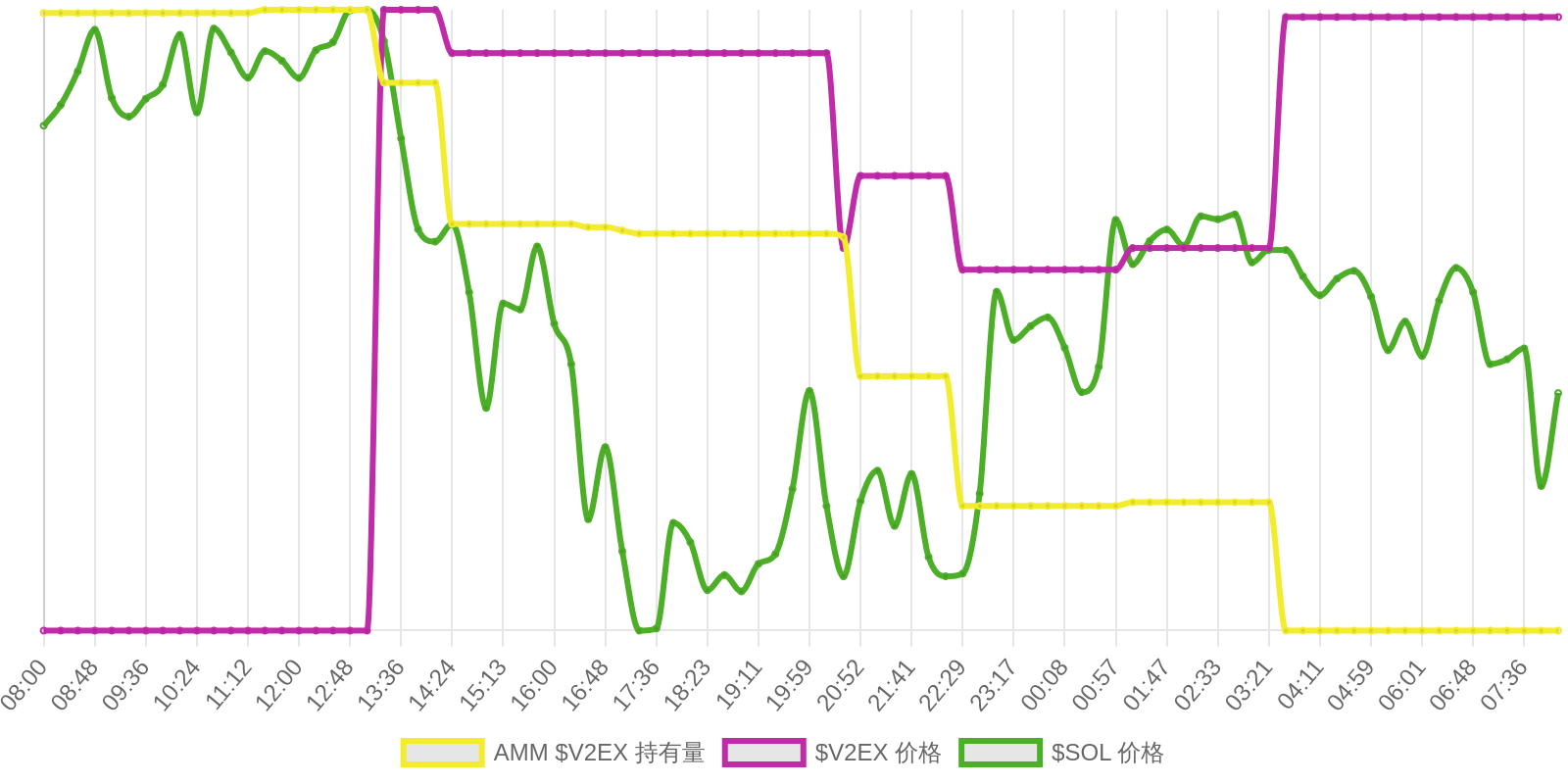
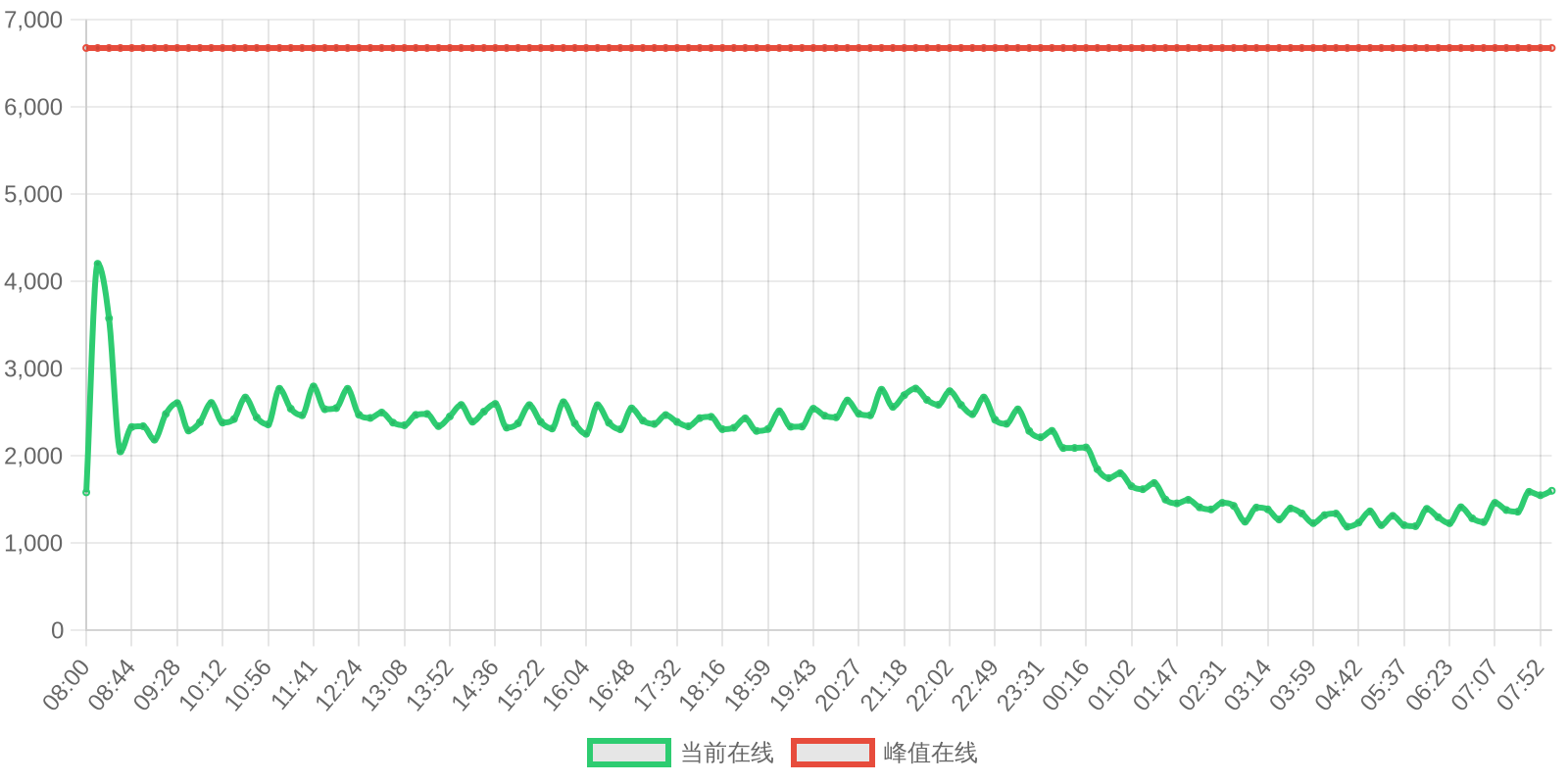
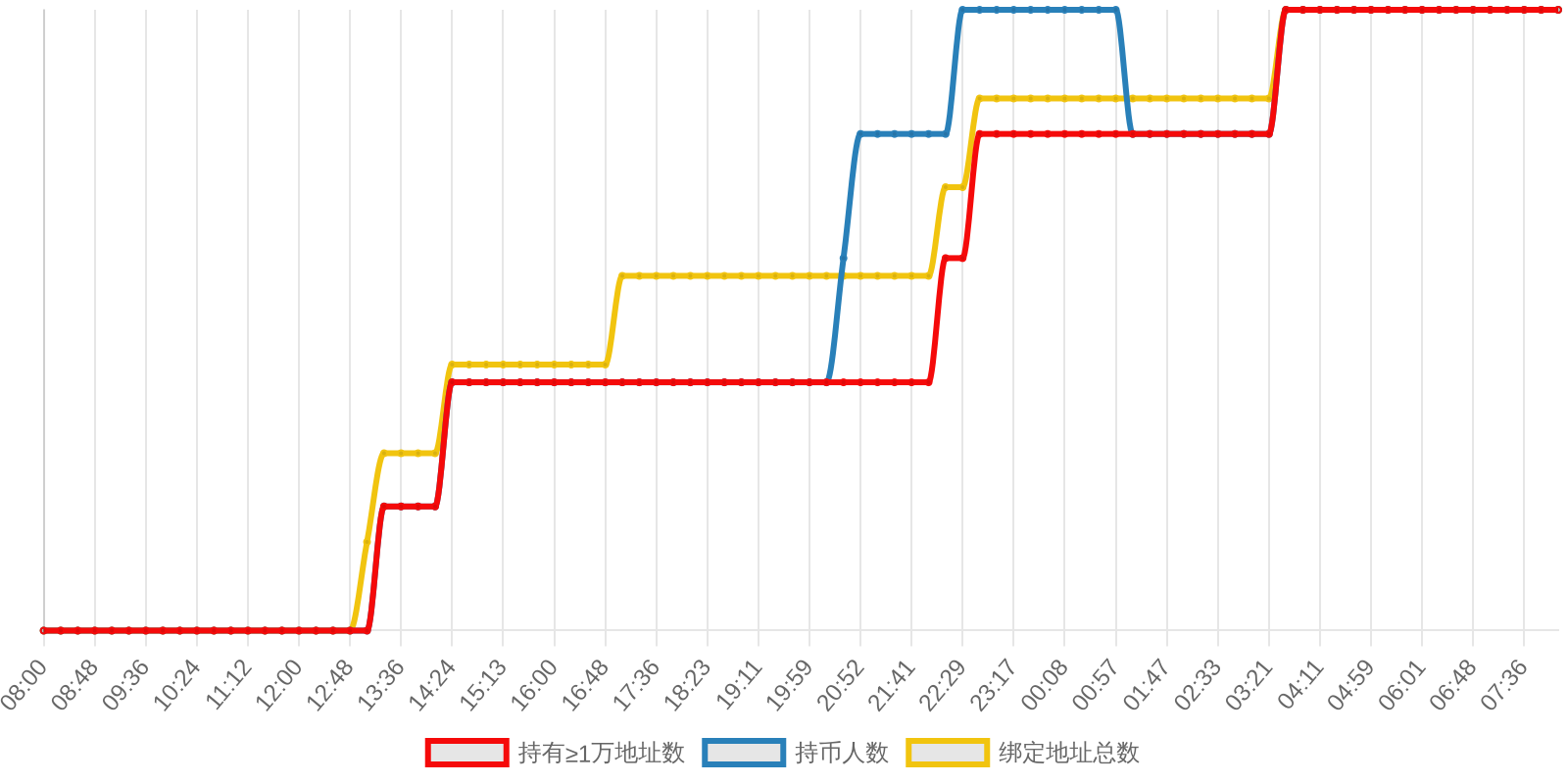
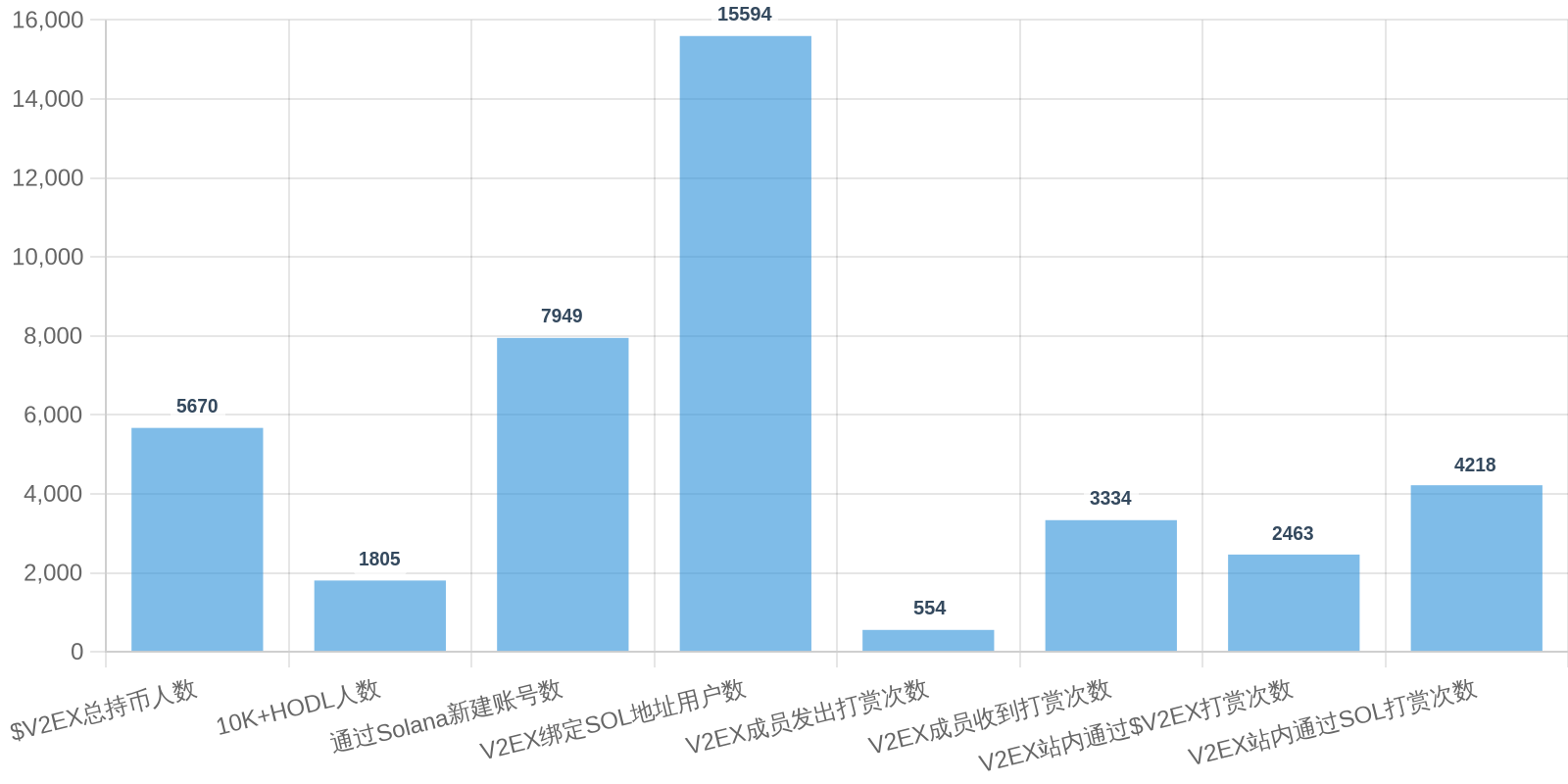
BTC - $80,006.07 SOL - $101.22 PUMP - $0.0042 V2EX - $0.0022
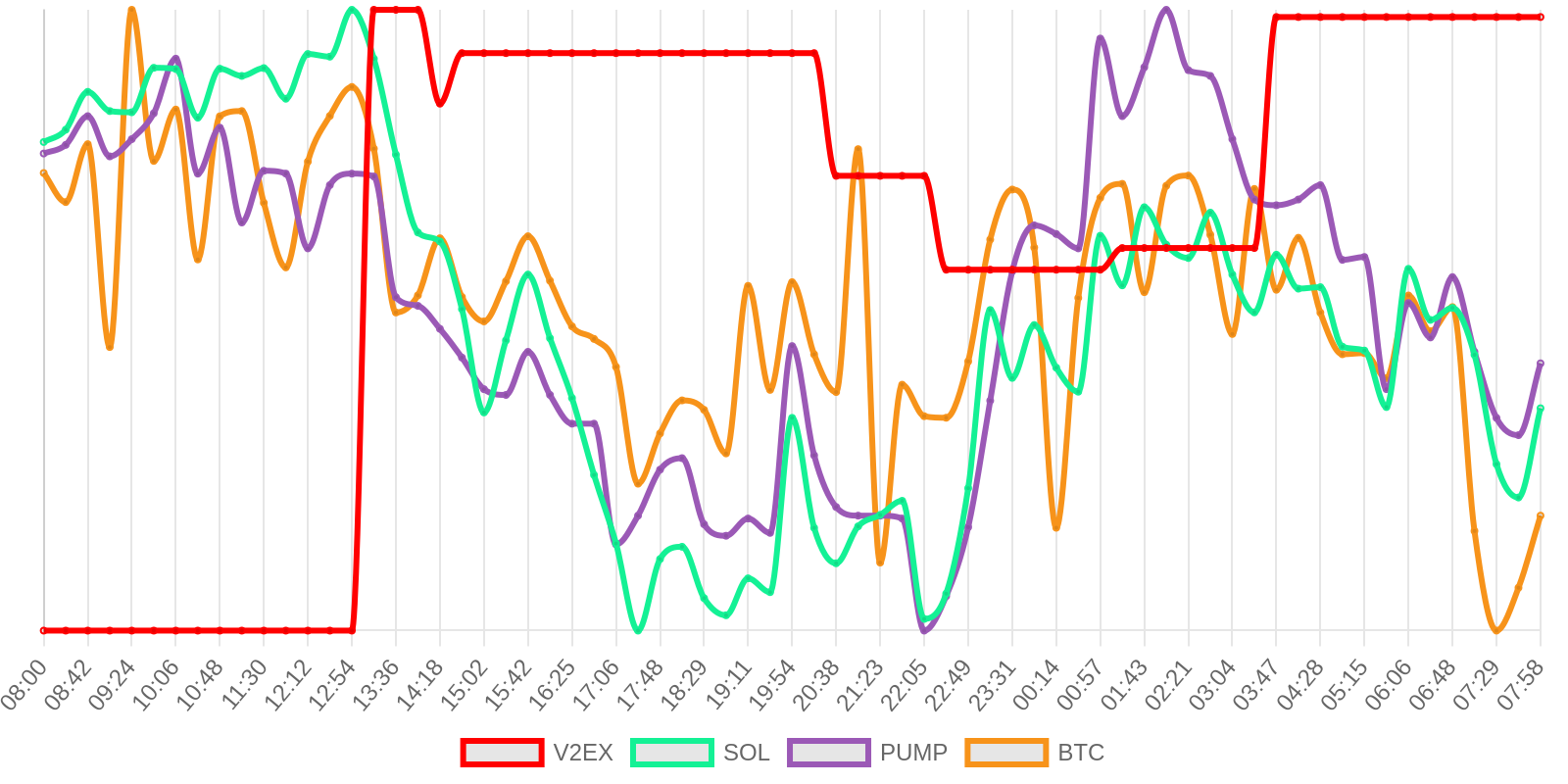
| 排名 | 地址 | 持有数量 | 持仓比例 | 排名变化 | 数量变化 |
|---|---|---|---|---|---|
| #2 | Pump.fun AMM (V2EX-WSOL) Pool | 52.47M | 5.25% | - | -47.59K |
| #9 | Meteora (V2EX-WSOL) Market | 5.03M | 0.50% | - | -4.56K |
TG 机器人订阅: 点我订阅
原始图表与数据存放于: 点我查看
此报告由 V2EX Info 提供数据, 由 Newsletter Report Bot 自动生成。
此报告仅供参考,不构成任何投资建议。投资有风险,入市需谨慎。
早上好!以下为昨日摘要:
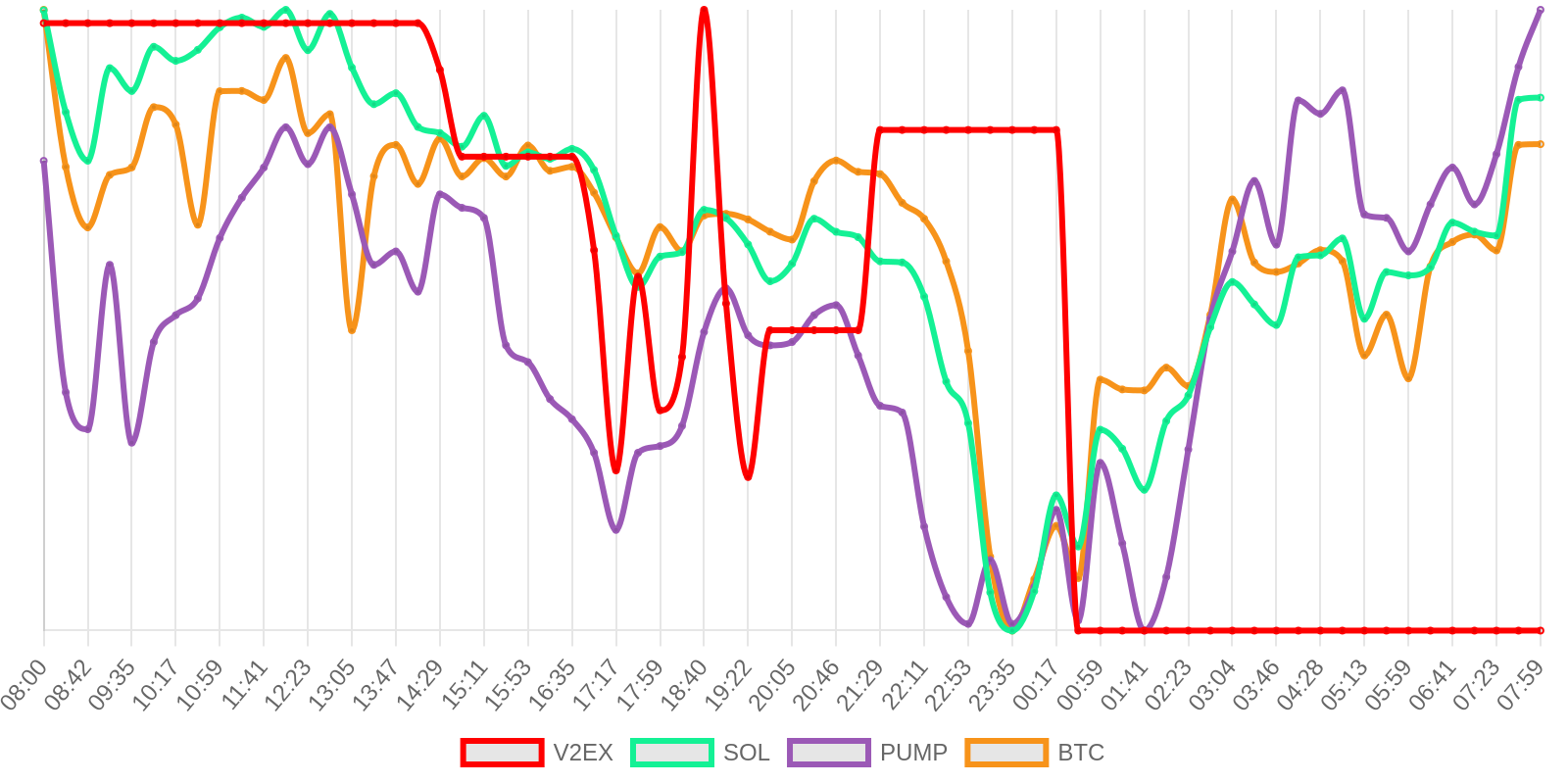
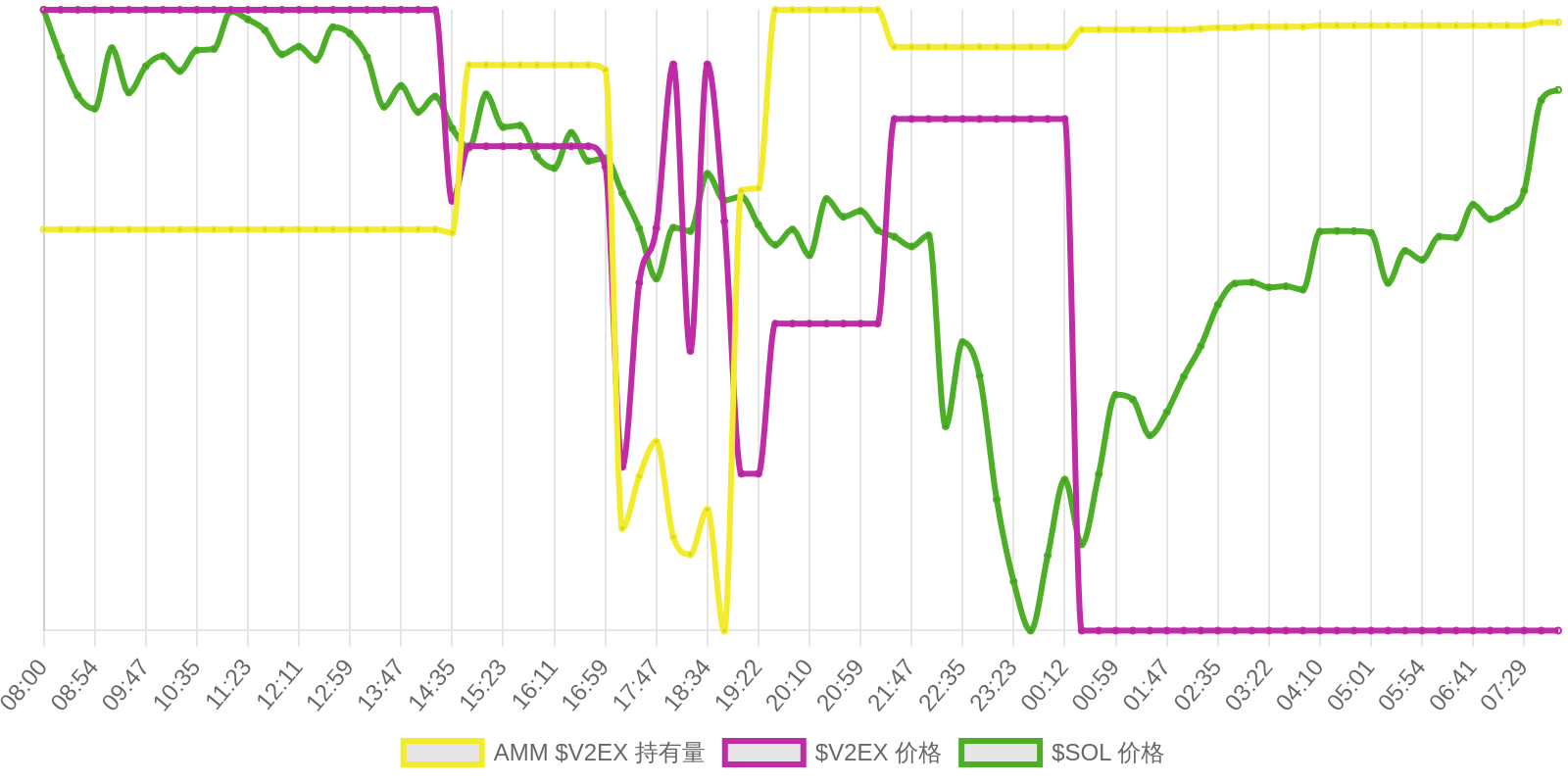
BTC - $80,738.32 SOL - $102.22 PUMP - $0.0043 V2EX - $0.0021
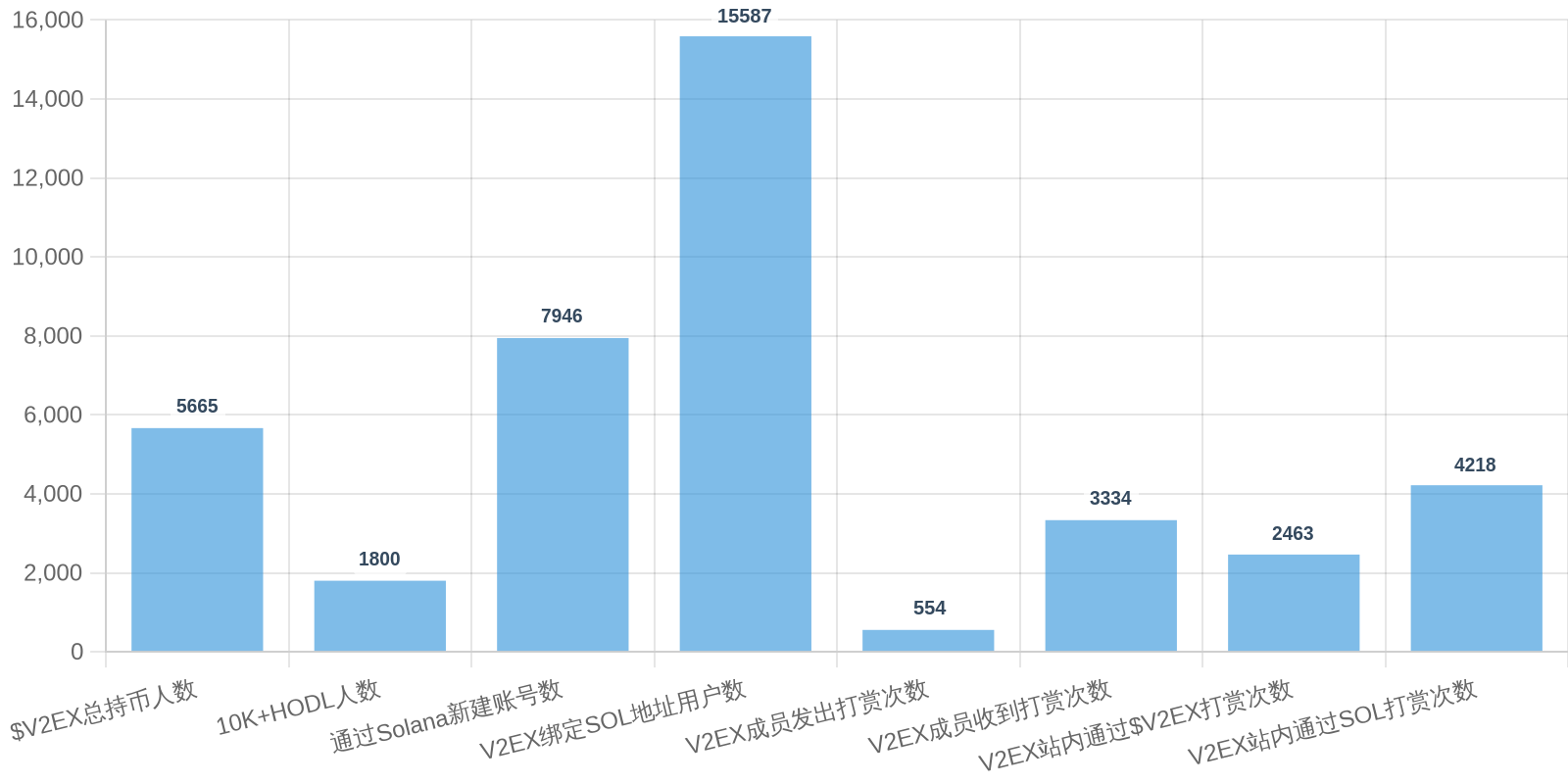
| 排名 | 地址 | 持有数量 | 持仓比例 | 排名变化 | 数量变化 |
|---|---|---|---|---|---|
| #2 | Pump.fun AMM (V2EX-WSOL) Pool | 52.52M | 5.25% | - | +57.52K |
| #9 | Meteora (V2EX-WSOL) Market | 5.04M | 0.50% | - | +2.50K |
TG 机器人订阅: 点我订阅
原始图表与数据存放于: 点我查看
此报告由 V2EX Info 提供数据, 由 Newsletter Report Bot 自动生成。
此报告仅供参考,不构成任何投资建议。投资有风险,入市需谨慎。
早上好!以下为昨日摘要:
BTC - $81,059.73 SOL - $102.69 PUMP - $0.0043 V2EX - $0.0022
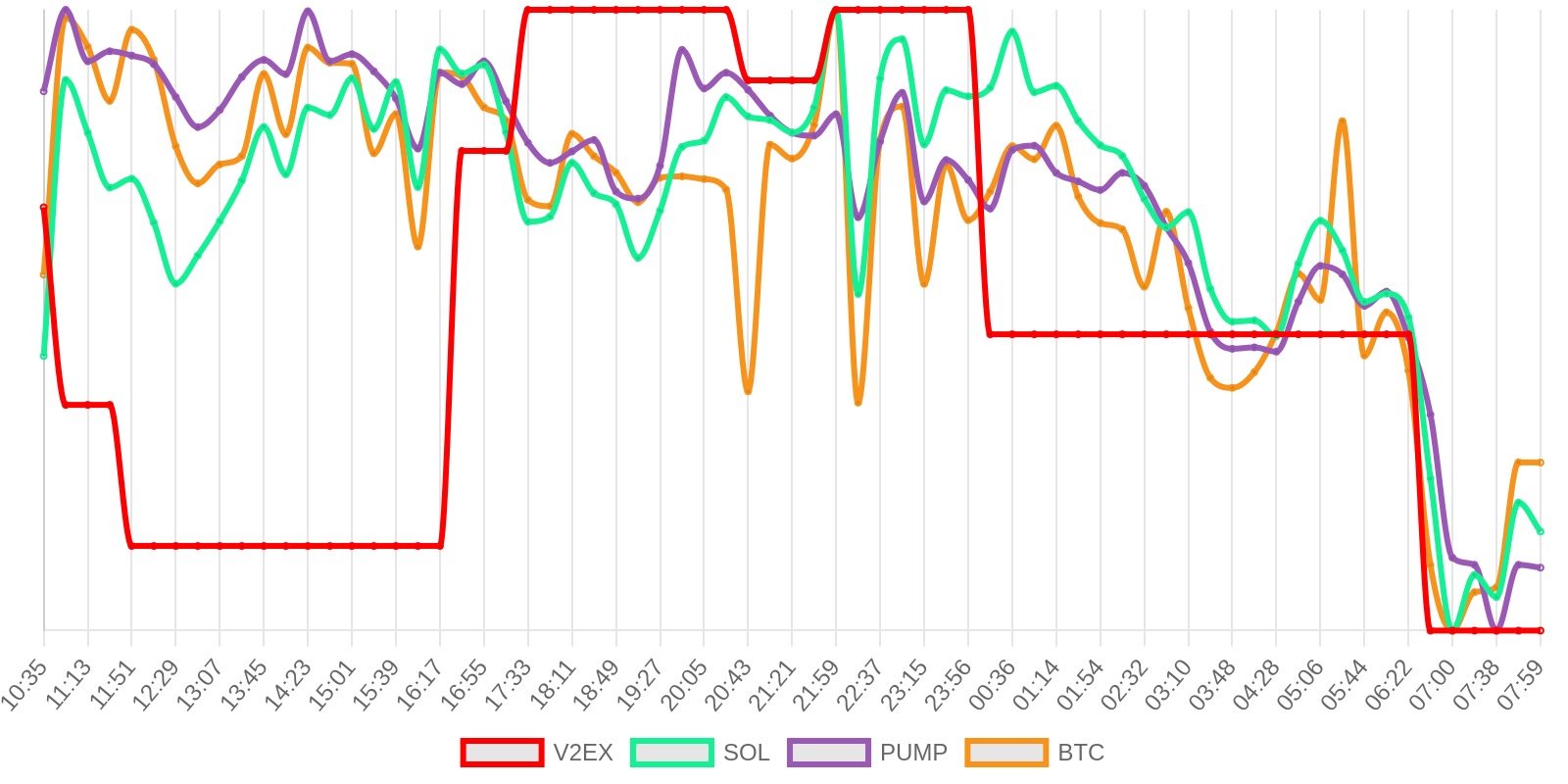
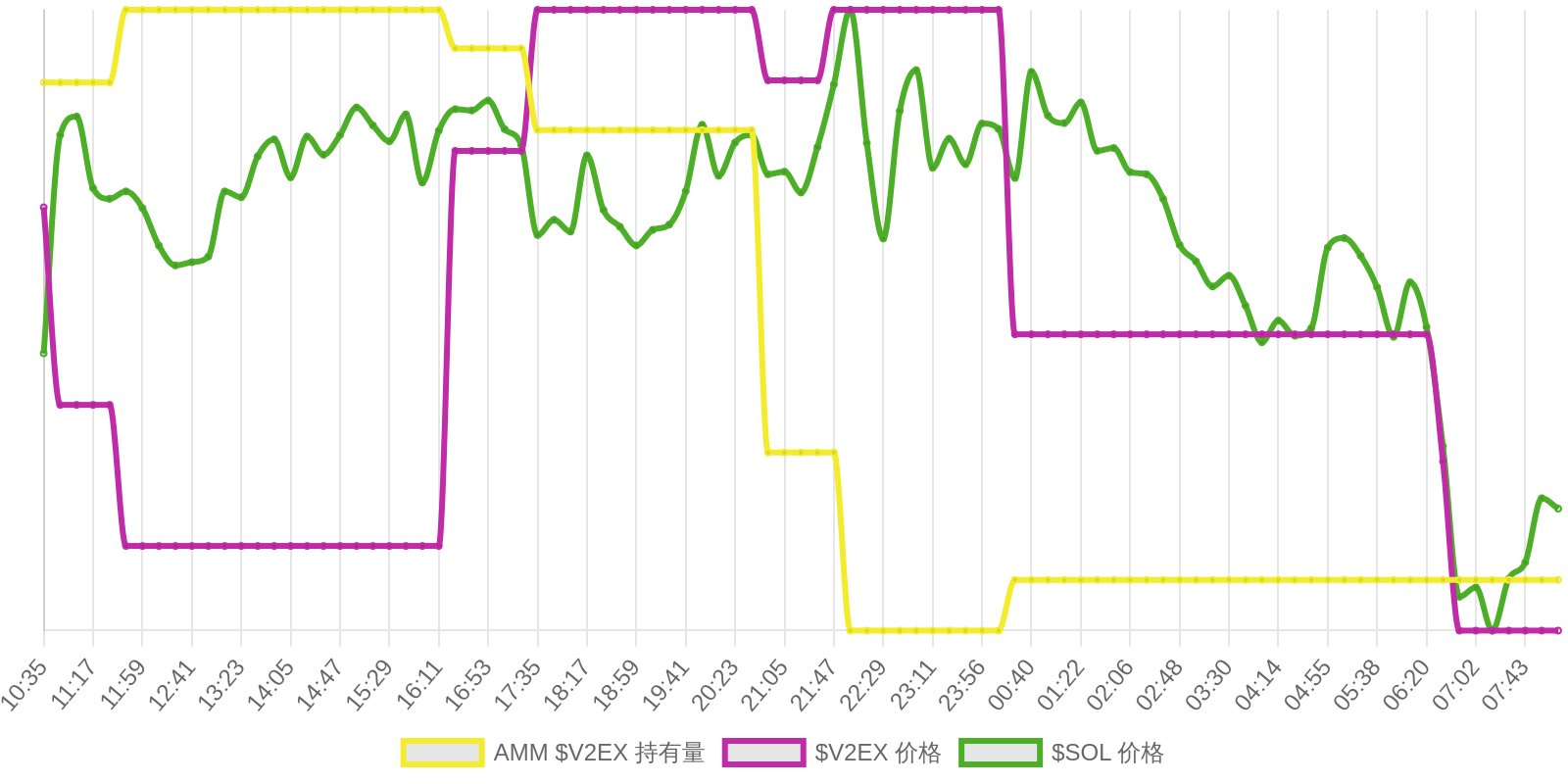
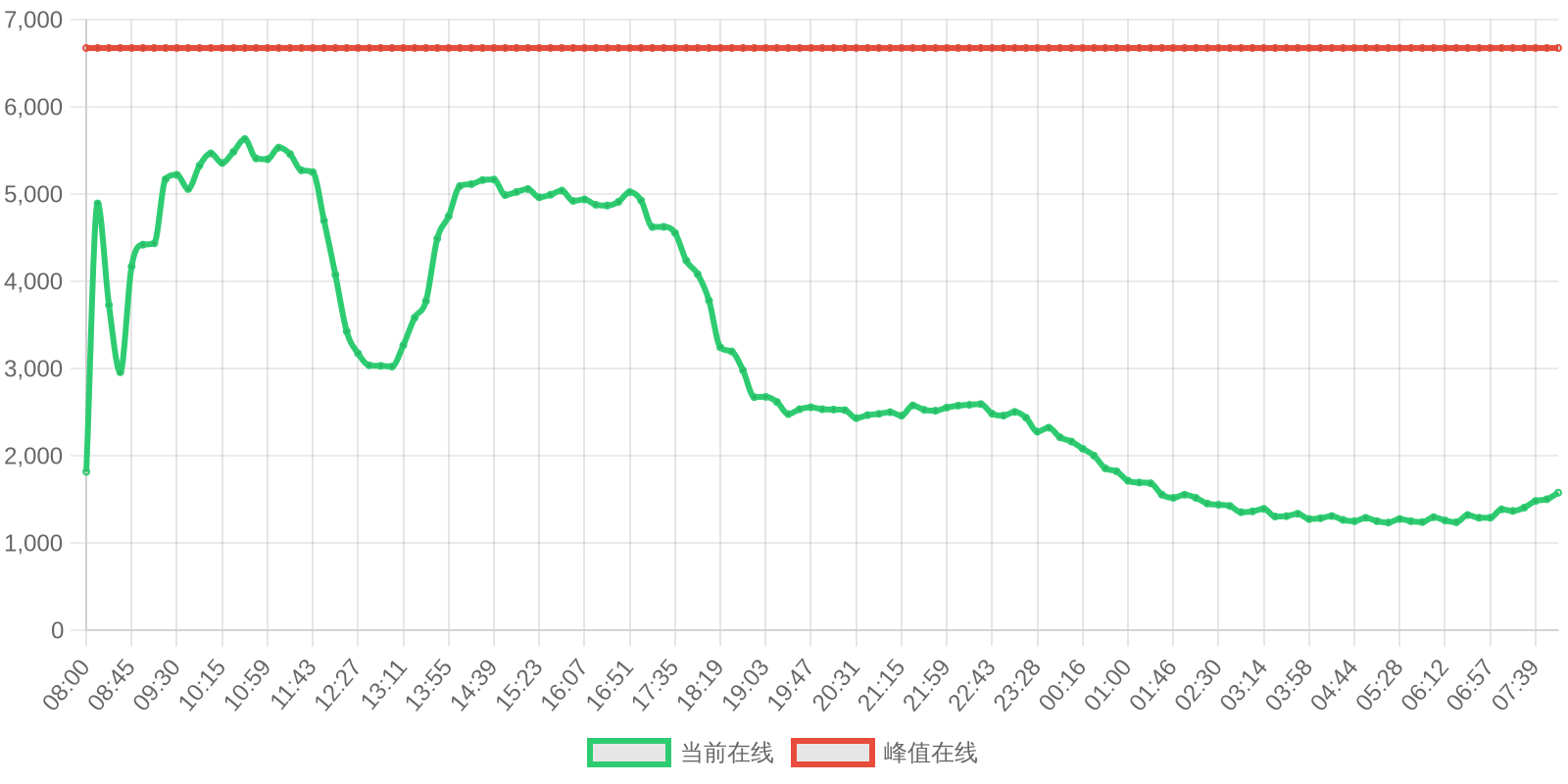
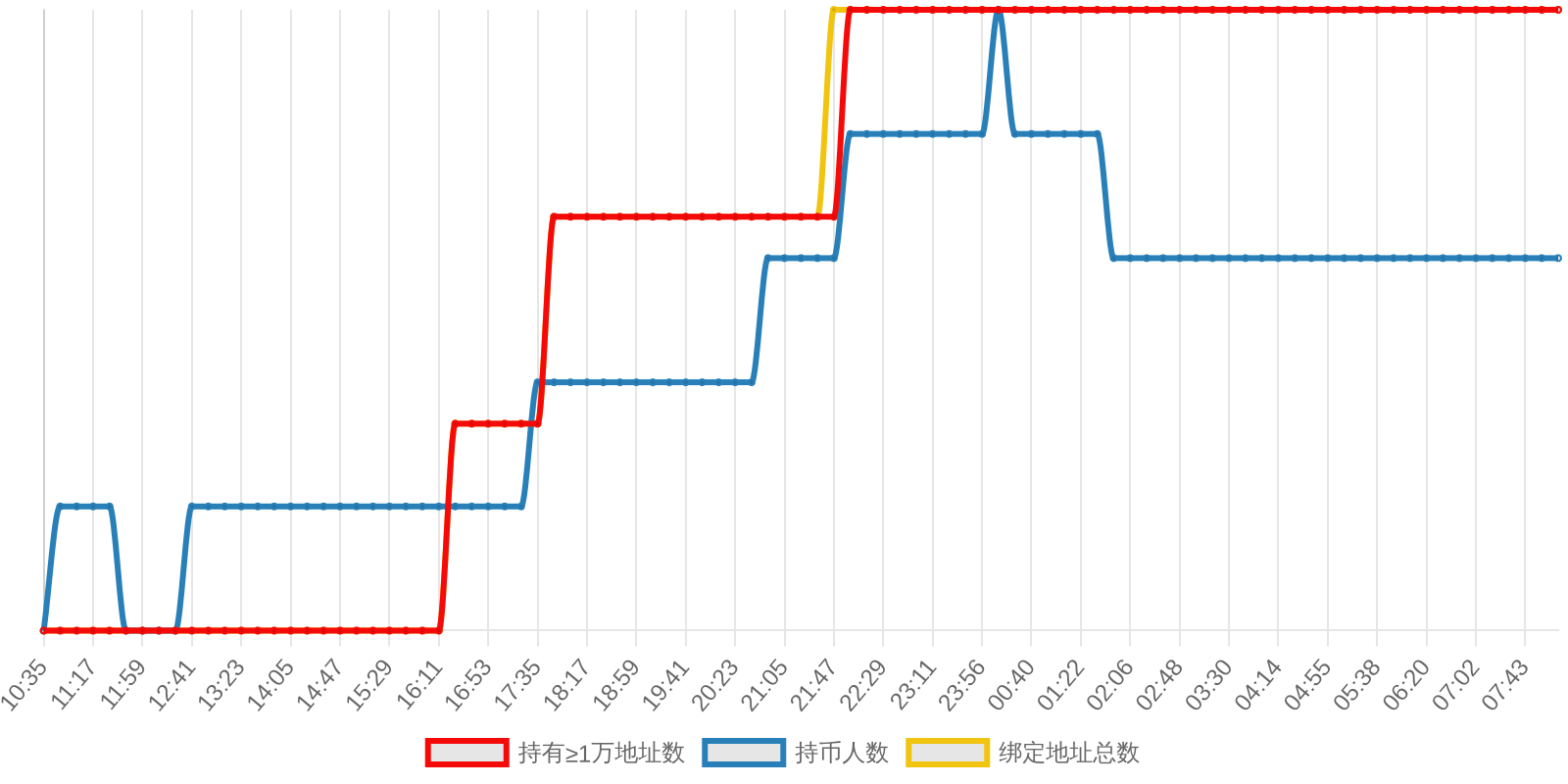
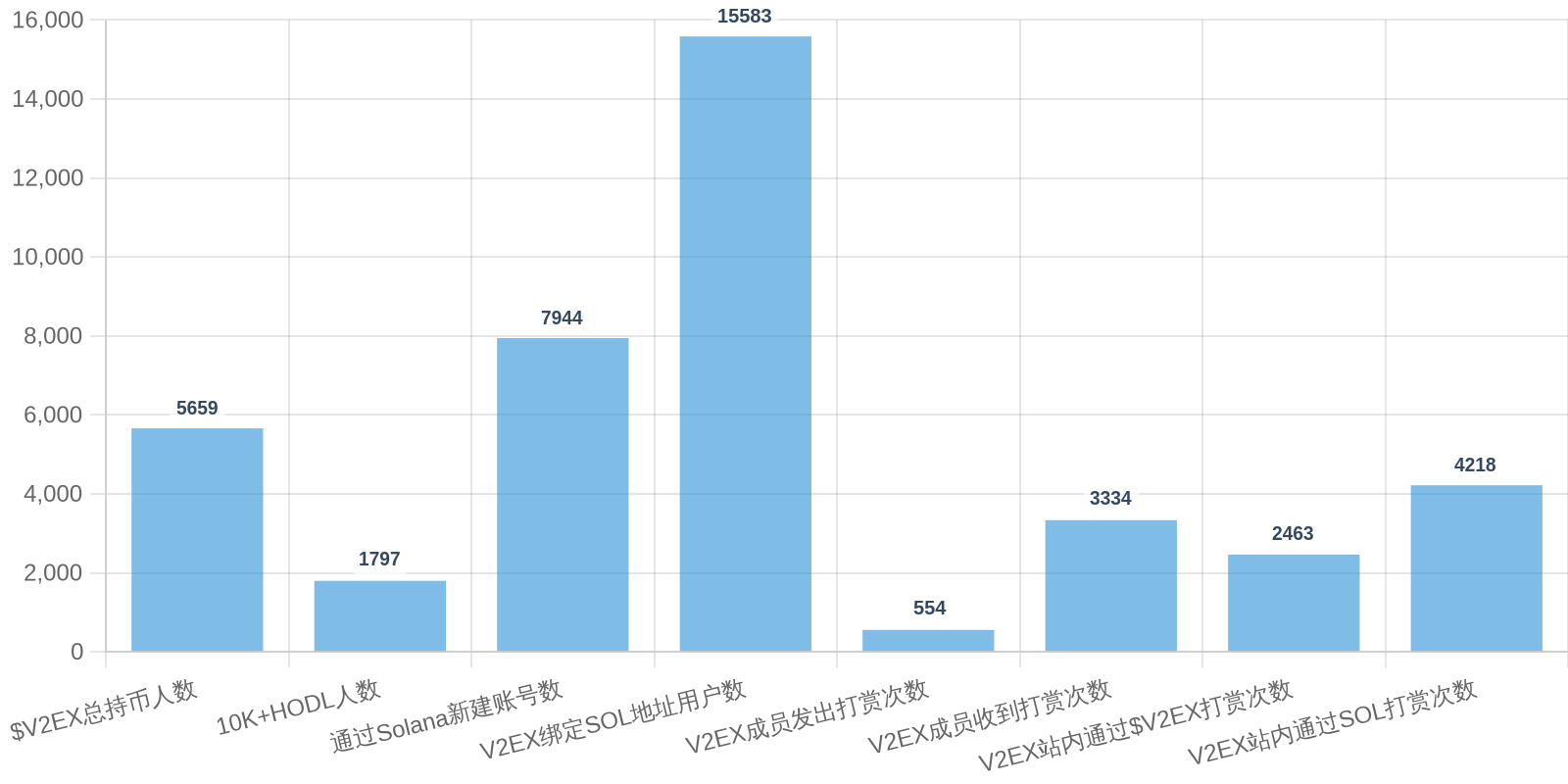
| 排名 | 地址 | 持有数量 | 持仓比例 | 排名变化 | 数量变化 |
|---|---|---|---|---|---|
| #2 | Pump.fun AMM (V2EX-WSOL) Pool | 52.46M | 5.25% | - | +6.98M |
| #4 | tousol | 11.95M | 1.20% | - | +44.60K |
| #5 | DdGV...aRkf | 7.04M | 0.70% | - | -0.69M |
| #9 | Meteora (V2EX-WSOL) Market | 5.04M | 0.50% | +2 | +48.41K |
| #12 | Meteora (V2EX-PUMP) Market | 4.26M | 0.43% | - | -0.59M |
| #13 | Livid | 3.71M | 0.37% | +7 | +1.51M |
| #14 | hackerwgf | 3.70M | 0.37% | +1 | +0.24M |
| #17 | crocoBaby | 2.38M | 0.24% | +19 | +1.26M |
| #20 | MarsWang | 2.03M | 0.20% | +14 | +0.88M |
TG 机器人订阅: 点我订阅
原始图表与数据存放于: 点我查看
此报告由 V2EX Info 提供数据, 由 Newsletter Report Bot 自动生成。
此报告仅供参考,不构成任何投资建议。投资有风险,入市需谨慎。
早上好!以下为昨日摘要:
BTC - $81,385.16 SOL - $103.40 PUMP - $0.0046 V2EX - $0.0022
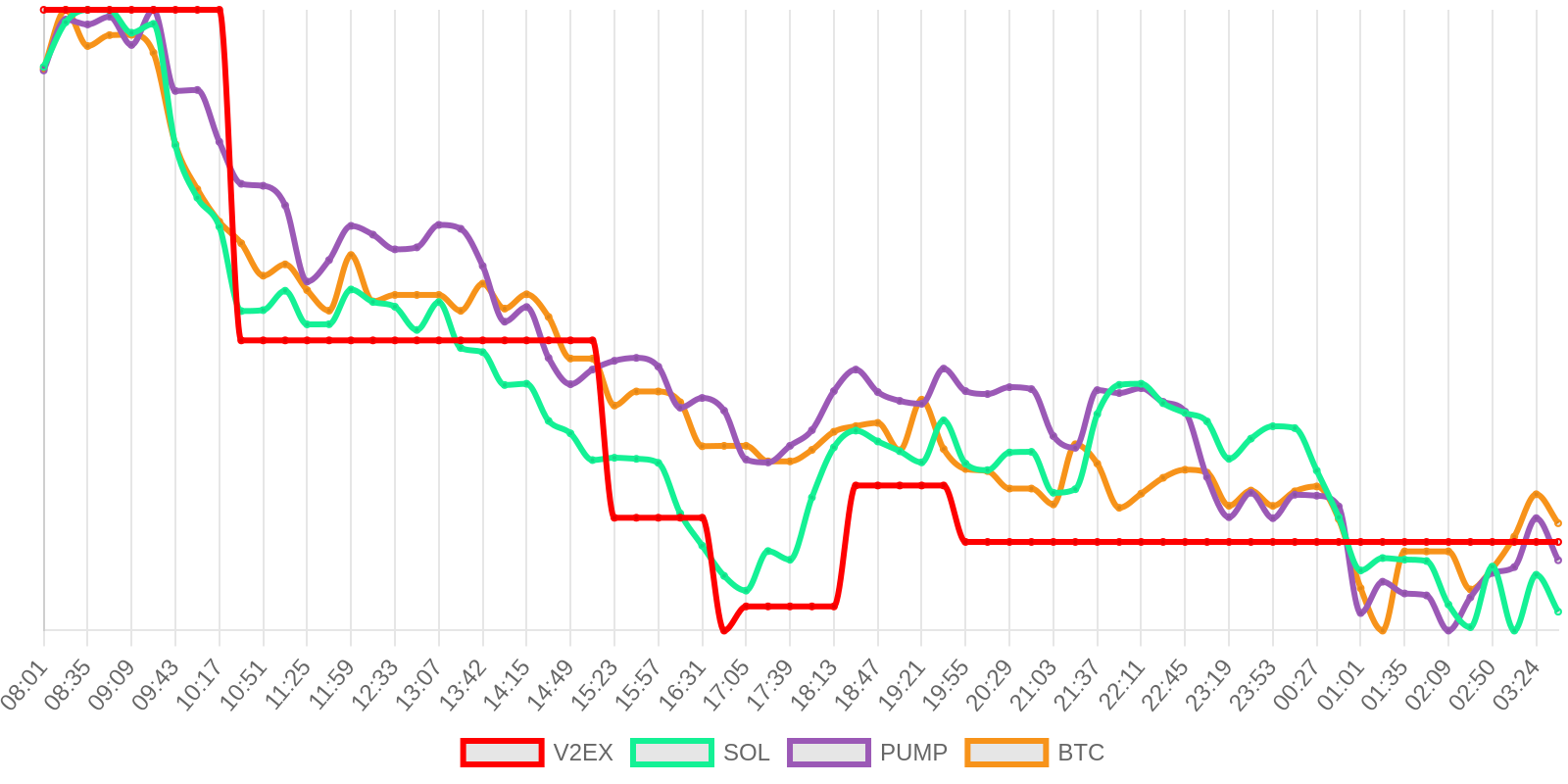
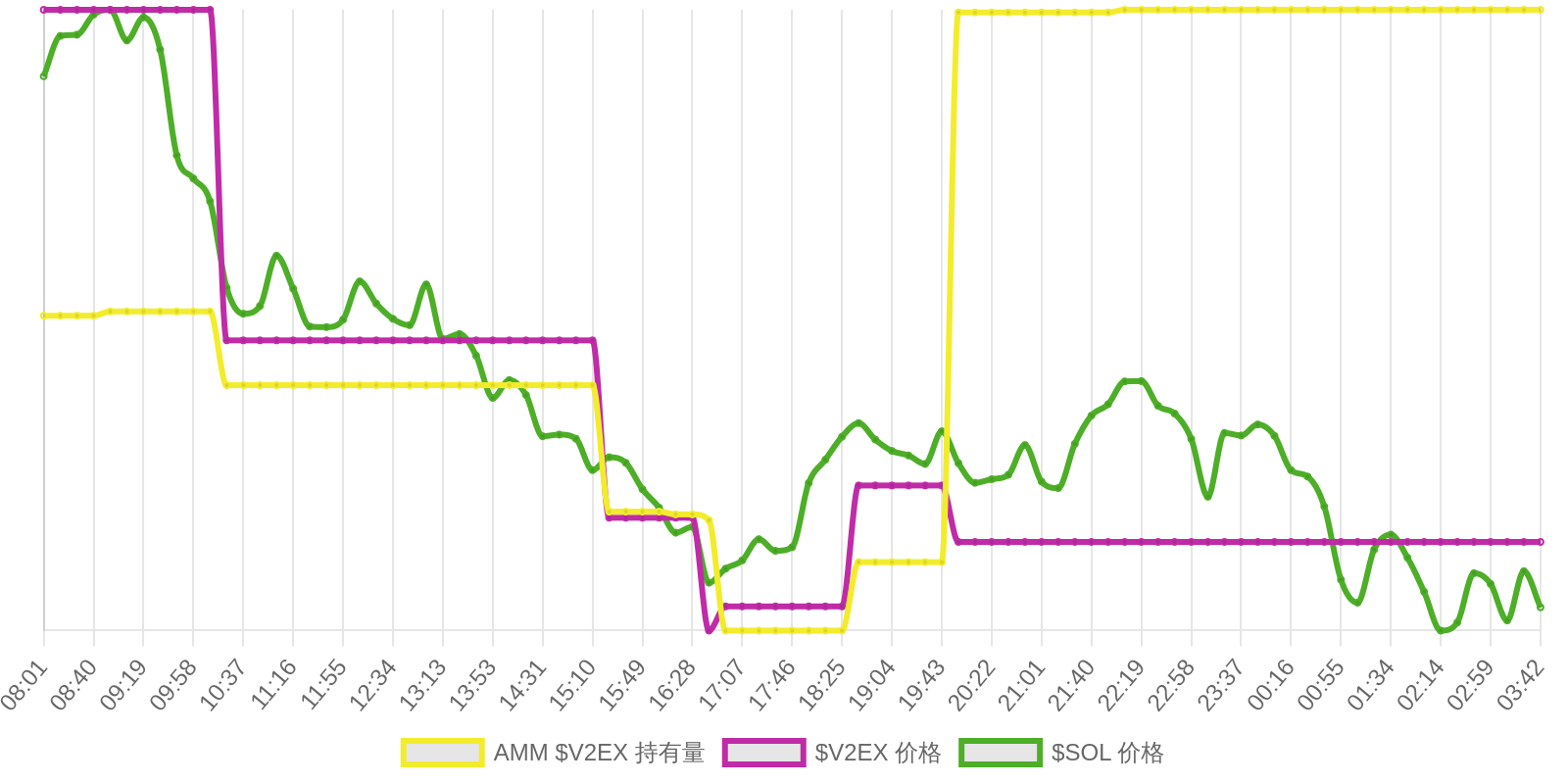
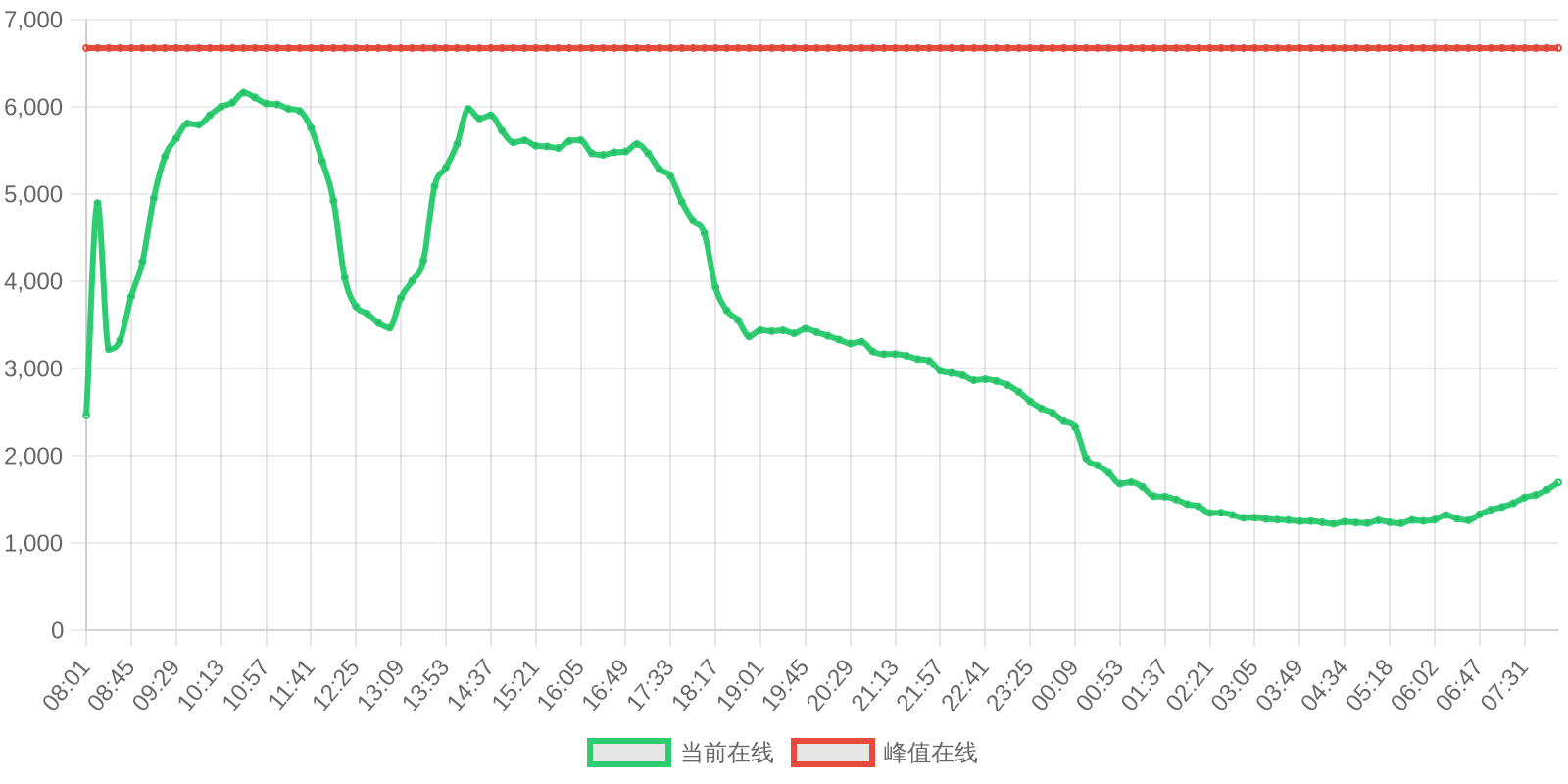
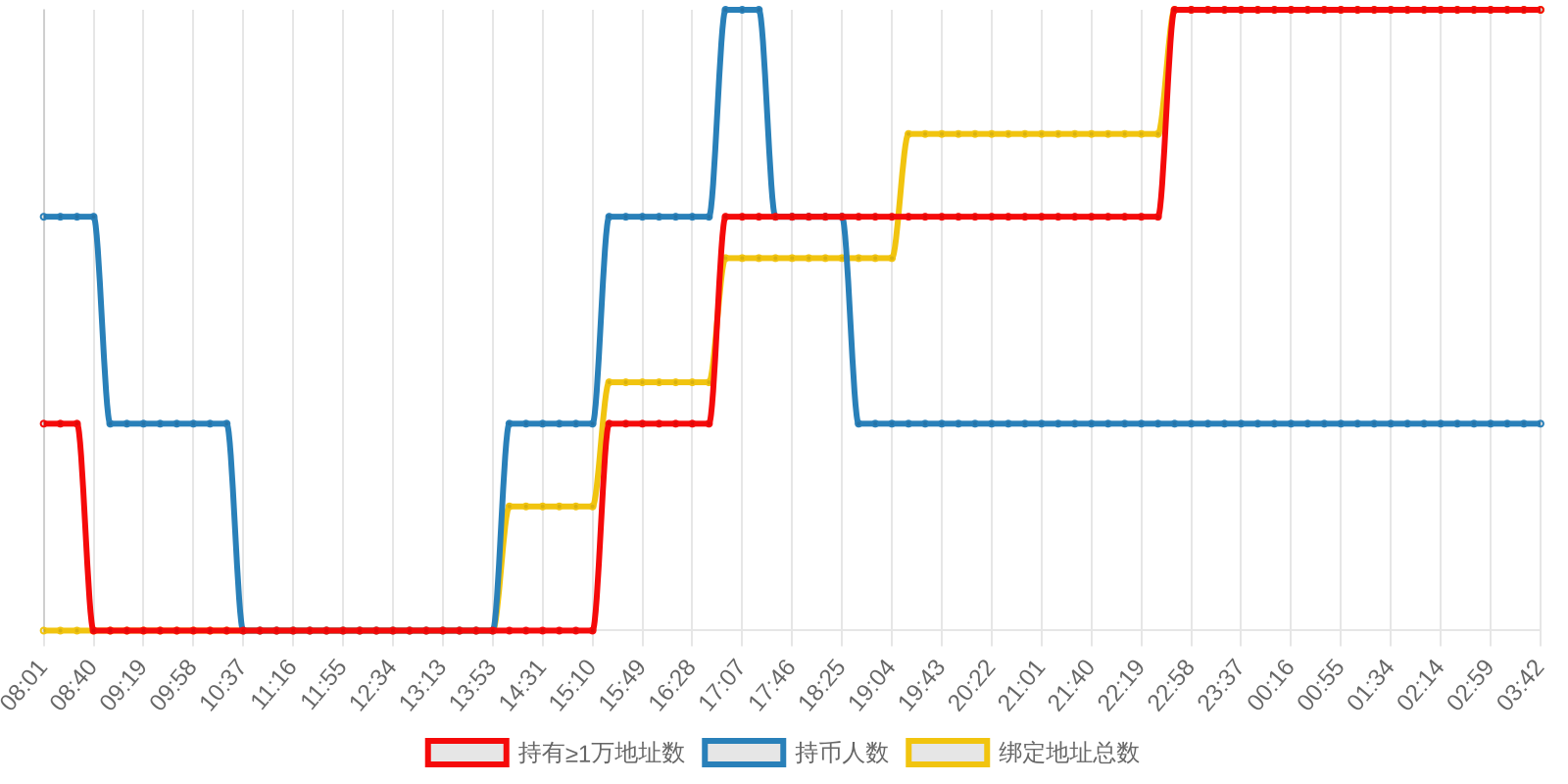
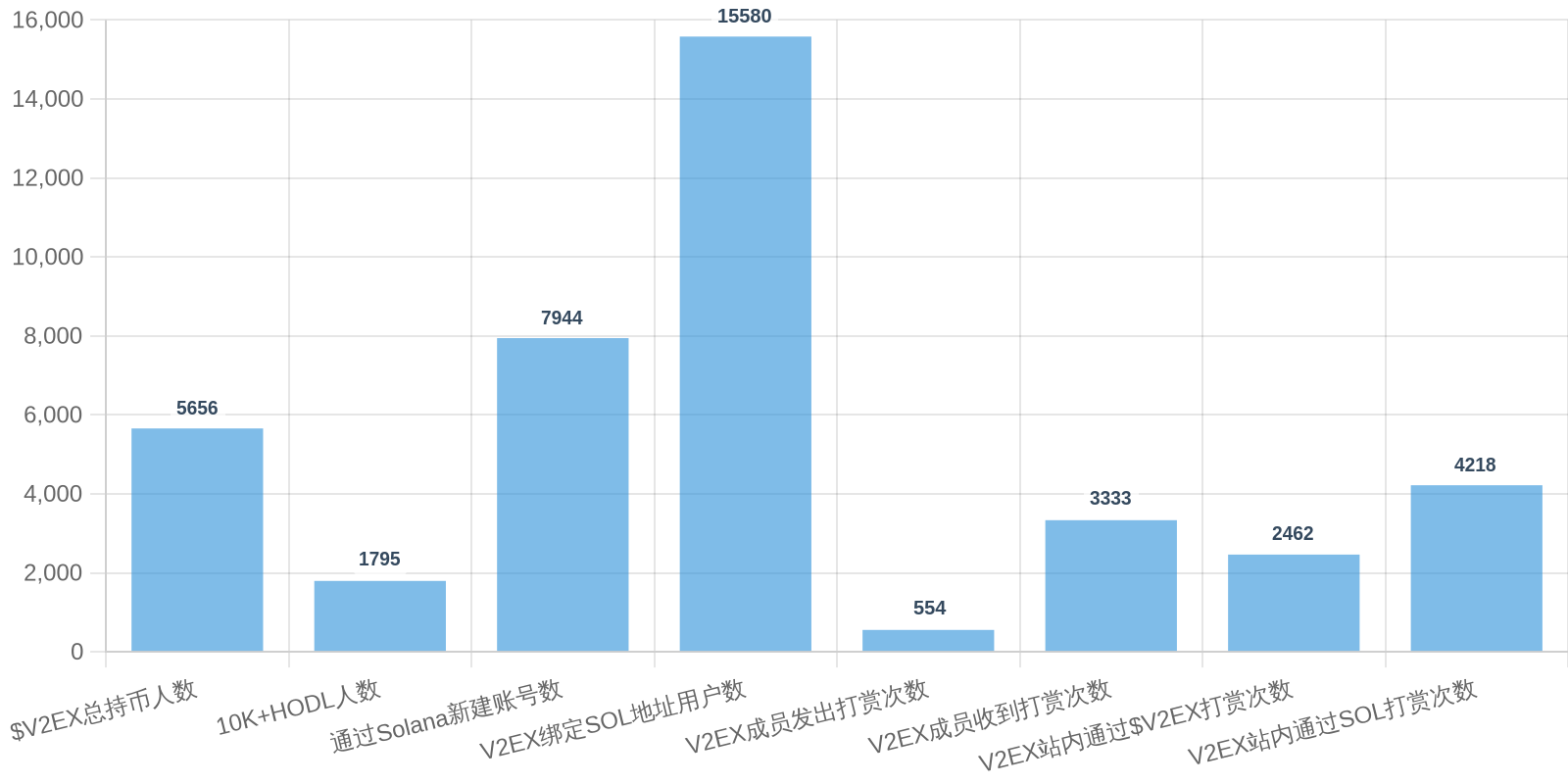
| 排名 | 地址 | 持有数量 | 持仓比例 | 排名变化 | 数量变化 |
|---|---|---|---|---|---|
| #2 | Pump.fun AMM (V2EX-WSOL) Pool | 52.53M | 5.25% | - | -23.69K |
| #4 | Meteora (V2EX-WSOL) Market | 5.04M | 0.50% | - | +608.85 |
| #5 | Livid | 3.71M | 0.37% | +1 | +9.60K |
| #11 | HLnp...TLcC | 0.44M | 0.04% | -3 | -1.05K |
| #29 | LitterL | 0.50M | 0.05% | -4 | -50.00K |
TG 机器人订阅: 点我订阅
原始图表与数据存放于: 点我查看
此报告由 V2EX Info 提供数据, 由 Newsletter Report Bot 自动生成。
此报告仅供参考,不构成任何投资建议。投资有风险,入市需谨慎。
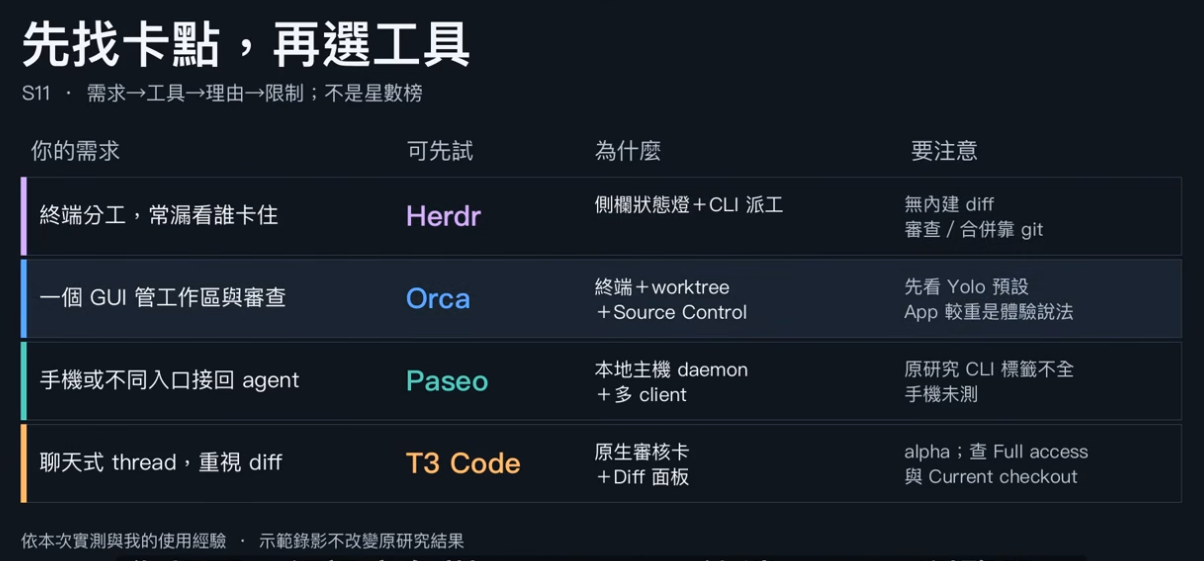 <iframe width="560" height="315" src="https://www.youtube.com/embed/hlWzmtyr55Q?si=G_W-Us_be5tAzUsT" title="YouTube video player" frameborder="0" allow="accelerometer; autoplay; clipboard-write; encrypted-media; gyroscope; picture-in-picture; web-share" referrerpolicy="strict-origin-when-cross-origin" allowfullscreen></iframe>

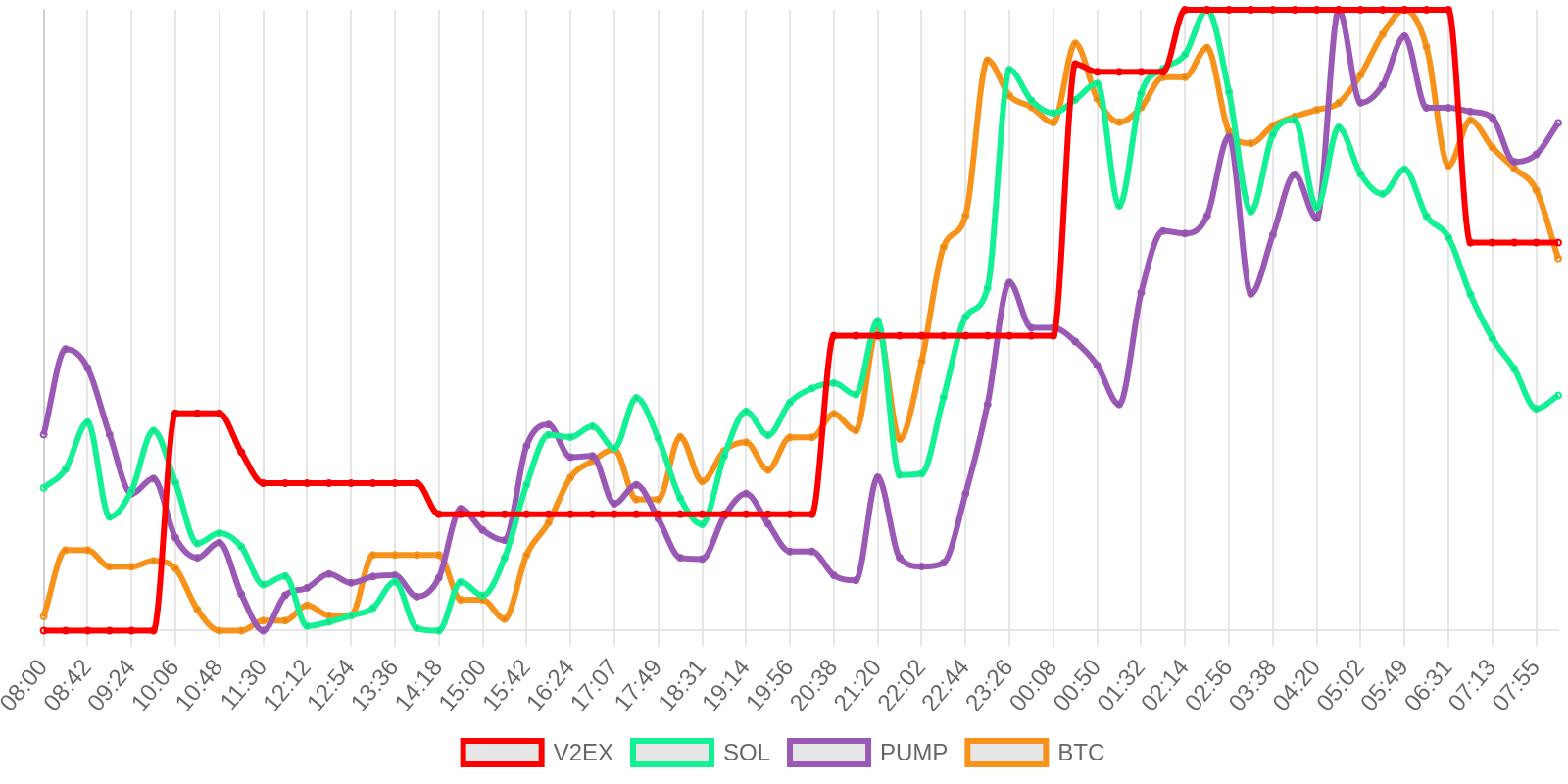
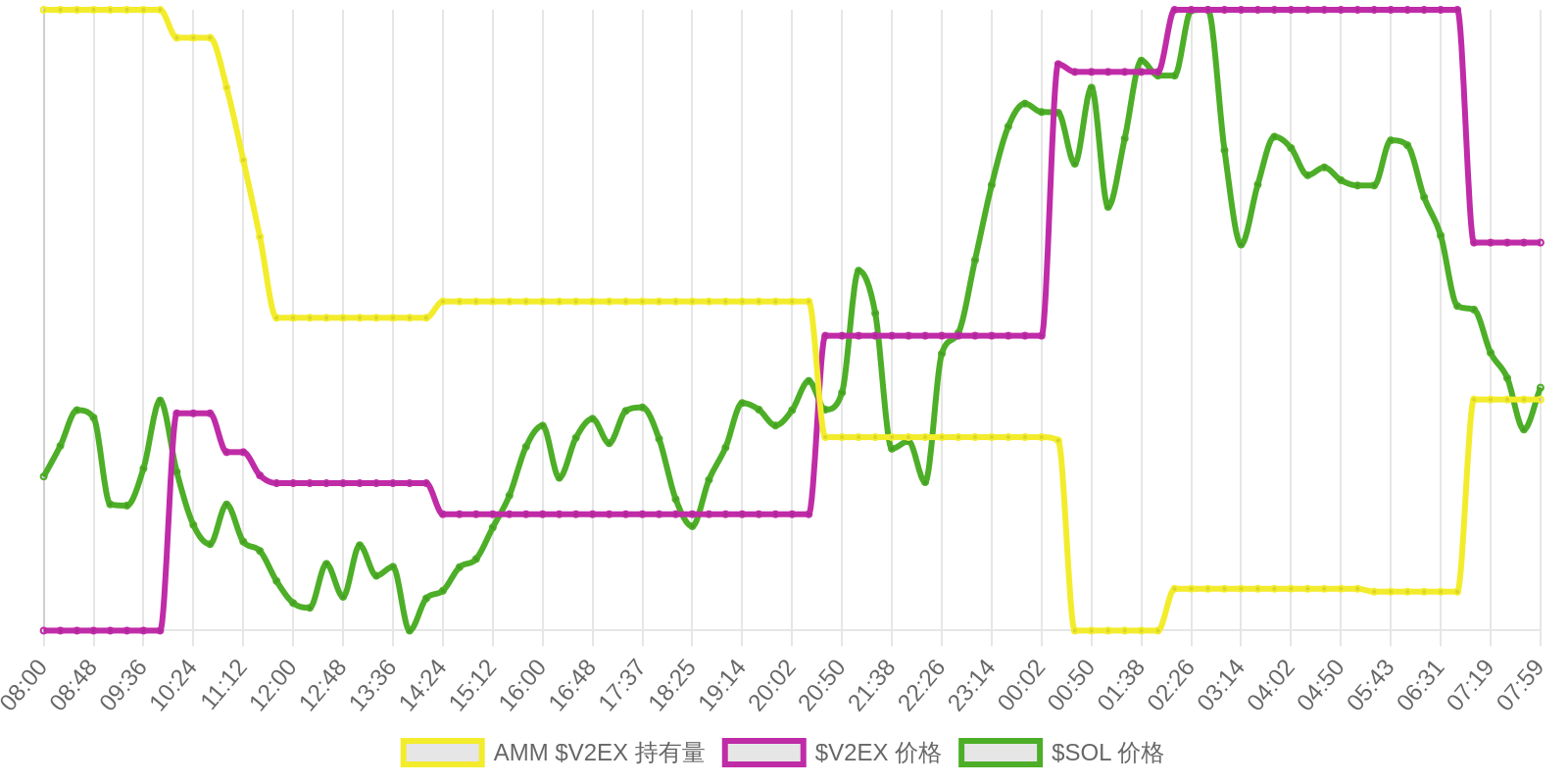
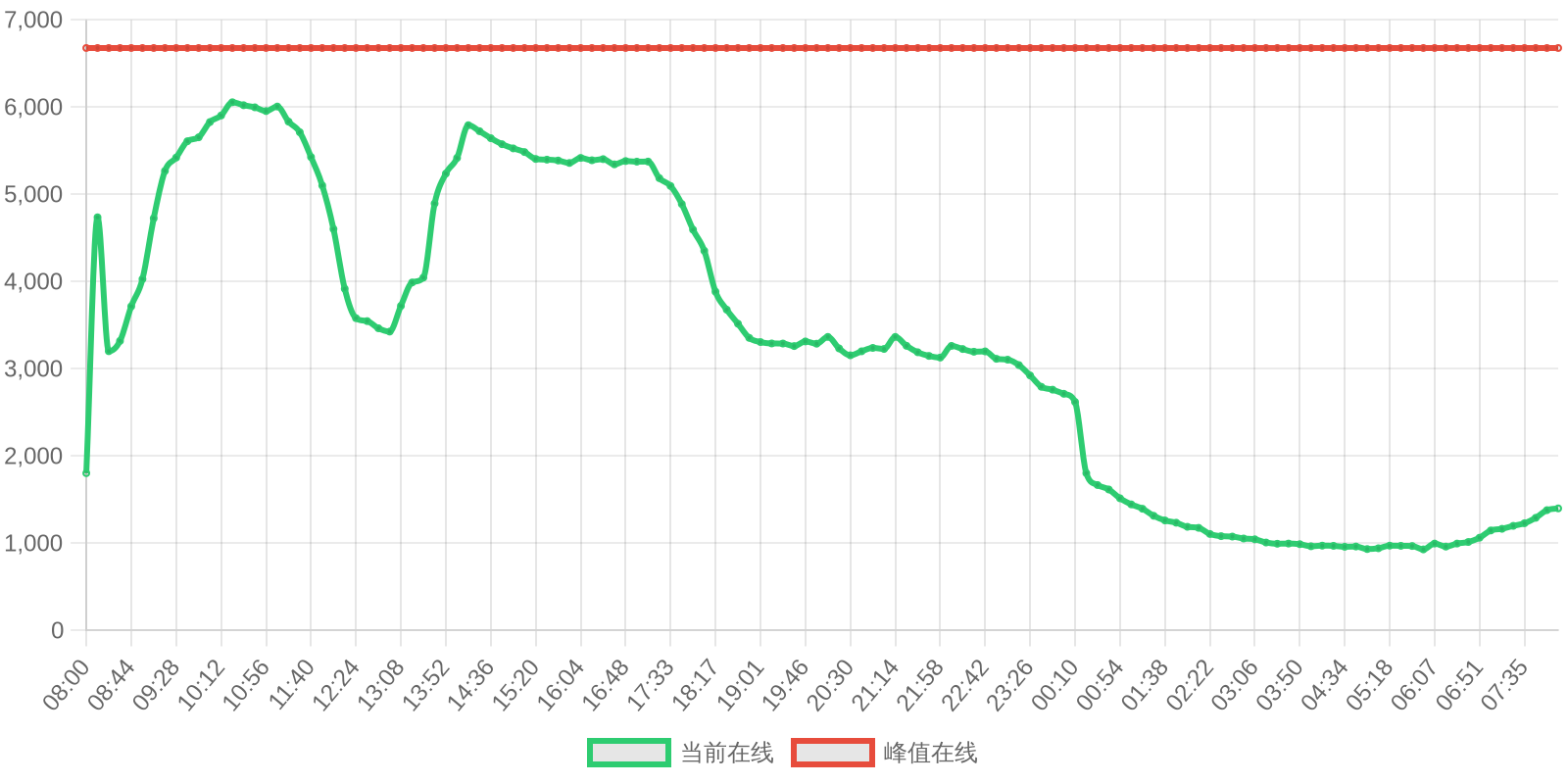
早上好!以下为昨日摘要:
BTC - $83,973.53 SOL - $106.91 PUMP - $0.0051 V2EX - $0.0023
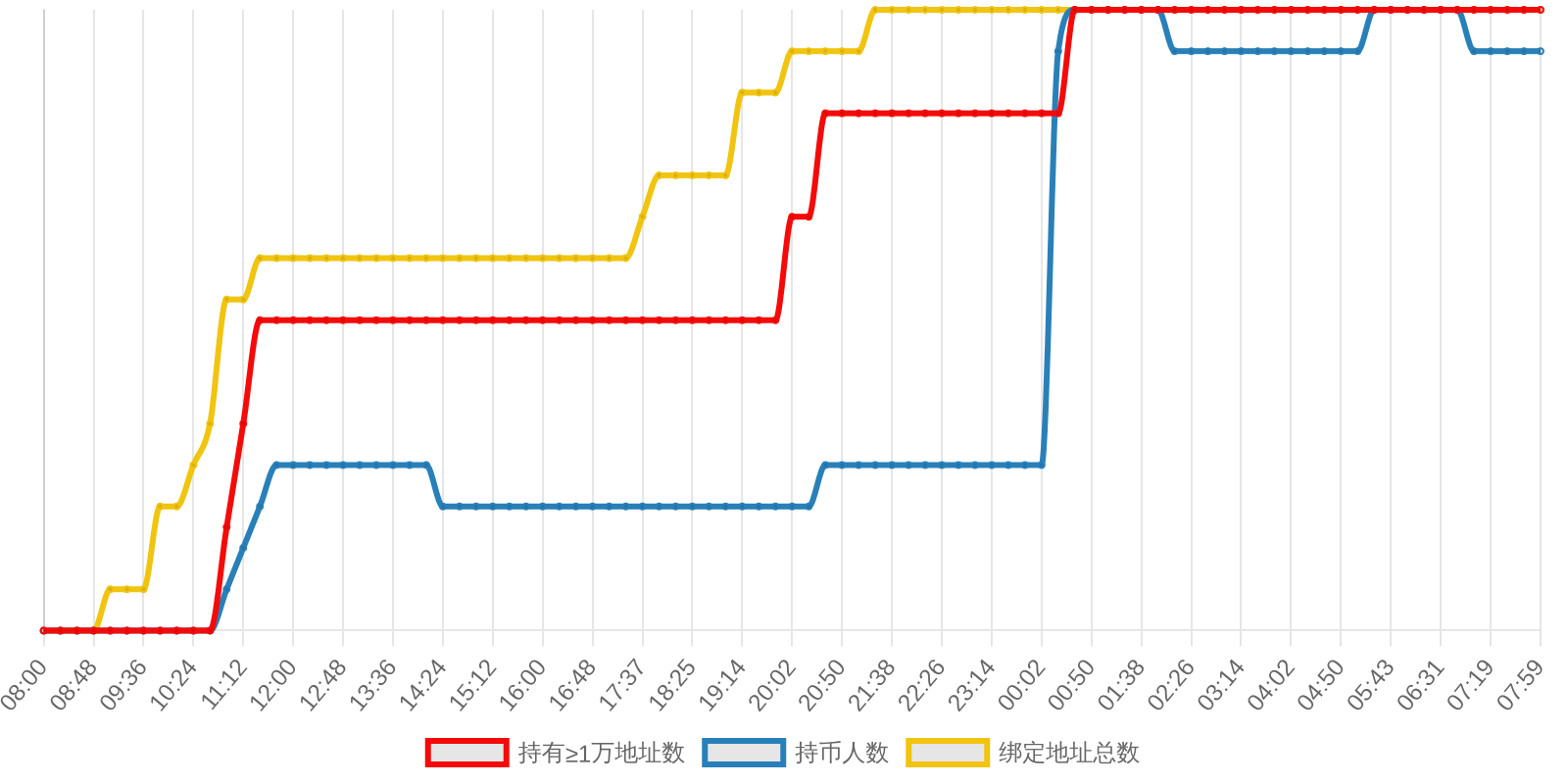
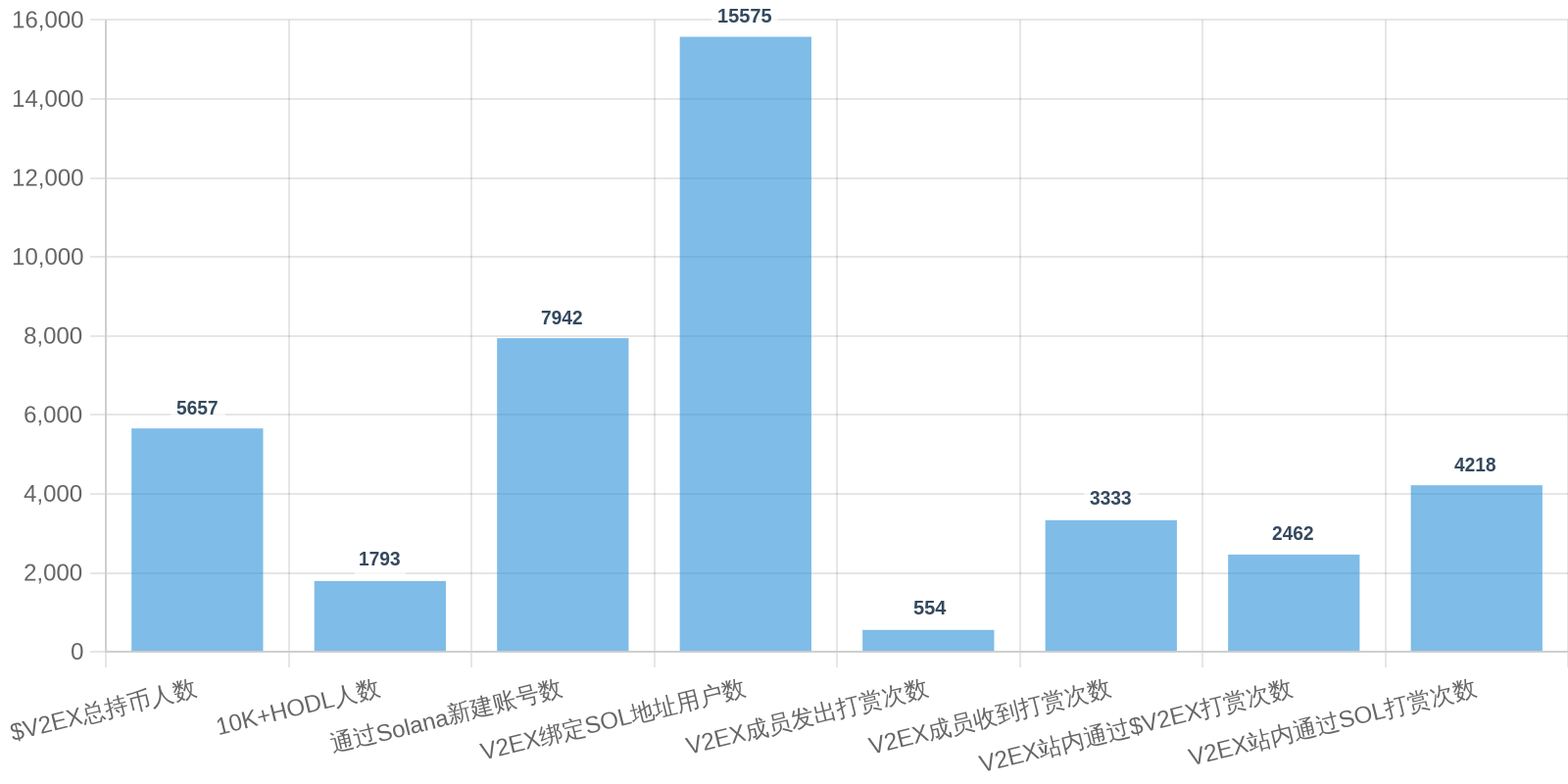
| 排名 | 地址 | 持有数量 | 持仓比例 | 排名变化 | 数量变化 |
|---|---|---|---|---|---|
| #2 | Pump.fun AMM (V2EX-WSOL) Pool | 52.51M | 5.25% | - | -51.51K |
| #4 | Meteora (V2EX-WSOL) Market | 5.04M | 0.50% | - | -128.31 |
| #11 | HLnp...TLcC | 0.43M | 0.04% | -3 | -4.17K |
| #28 | BHn3...NyWX | 26.18K | 0.00% | +2 | +15.83K |
TG 机器人订阅: 点我订阅
原始图表与数据存放于: 点我查看
此报告由 V2EX Info 提供数据, 由 Newsletter Report Bot 自动生成。
此报告仅供参考,不构成任何投资建议。投资有风险,入市需谨慎。


 Select Language